I design enterprise systems
that people actually use.
Senior Product Designer (UX) specialising in complex B2B SaaS, multirole workflows, admin systems, dataheavy interfaces, and missioncritical platforms where design decisions have real operational consequences.
Redesigned a missioncritical geoscience workspace to unblock cloud migration, confronting 21click complexity, navigating 24 months of stakeholder alignment, and rebuilding around how geologists actually work.
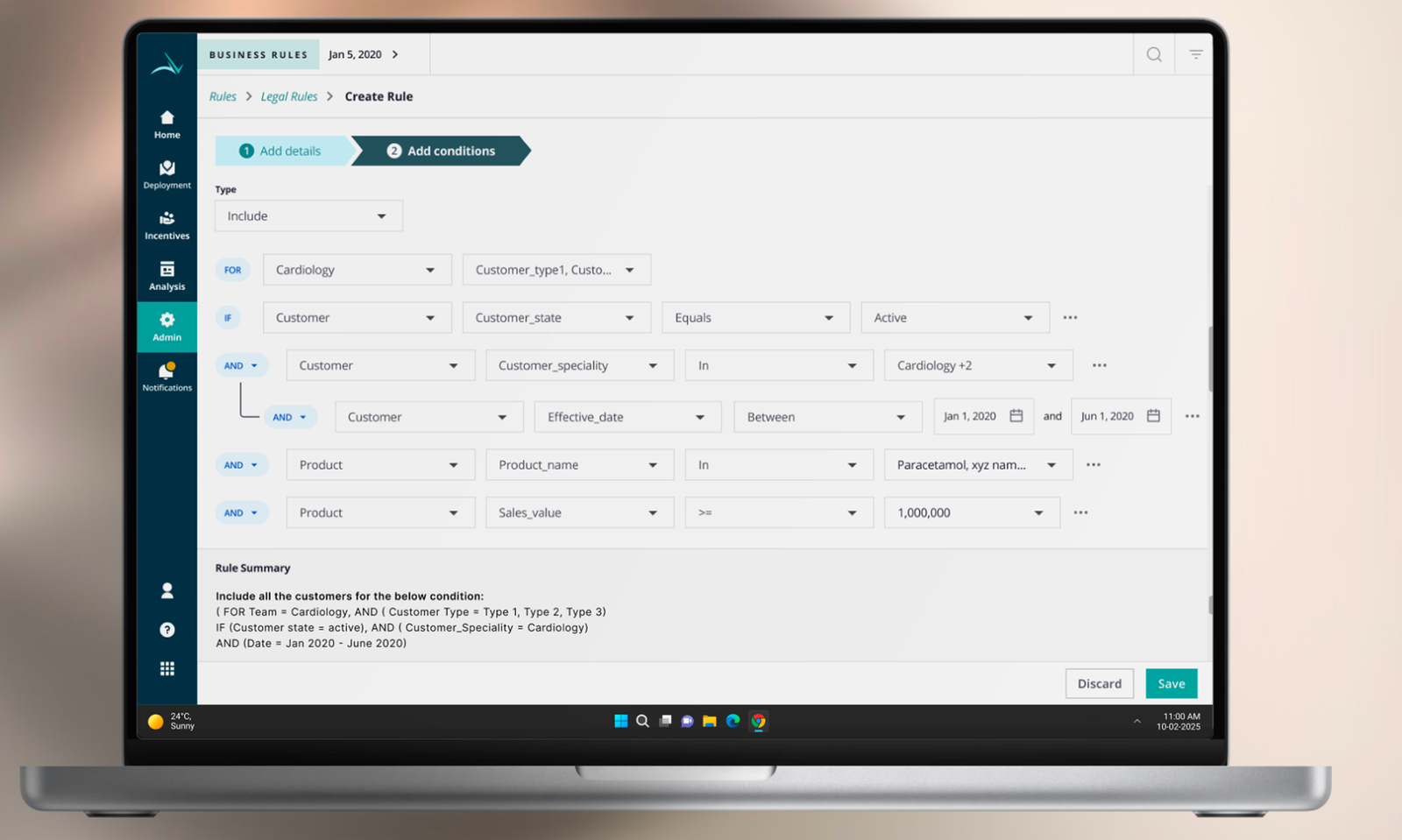
Redesigned a multirole admin system for pharma SFA, serving expert managers and occasional users with opposite needs. AI integration cut rule creation time by 76% without disrupting power users.
The shipped foundation behind the AI exploration in Case Study 02 , a complete rebuild of a broken multi-role rule engine for pharma SFA. Reduced rule creation time by 40%, lifted SUS from 33 to 82, and saved managers 5–7 hours every week.
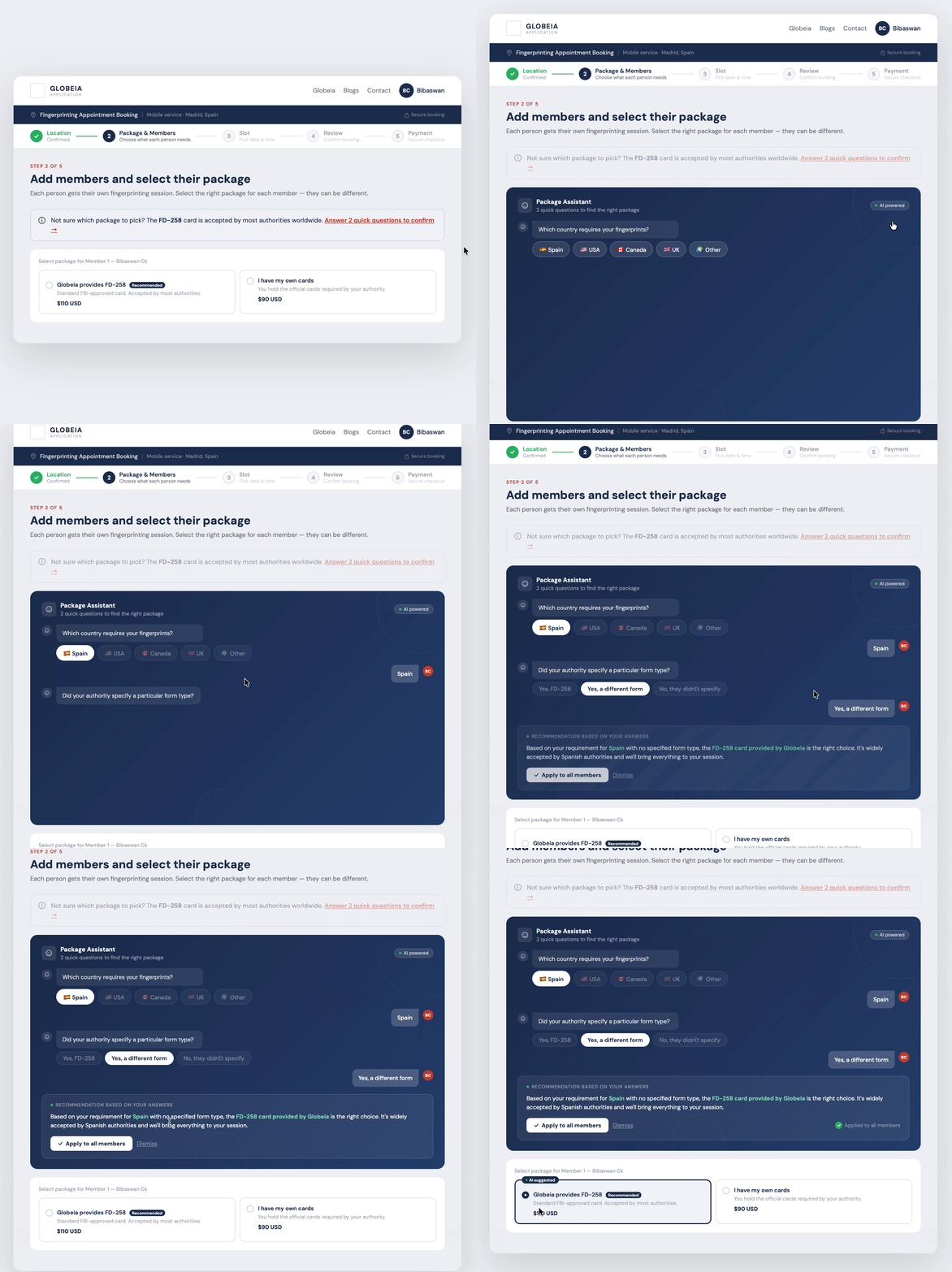
Identified 3 critical friction points, redesigned 5 key screens, and proposed an AI Package Assistant that eliminates the highestanxiety decision in the flow. Demonstrates full UX methodology: audit → IA → flow redesign → hifi.
Endtoend redesign of a pathology reporting system, from zero engagement to full team adoption in 14 days through targeted workflow intervention, not a visual refresh.
Scalable component library and design language for a multiproduct enterprise platform, built for domain experts across global teams, with governance that survived 3 product teams contributing simultaneously.
Enterprise work fails when designers don't understand what users actually do. I embed in the domain before touching a screen, learning the data models, the role hierarchy, and the workflows that already exist.
Enterprise products serve multiple user types simultaneously , admins, operators, reviewers, and viewers with conflicting needs. I map every role before designing any flow, because the admin experience shapes everything the end user sees.
I find where workflows break , not where they look broken. Click depth, cognitive load, task failure, and support ticket volume are the real diagnostics. Heuristic audits confirm; usage data reveals.
Every screen is a decision point. I design for the choice users need to make , not the feature the team wanted to ship. IA defines the structure. Interaction design reduces the friction at every step.
Design is a hypothesis. I test it, instrument it, and hold myself to the outcome , not the deliverable. Postlaunch adoption data, support ticket trends, and task success rates are the metrics that matter.
Engineering wants to ship. Sales wants features. PMs want velocity. I navigate these pressures by keeping research visible, tradeoffs explicit, and the cost of bad UX quantifiable. Data beats opinion in every stakeholder room.
Five years of enterprise UX means building fluency in the systems that make B2B SaaS hard , not just the screens that face users.
He doesn't just design screens , he redesigns how the team thinks about the problem. The workspace project would have shipped as a visual refresh without him pushing for the architectural rethink.
In 24 months on the geoscience platform, I watched him win three separate arguments with engineering using research, not opinion. Stakeholders started asking for him in scoping calls.
Rare combination: rigorous with research, fast with a prototype, and willing to tell a VP why they're wrong about their own users. That last quality is the hard one to find.
I'm Bibaswan , a Senior UX Designer based in Pune, India, with ~7 years working on enterprise B2B systems where the workflows are complex, the users are experts, and the consequences of poor design are measurable.
I started as an electronics engineer before pivoting to design. That background shaped how I approach systems: I look for the architecture before the aesthetics, the data flow before the interface. It's why I gravitate toward missioncritical platforms in oil and gas, pharma, and healthcare , domains where simplicity isn't decorative, it's operational.
I've led design across geoscience workspaces, clinical reporting tools, and pharma sales platforms , conducting 40+ user interviews, driving stakeholder alignment across 24month timelines, and holding myself to postlaunch metrics, not deliverable counts.
Outside client work, I teach UX design as a visiting faculty member , which keeps my thinking sharp and my ability to communicate design rationale even sharper.
~7 years of enterprise UX across pharma, oil & gas, and healthcare. I work best on hard problems where design decisions have real operational consequences.
Redesigned a missioncritical geoscience workspace to unblock cloud migration , by confronting 21click complexity and rebuilding around how geologists actually work.
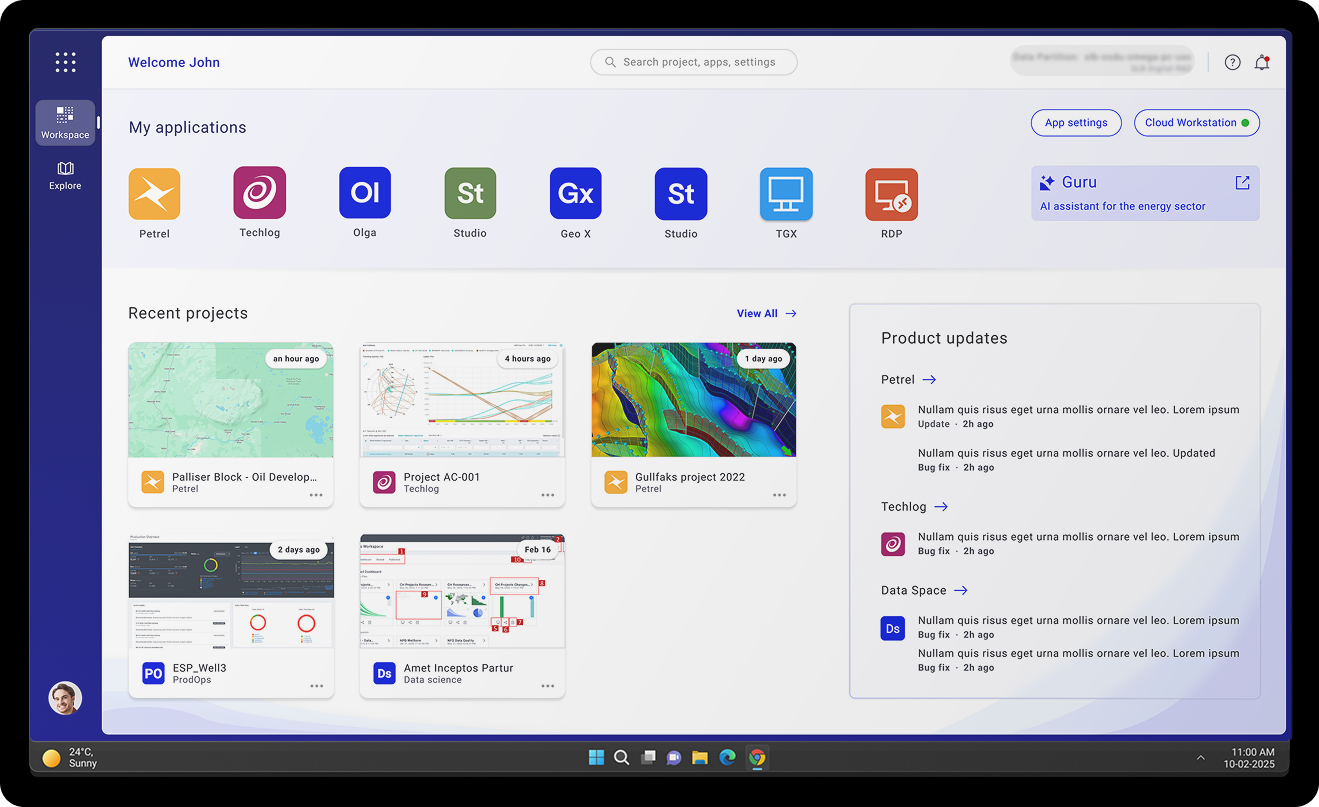
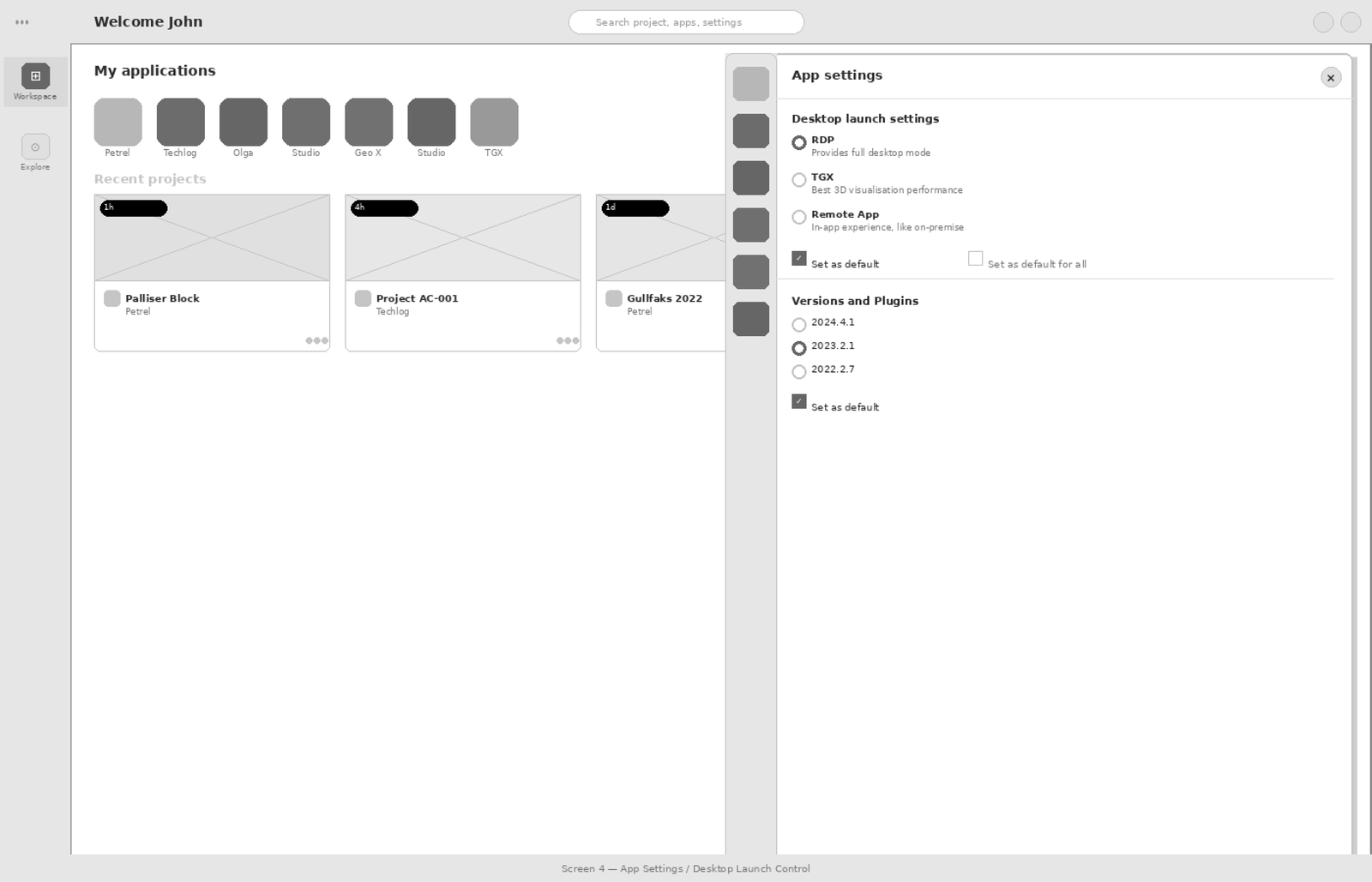
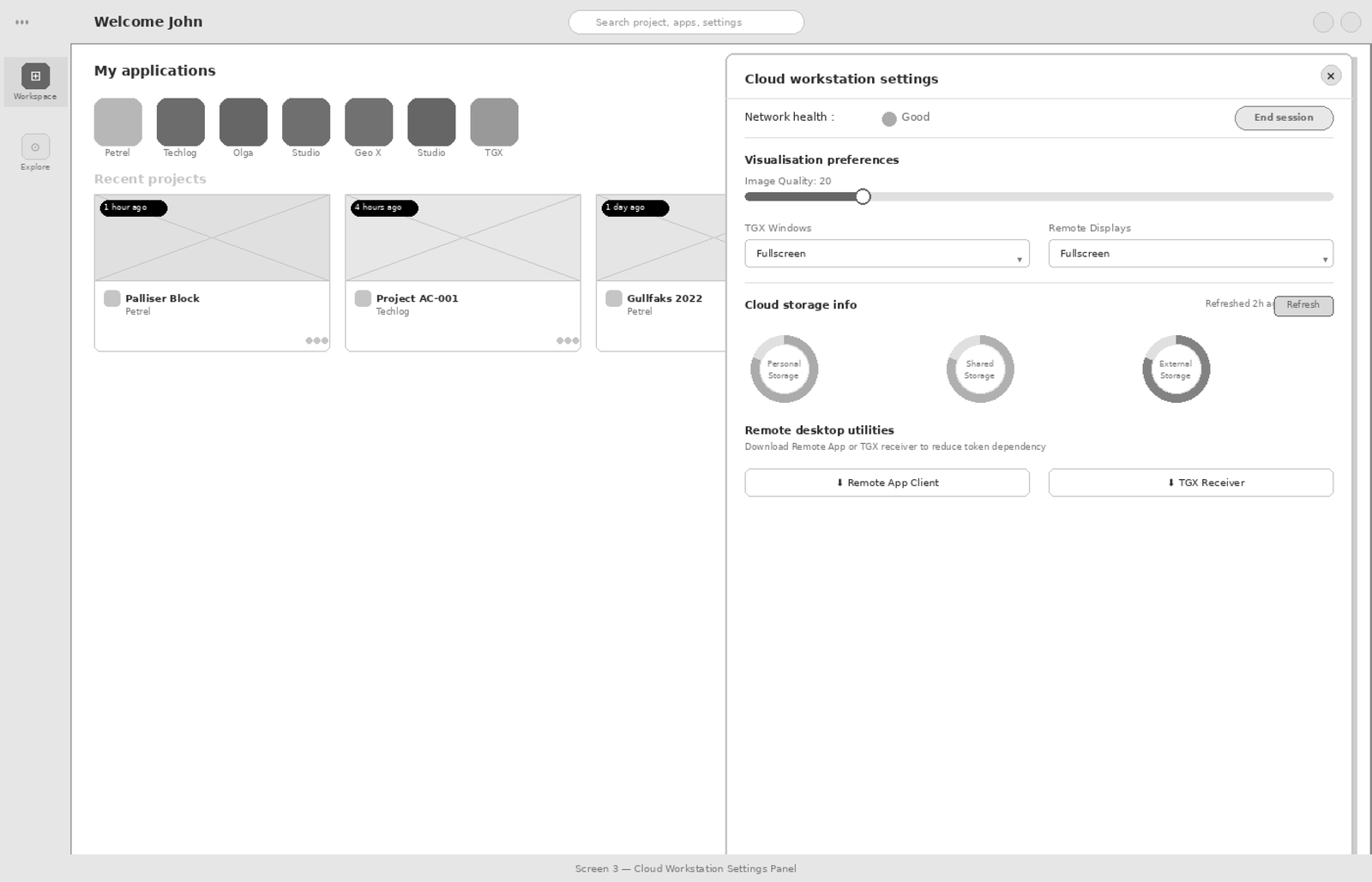
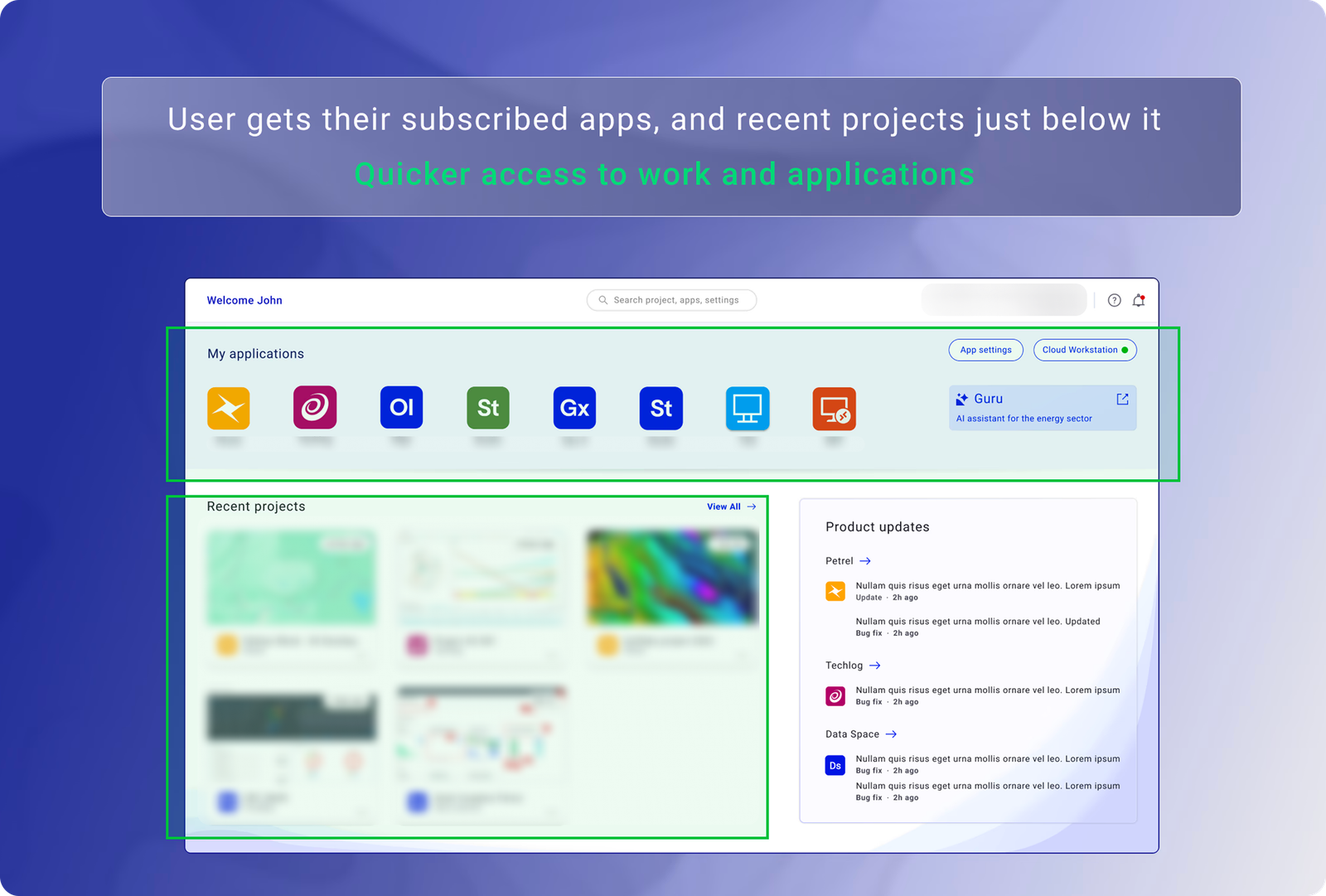
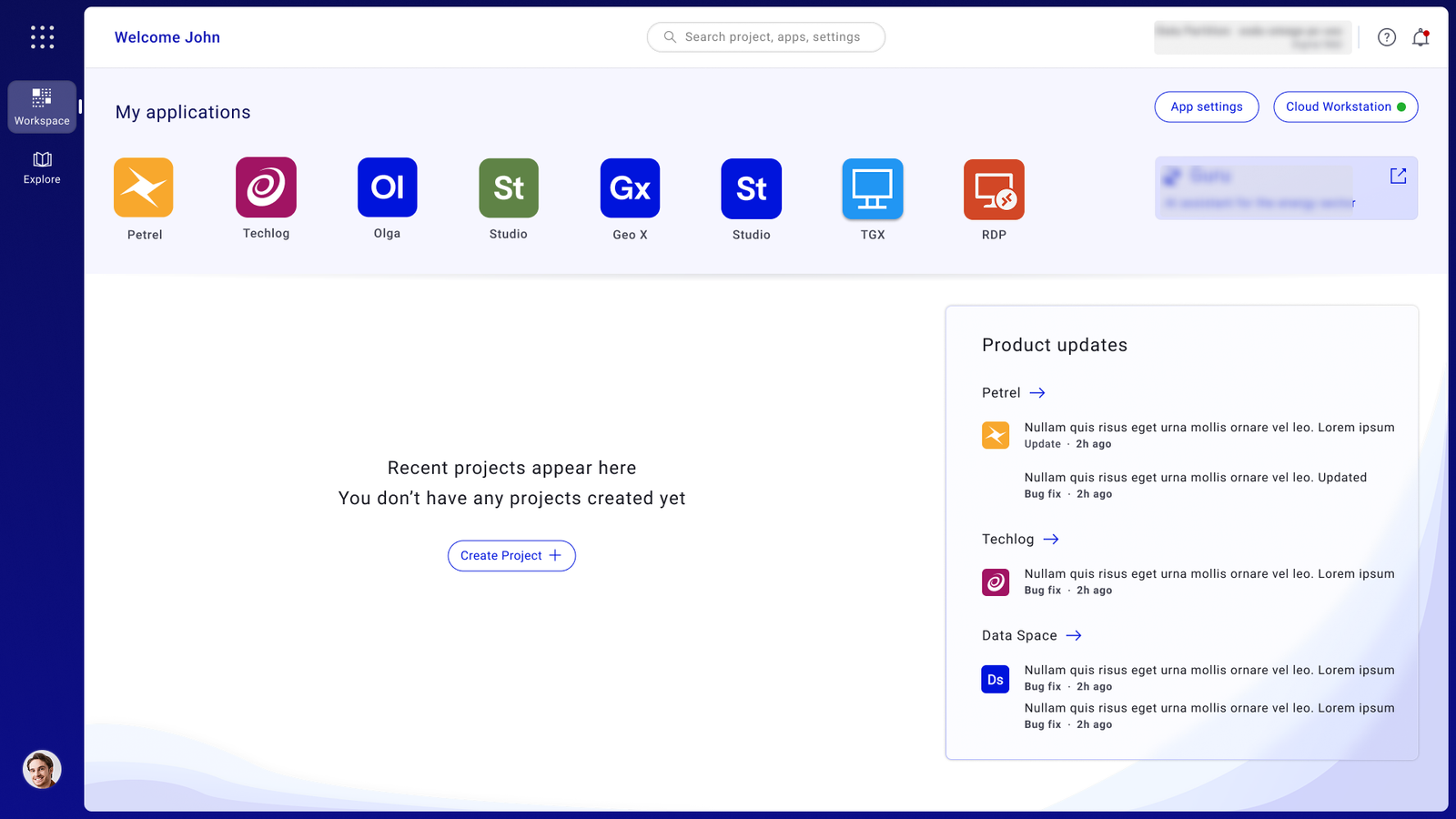
Enterprise users , geologists, geophysicists, and technical operators , needed a faster and clearer way to discover applications, resume recent work, view updates, and monitor product status. But the existing workspace experience was fragmented, forcing users to rely on manual search, repeated navigation, and disconnected tools just to begin everyday tasks.
The business consequence was direct: users were hesitant to adopt the cloud workspace because the experience created friction in daily workflows , too many steps before they could start work, weak visibility of recent projects, fragmented application access, and unclear system status.
"I spend more time navigating than actually working. By the time I get to the data, I've already lost my train of thought."
Cloud infrastructure was ready. Adoption wasn't. The gap was entirely in the user experience , and it was measurable: 21 clicks to complete a core task that should have taken 3.
I led endtoend UX strategy for the workspace redesign , owning research direction, design principles, prioritisation calls, and validation. My remit was the user experience. In practice, it also meant being the person who kept surfacing the research when the conversation drifted toward surfacelevel fixes.
The 24month timeline reflects the reality of enterprise B2B: stakeholder alignment, legacy dependency mapping, phased rollouts, and iteration on real usage data. The design took 4 months. Getting it built correctly took the rest , and that gap is where most of the real design work happened.
My research showed the problem wasn't visual. It was architectural.
Three weeks in, Engineering proposed a visual cleanup , keep the navigation, add a recent work widget. 6 weeks of dev.
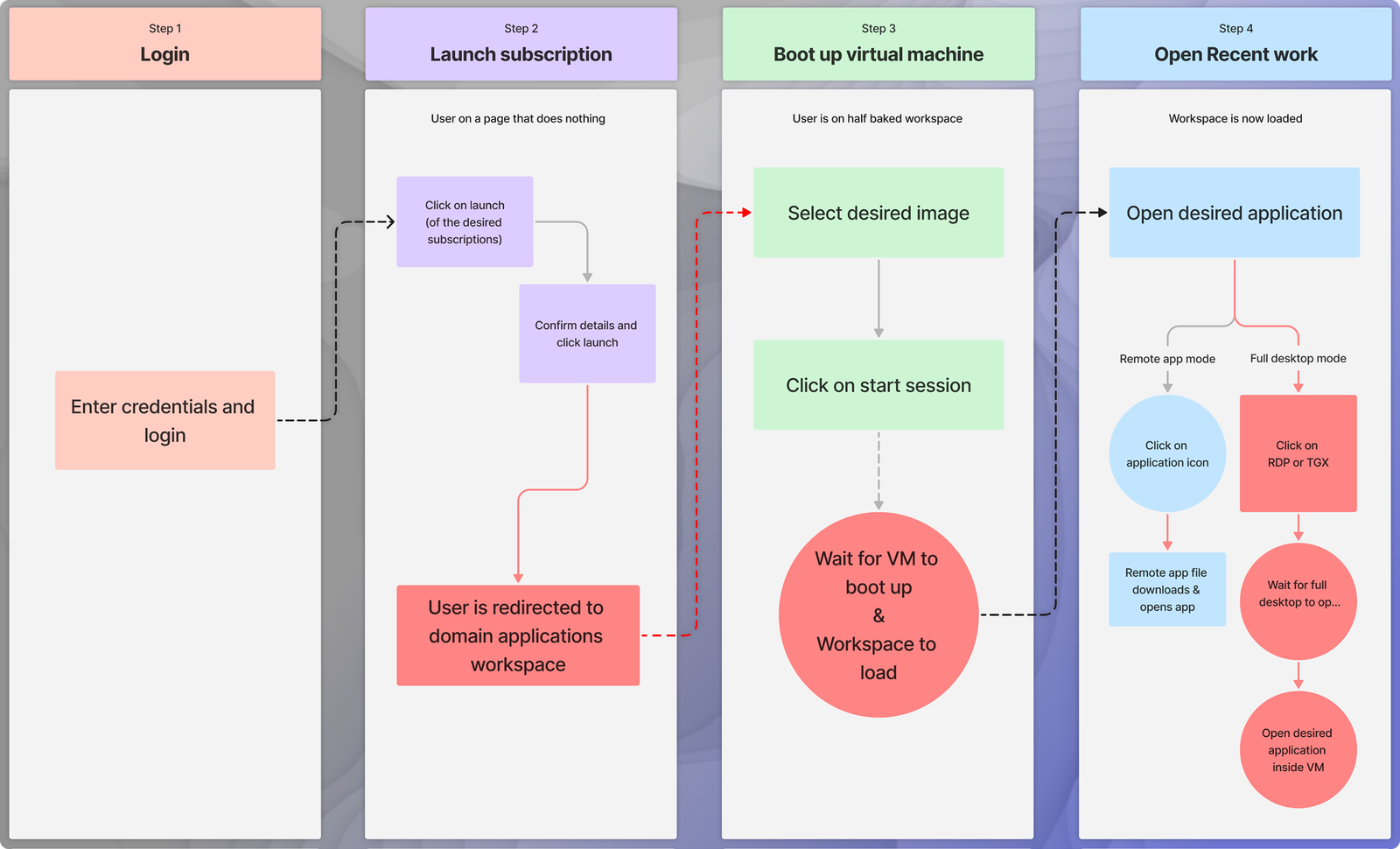
The 21step journey map I brought into the working session.
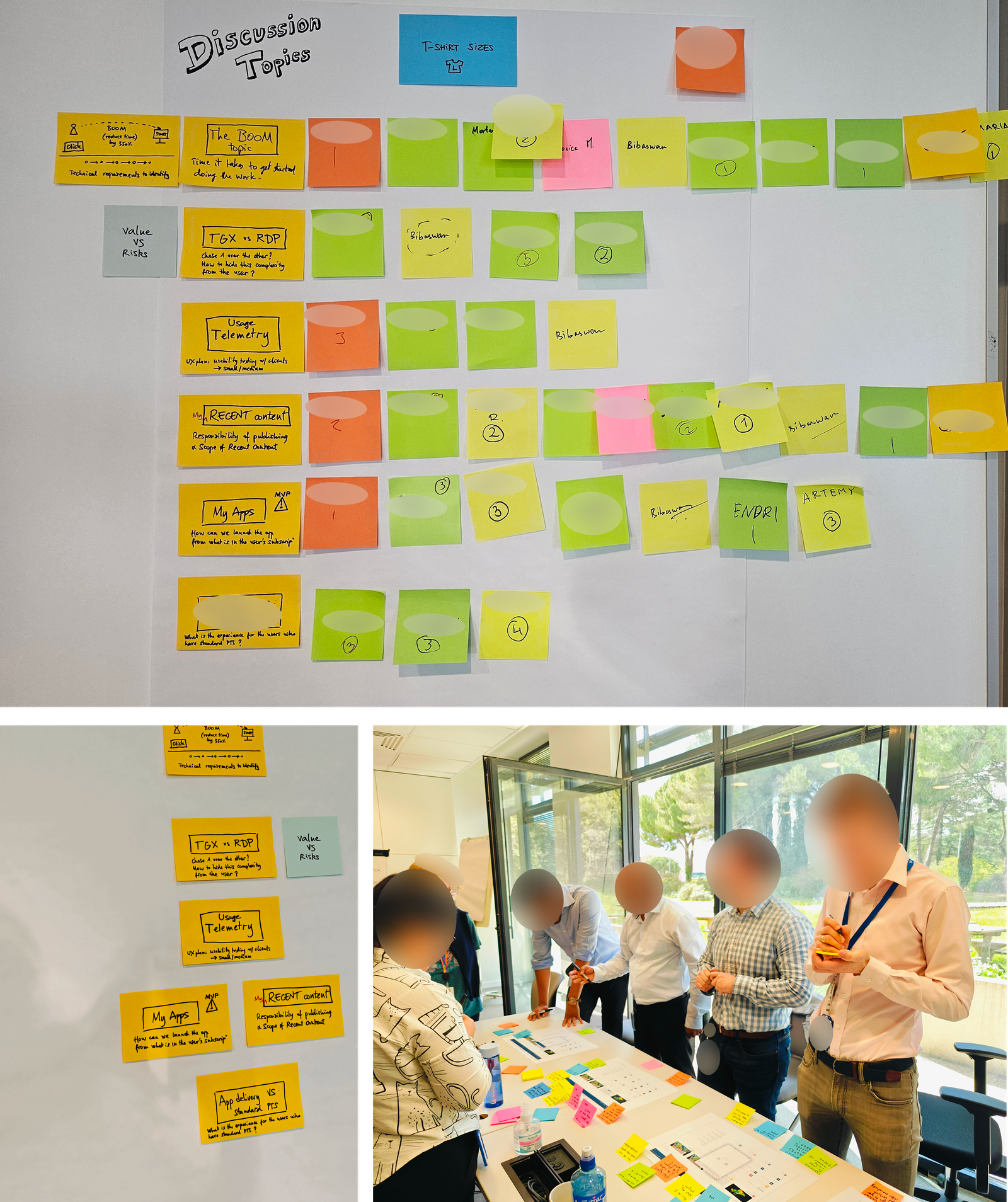
I asked the engineering lead and PM to walk it as if they were a geologist starting their day for the 400th time.
The engineering lead stopped at step 9 , "this is where the VM boots, right , can we hide that?"
That question became the breakthrough.
Three rounds of crossfunctional workshops over two weeks. Two sessions ended without resolution. The third produced the infrastructure architecture that made 21→3 possible. A cosmetic fix would have shipped in 6 weeks and delivered a fraction of the value.
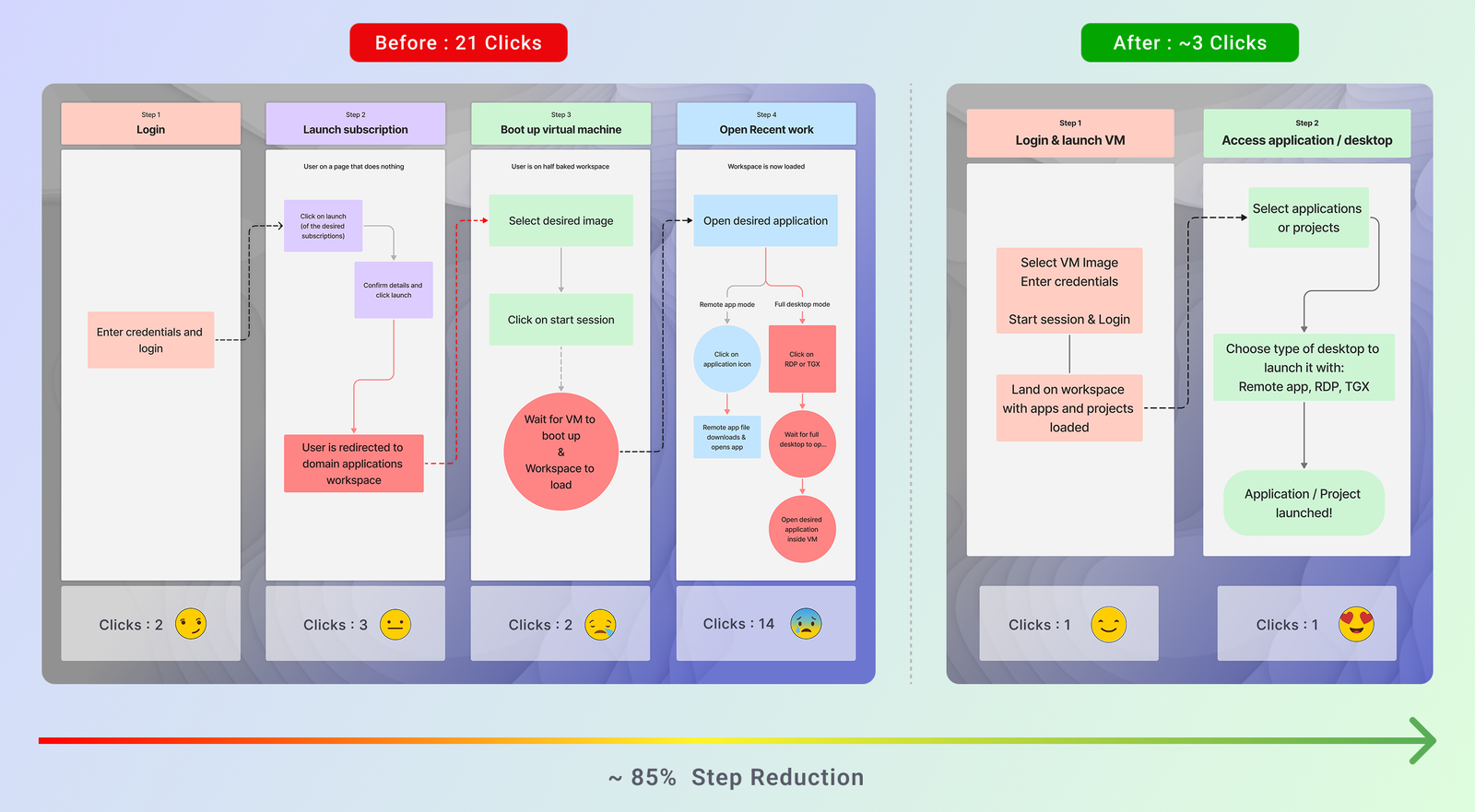
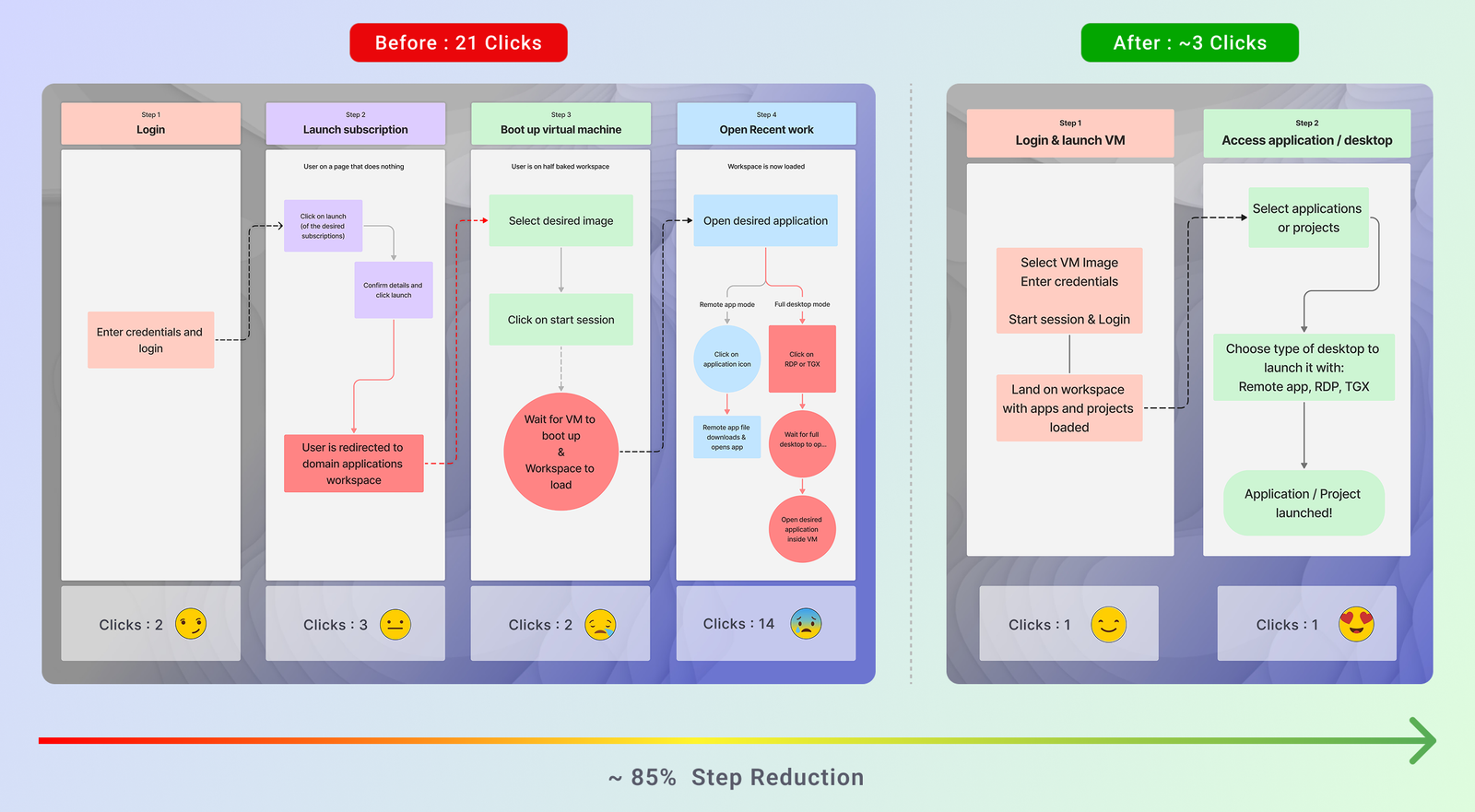
Before: Login → Launch Subscription → Boot VM → Content access , 4 stages, 21 clicks, multiple redirects.
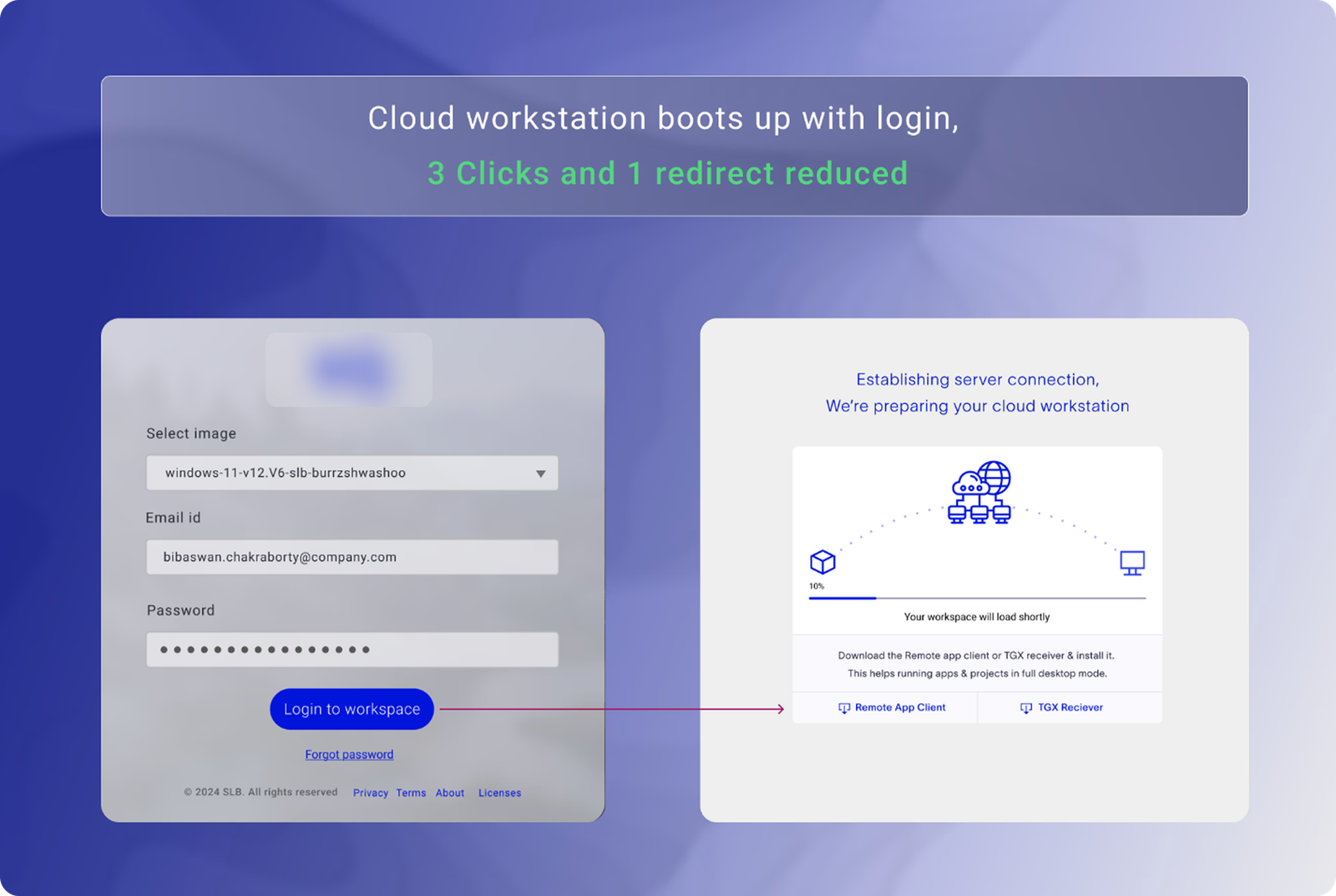
After: authentication and VM boot collapsed into a single background process , workspace ready on arrival.
My process started with listening to users and understanding how they moved across tools, projects, and cloud workflows. To understand why users were facing friction, I studied how geologists, geophysicists, and enterprise users moved from login to actual work , analyzing the workspace not just as a dashboard, but as a daily productivity environment.
The research focused on four areas: how users accessed applications, how they resumed recent projects, how they understood cloudsession status, and where they lost time in the workflow.
I conducted feedback synthesis from 40 professional geologists and geophysicists , combining 1:1 interviews, workflow walkthroughs, supportticket analysis, contextual inquiry, and review of product usage data. I collaborated closely with internal domain experts throughout.
| Research Method | Scale | Purpose |
|---|---|---|
| User Interviews | 40 users | Understood user needs and workflow friction |
| Workflow Walkthroughs | 3 core workflows | Mapped login, app launch, and recent work access |
| UX Audit | 5 friction areas | Identified navigation, visibility, and trust issues |
| Usage & Support Analysis | 21 → 3 clicks | Found opportunities to reduce workflow effort |
Before any interviews were conducted, a structured research document was prepared to align the team on what we were trying to learn and why.
Feedback from the engineering operations team and platform analysts revealed that the existing workspace was a fragmented collection of disconnected tools and entry points. Geoscientists , who work under significant time pressure on missioncritical data , were forced to rebuild their session context from scratch on every login.
A geologist needs to think from the perspective of the entire subsurface analysis chain , not just their own task. Keeping that in mind, their workspace needed to surface the right information at the right moment. The current flow made this impossible.
User interviews were planned to get a groundlevel view of the workflow breakdowns and to hear directly from domain experts about what the ideal experience would look like.
Below is what we wanted to learn from domain experts:
Each interview followed a structured framework to ensure consistency across 40+ sessions while leaving room for the conversation to go where the user's experience led.
I audited the existing workspace experience across navigation, app access, recent work visibility, system feedback, and user confidence. The audit surfaced five critical failure points , not aesthetic issues, but structural problems in how the workspace communicated and responded to users.
| Heuristic | Evaluation | Finding |
|---|---|---|
| Visibility of System Status | ✗ Fail | Navigation unclear. App does not communicate well with the user , information is present but not discoverable. |
| User Control & Flexibility | ✗ Fail | User feels no sense of control. No customisations available , no ability to prioritise or personalise workflow. |
| Learnability | ✓ Pass | Terminology is fair but improvable. Basic task completion is possible for experienced users with patience. |
| Error Control | ✗ Fail | No provision for error recovery or help documentation. Edge cases produce dead ends with no guidance. |
| Operability | ✗ Fail | Inconsistent app behaviour, no rapid response feedback, no option to save defaults. No keyboard navigation path for users on remote desktop configurations , a functional constraint for Technical Operators managing sessions across multiple screens simultaneously. |
Mapping user struggles to business impacts made the cost of inaction impossible to ignore. Every friction point in the user experience had a direct operational consequence for the business , stalled cloud migration, unused infrastructure, and rising support load.
| Key Insight | Evidence |
|---|---|
| Users frequently resume the same work multiple times a day | 6 indepth interviews with geologists and geophysicists |
| Finding "where I left off" was harder than performing the task itself | Product usage data + workflow walkthroughs |
| Tool discovery was a secondary friction , the launch flow was the primary blocker | Usage data + interview synthesis |
| Context switching between views increased errors and user hesitation | Shadowing sessions + support ticket review |
| User Friction | Business Impact |
|---|---|
| 21 clicks + multiple redirects before starting work | Users hesitant to migrate to cloud , expensive servers going unused |
| Outdated tech, inconsistent interface, high cognitive load | Users reverting to legacy systems , high cost of maintaining parallel infrastructure |
| No visibility of system status, overwhelming technical jargon | Poor app access and trust deficit , preventing business scaling and adoption targets |
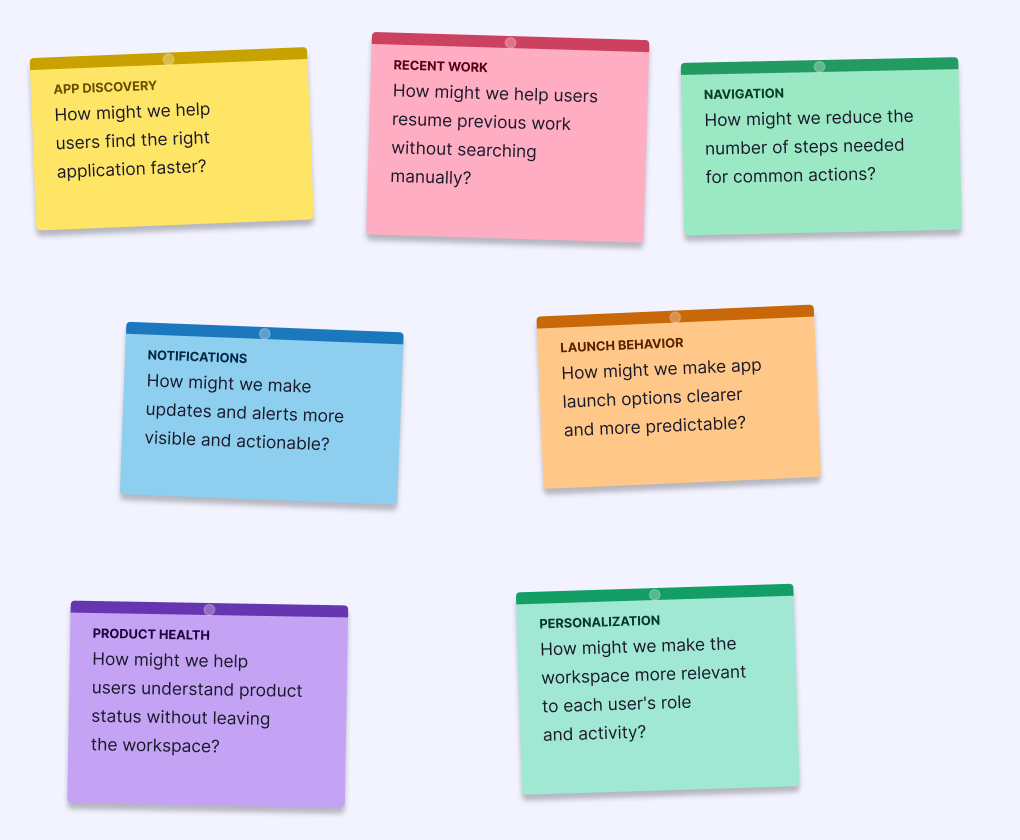
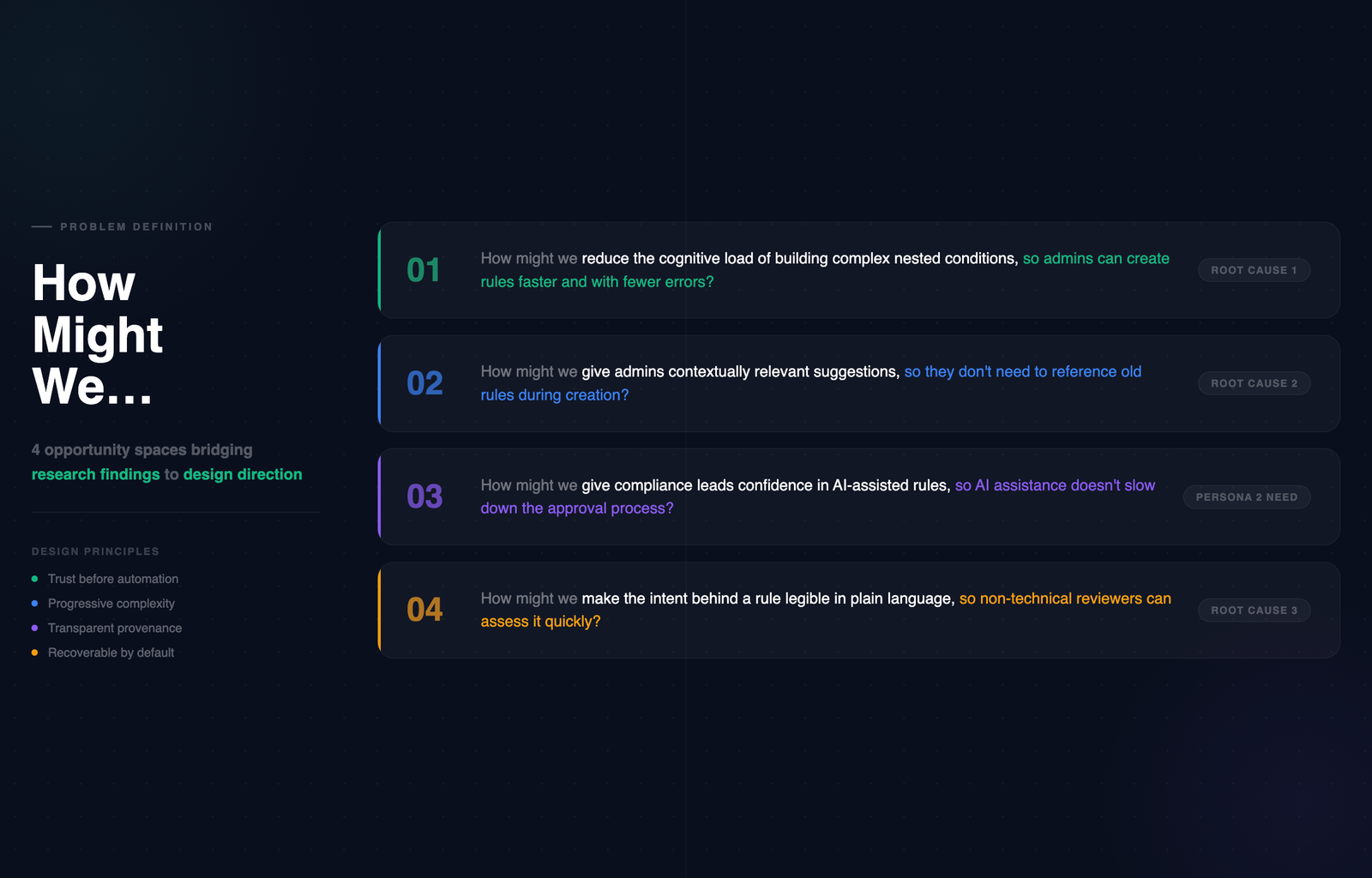
How might we reduce the steps between login and starting actual work to under 3 clicks?
How might we surface recent projects so users can resume work without searching again?
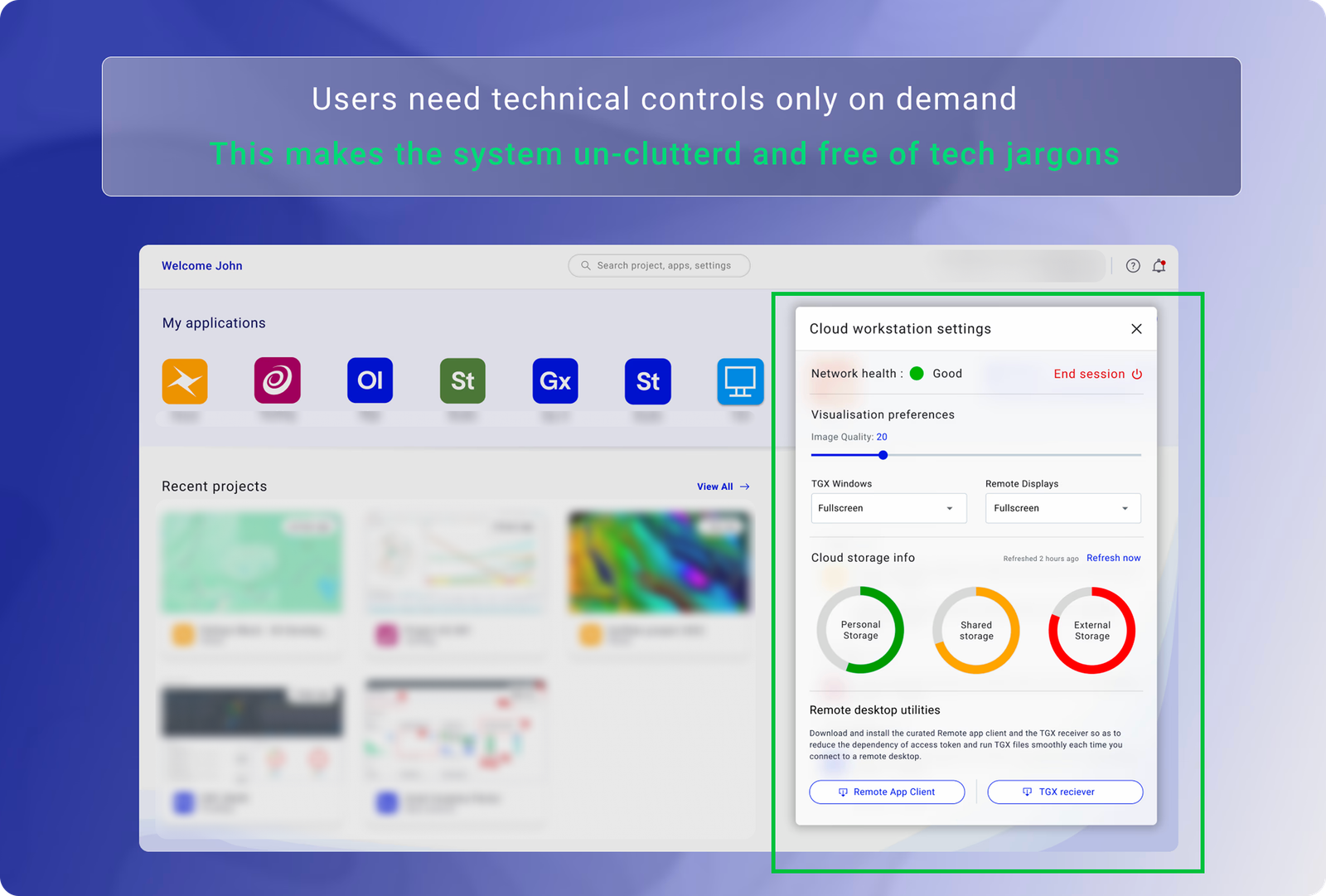
How might we give users visibility into system health without overwhelming them with technical detail?
How might we make application discovery intuitive for both new and experienced users?
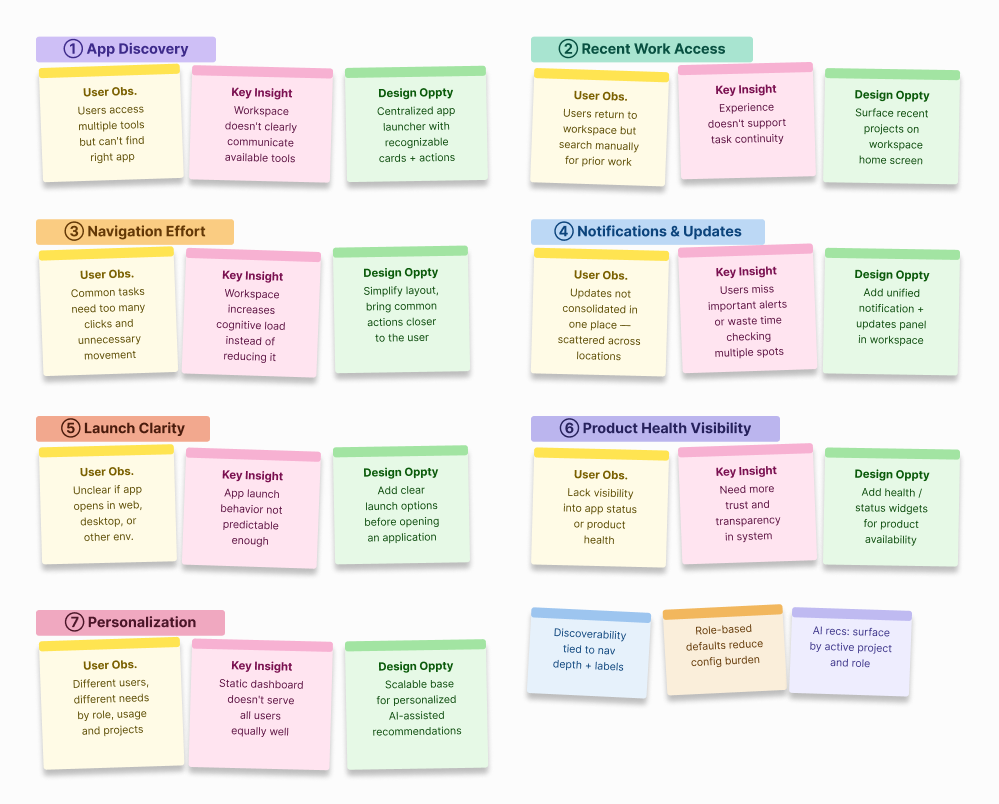
Each insight from research was mapped directly to a design intervention , and each intervention was evaluated against the value it would deliver to users. This kept the work anchored to outcomes, not features.
Designing a single workspace that works for all three required mapping each role's mental model before any wireframe was drawn. The IA had to accommodate their different entry points without creating three separate products.
Primary taskdoers. Need to resume work instantly, access specific applications, and understand session state. Cognitively loaded before they open the workspace , every friction compounds.
Manages infrastructure configuration, monitors system health, and troubleshoots session issues. Needs system visibility without contextswitching out of the workspace. Often the person scientists blame when things go wrong.
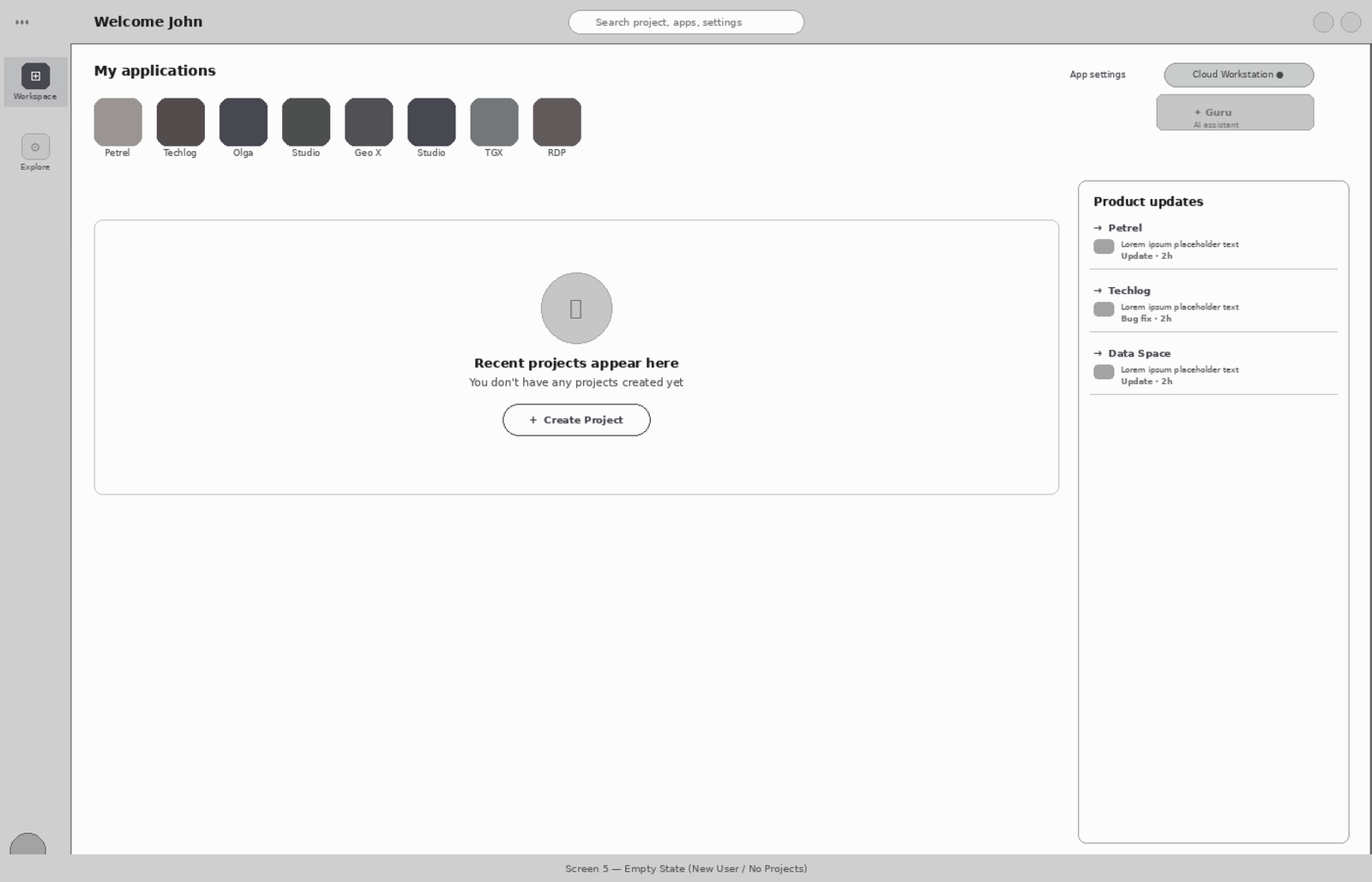
Onboarding regularly postmigration. Needs application discovery, clear empty states, and guidance on launch behaviour , without the workspace feeling like it was designed only for experts.
The existing IA forced every user through the same fourstage flow regardless of their goal: Login → Subscription launch → VM boot → Content access. There was no rolebased differentiation, no state persistence, and no separation between infrastructure controls and work tools. The architecture treated every session as a first session.
| User Type | Primary Goal | What the Old IA Required | What the New IA Does |
|---|---|---|---|
| Geologist / Geophysicist | Resume yesterday's project | Navigate 21 steps before touching any data | Recent work surfaces at login , 1 click to resume |
| Technical Operator | Check session and network health | Navigate to a separate system status area | Embedded health panel in the workstation , no context switch |
| New User | Discover available applications | Blank screen with no orientation or guidance | Designed empty state with clear application discovery path |
Based on research with all three user types, I defined four principles that governed every design decision. Not aspirational guidelines , actual filters. If a proposed solution didn't hold up against all four, it didn't ship.
Help users continue work instantly. The home screen is not a launchpad , it's a resumption point.
Organise the interface around what users are doing, not what features the product has.
Minimise decisions required before meaningful action. Every extra choice is friction.
Simplify the workflow , never the domain. Geologists need professionalgrade tools.
Every design decision was tied to a specific friction point identified in research. The goal wasn't to redesign the interface , it was to remove the obstacles between users and their work.
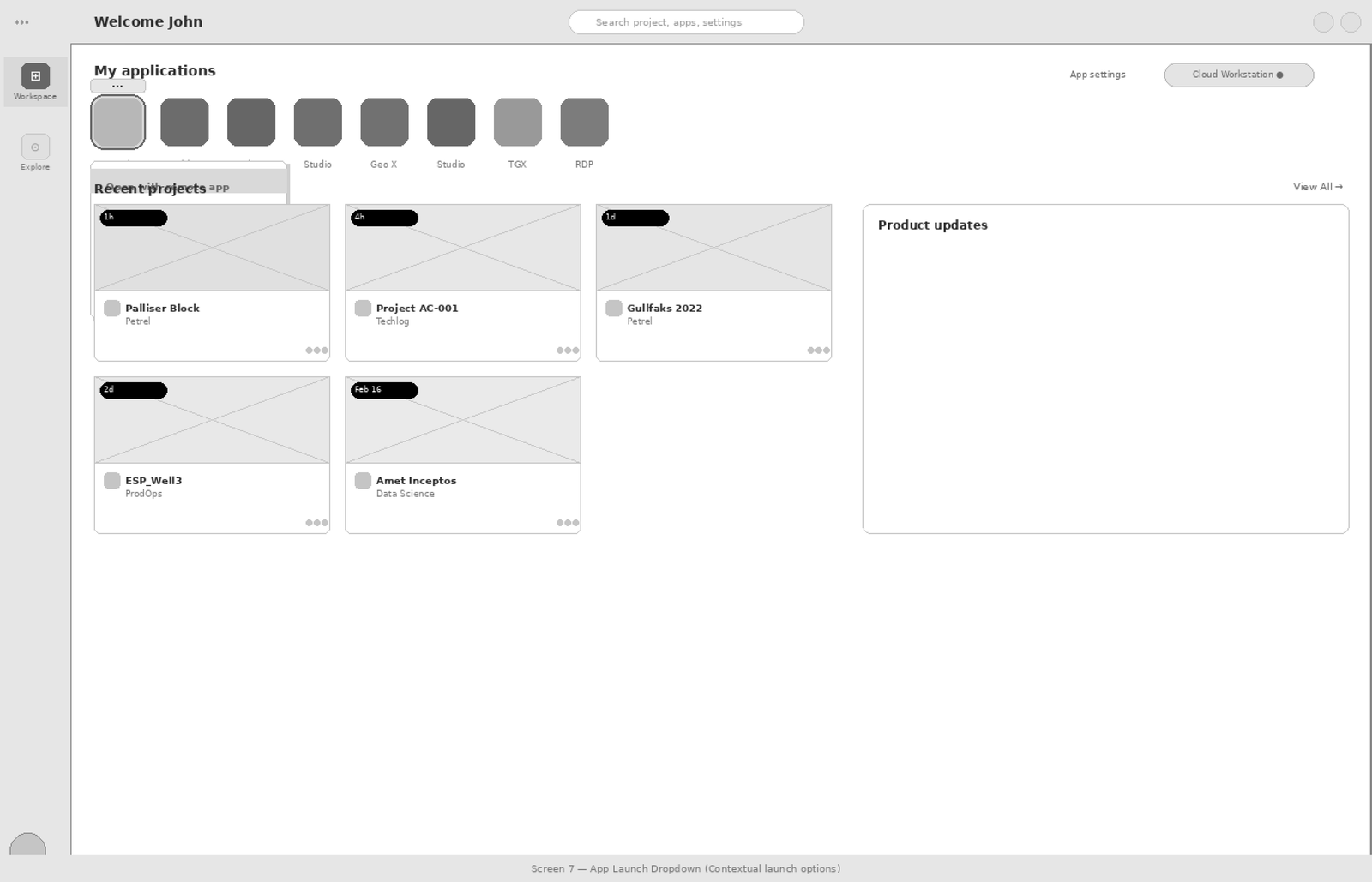
The friction map documents the exact journey users had to take before and after the redesign. It reveals where unnecessary steps, repeated navigation, and unclear states were costing users time , and shows exactly how the redesign collapsed a fourstage, 21click process into a twostage, ~3click flow.
Before: Users navigated through Login → Launch Subscription → Boot Virtual Machine → Open Recent Work , accumulating 21 clicks, multiple redirects, and significant wait time before starting actual work.
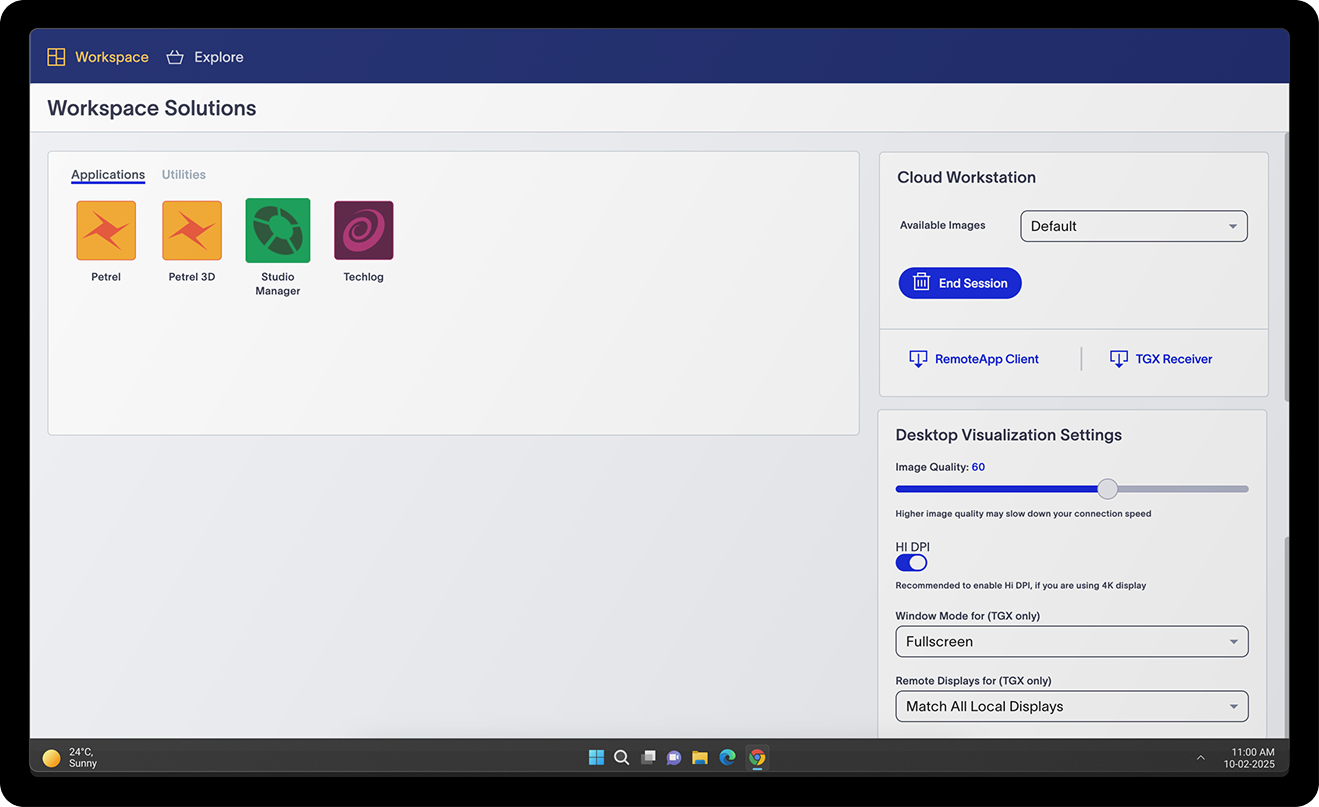
After: Login & VM launch are combined into a single step. The workspace loads readytouse with apps and recent projects visible. One click to start working.
Within six months of launch, the redesign delivered results that were measurable across every dimension , user behaviour, satisfaction, and business adoption. The data validated not just the design decisions, but the research approach that preceded them.
The adoption rate chart below tells the fuller story , a flat growth curve from 2020–2024 that sharply inflected upward immediately after the redesign launch, reaching +13,000 new users by December 2024.
Four honest calls , things I'd change if the project started today.
Analytics went in three months postlaunch. The early adoption curve , the data that would have told us why users weren't returning , was gone. A prioritisation failure I should have pushed harder on at kickoff.
Deferred pinned apps and custom layouts to Phase 2. When we got there, users had conflicting mental models we could have surfaced cheaply earlier. That delayed learning cost six months of scoping.
We designed for geologists. The 3,000+ new users included IT admins and project managers. Documentation wasn't enough. A guided firstrun experience would have cut the first 8 weeks of support load significantly.
My internal before/after showed sidebyside screens. Stakeholders read "it looks cleaner" , not "the architecture changed." The 21→3 story is a flow story. I should have used the journey map. My own presentation choices obscured the argument for months.
AI integration in a pharma SFA rules engine , reducing rule creation time from 47 minutes to 19 through natural language input, contextual suggestions, and a trust architecture built for compliance.
~7 years of enterprise UX across pharma, oil & gas, and healthcare. I work best on hard problems where design decisions have real operational consequences.
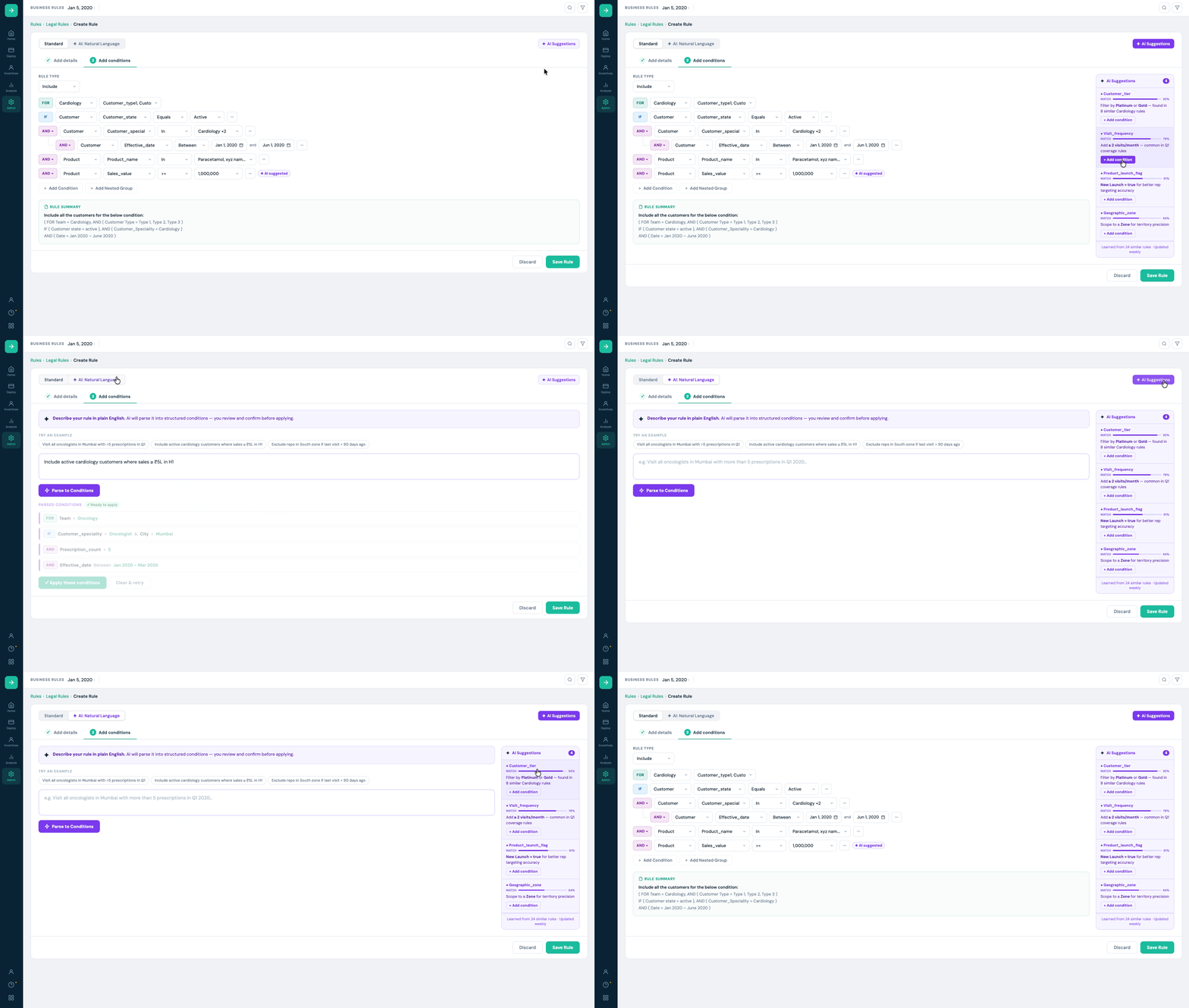
Redesigned a rule builder with AI integration , replacing a brittle, 3rdpartydependent interface with a system that supports complex nested logic. Rules that took 47 minutes now take 19.
This case study covers a Sales Force Automation (SFA) platform used by pharmaceutical companies across India and SouthEast Asia. The platform enables sales managers and compliance leads to configure business rules that govern which medical representatives (MRs) visit which doctors, under what conditions, and during which coverage periods.
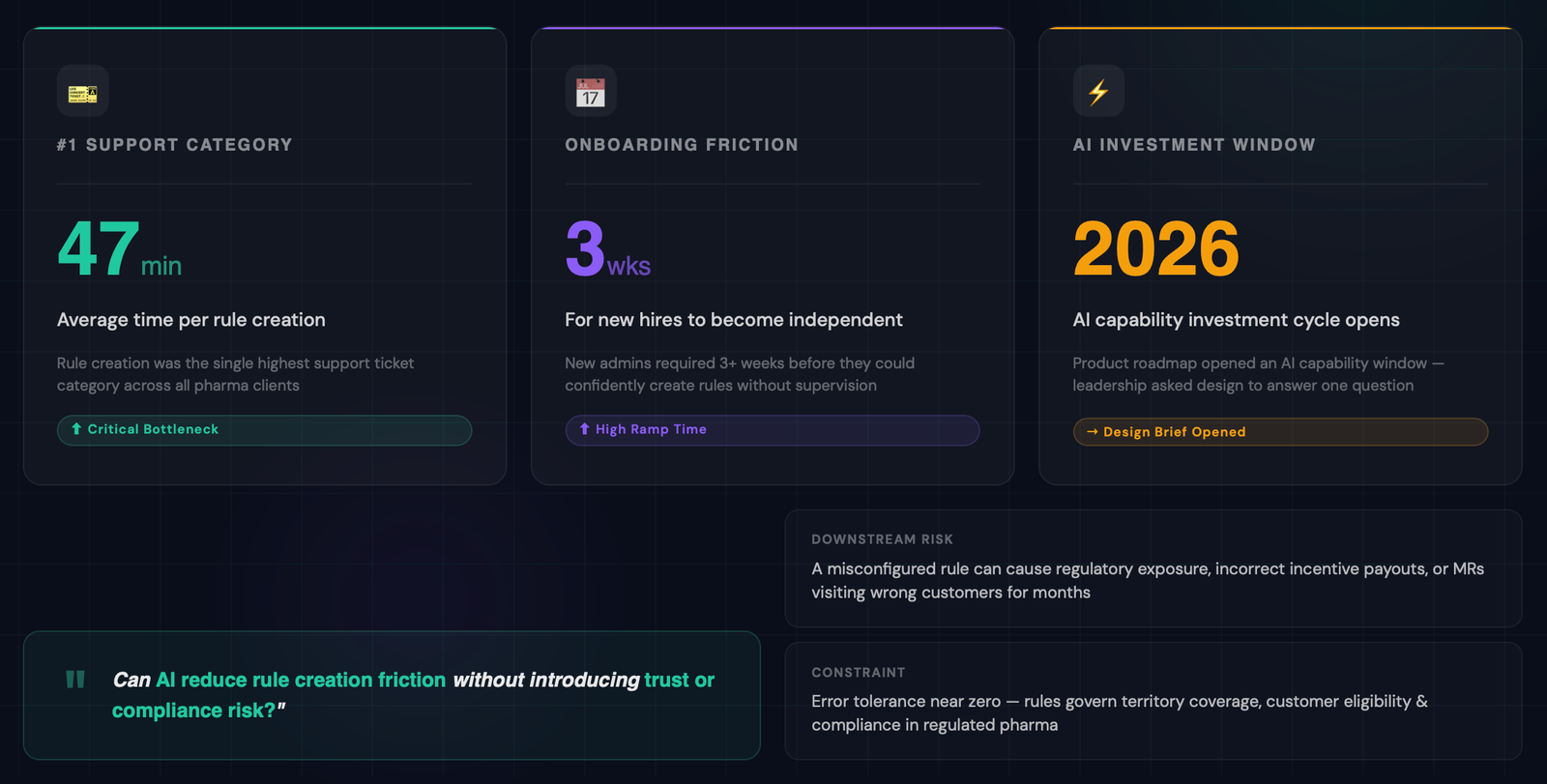
Business rules are the backbone of compliant field operations..They determine territory coverage, customer eligibility, product promotion boundaries, and visit frequency targets. A misconfigured rule doesn't just create bad data , it can result in regulatory exposure, incorrect incentive payouts, or MRs visiting the wrong customers for months before anyone notices.
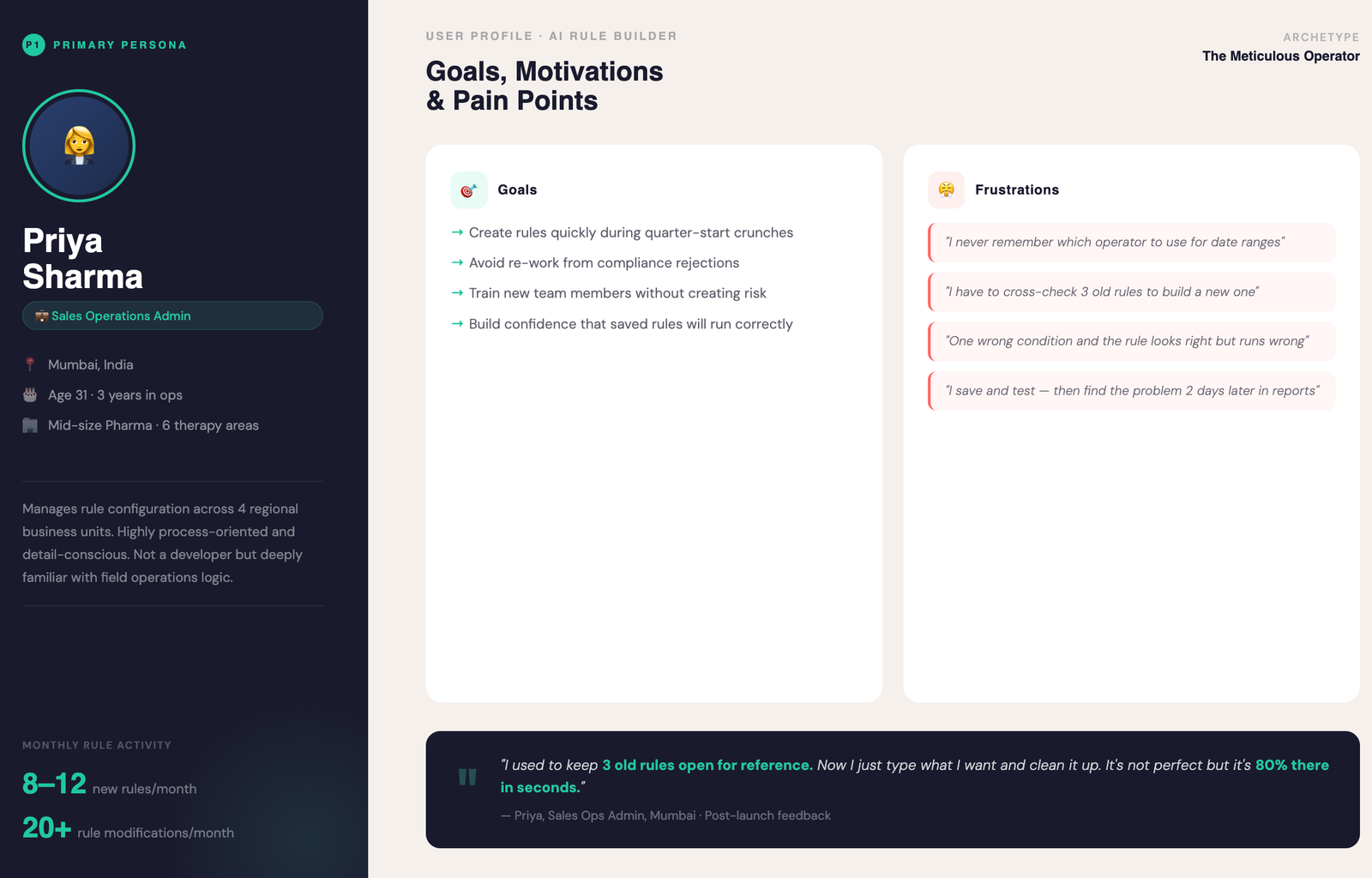
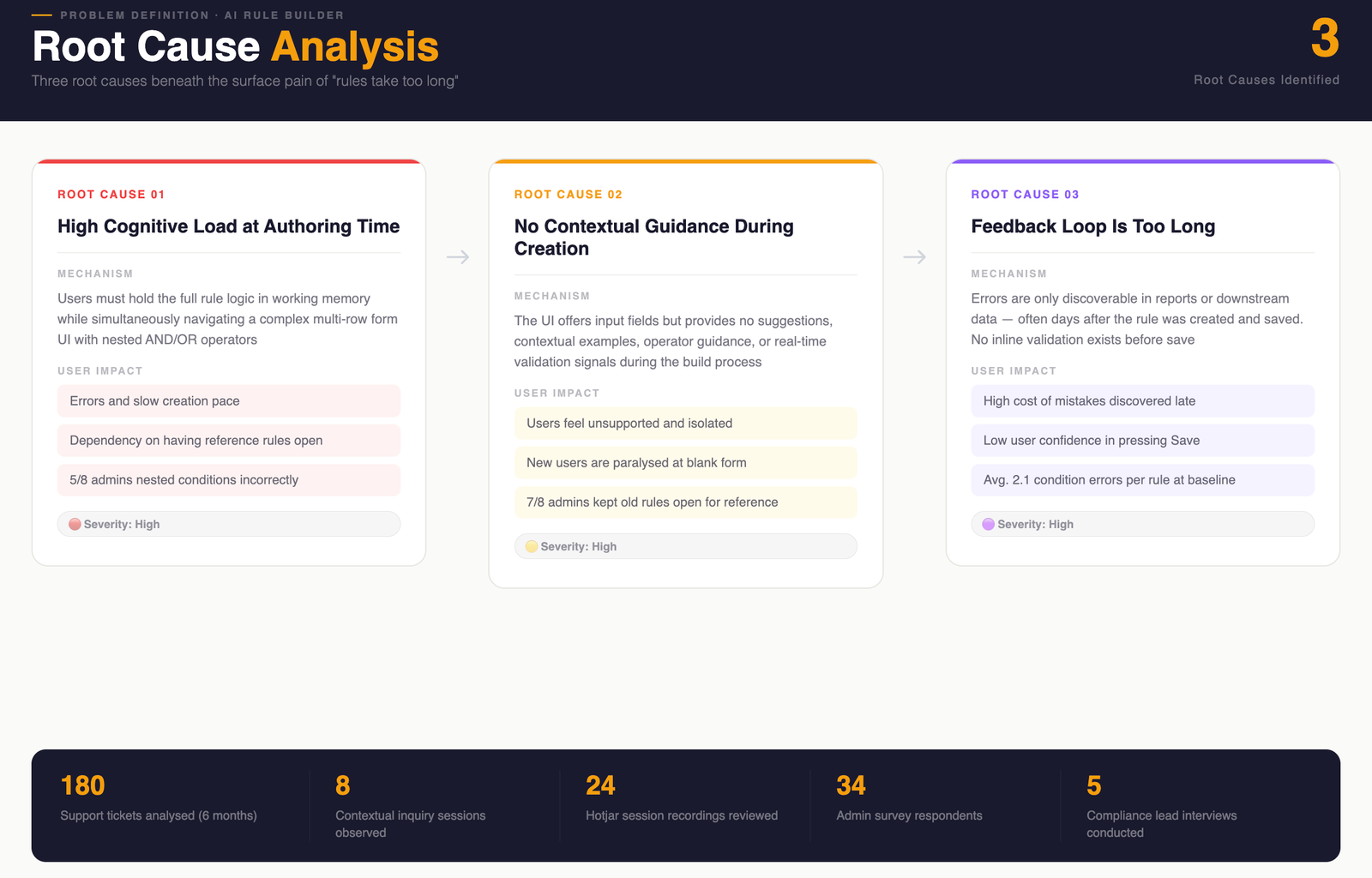
The product team identified a sharp bottleneck: Rule creation was the #1 support ticket category. Admins , the primary rule authors , were spending an average of 47 minutes per rule. New hires took over 3 weeks to become independent on the rules module. The product roadmap had an AI capability investment cycle opening, and leadership asked the design team to answer one question:
This case study documents how we answered that question , and what we shipped.
Business rules in pharma SFA are not simple filters. A single rule can combine teamlevel targeting, customer type segmentation, speciality conditions, effective date ranges, product inclusions, and minimum sales thresholds , all nested with AND/OR logic. The UI is expressive, but expressive UIs have steep learning curves. The challenge was not 'how do we simplify the UI' , it was 'how do we help experts work faster without dumbing down a tool they depend on.'
"I need to create a complex rule and I can't , so I just create a simpler one that's wrong. Then the rep visits the wrong customers."
The interface couldn't handle nested rule structures , so users simplified their rules to fit what the tool could express, not what the business actually needed. The result was systematic field misalignment: reps visiting the wrong doctors, incentive payouts calculated on bad data, and compliance exposure that could run for months before surfacing.
The problem wasn't user skill. It was that the interface was designed around the tool's data model , not around how managers actually think about territory coverage. That mental model mismatch was upstream of every downstream failure.
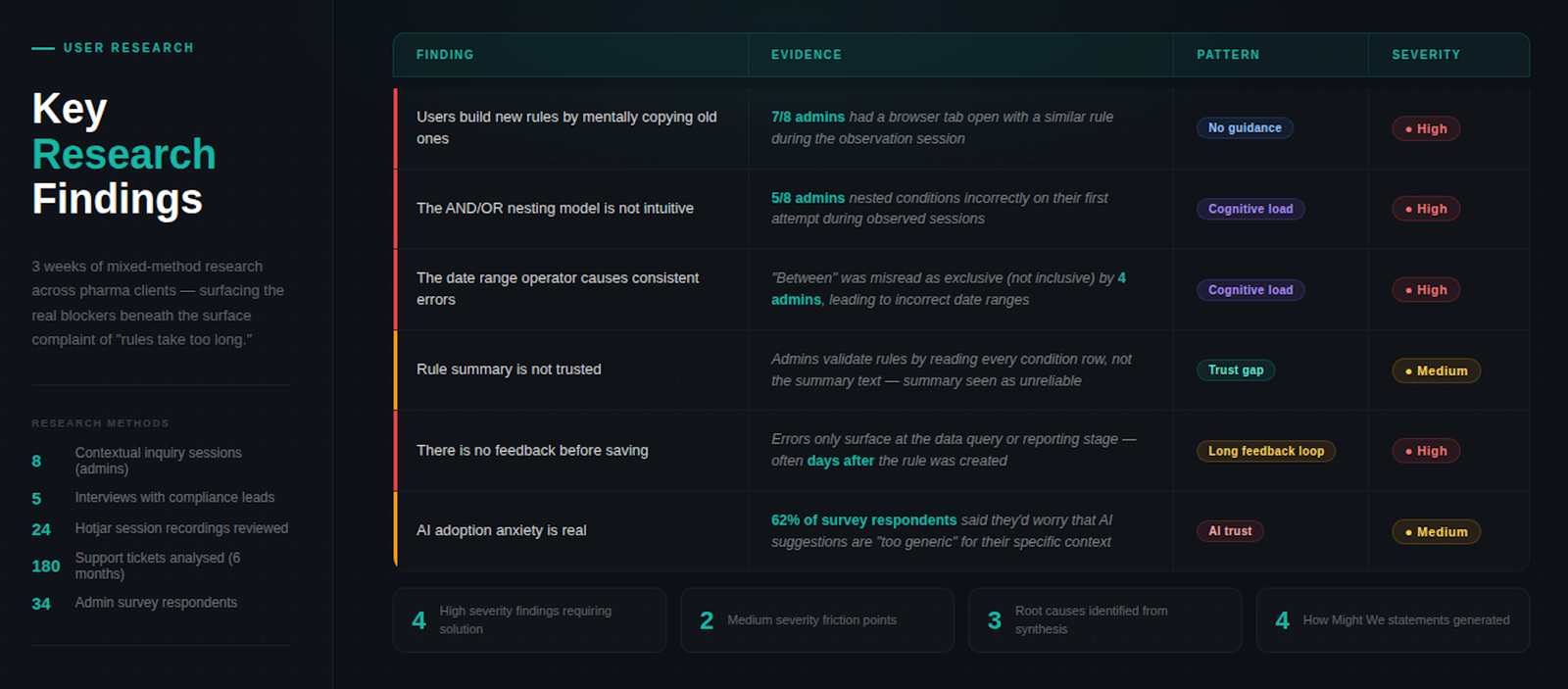
3 weeks of mixedmethod research
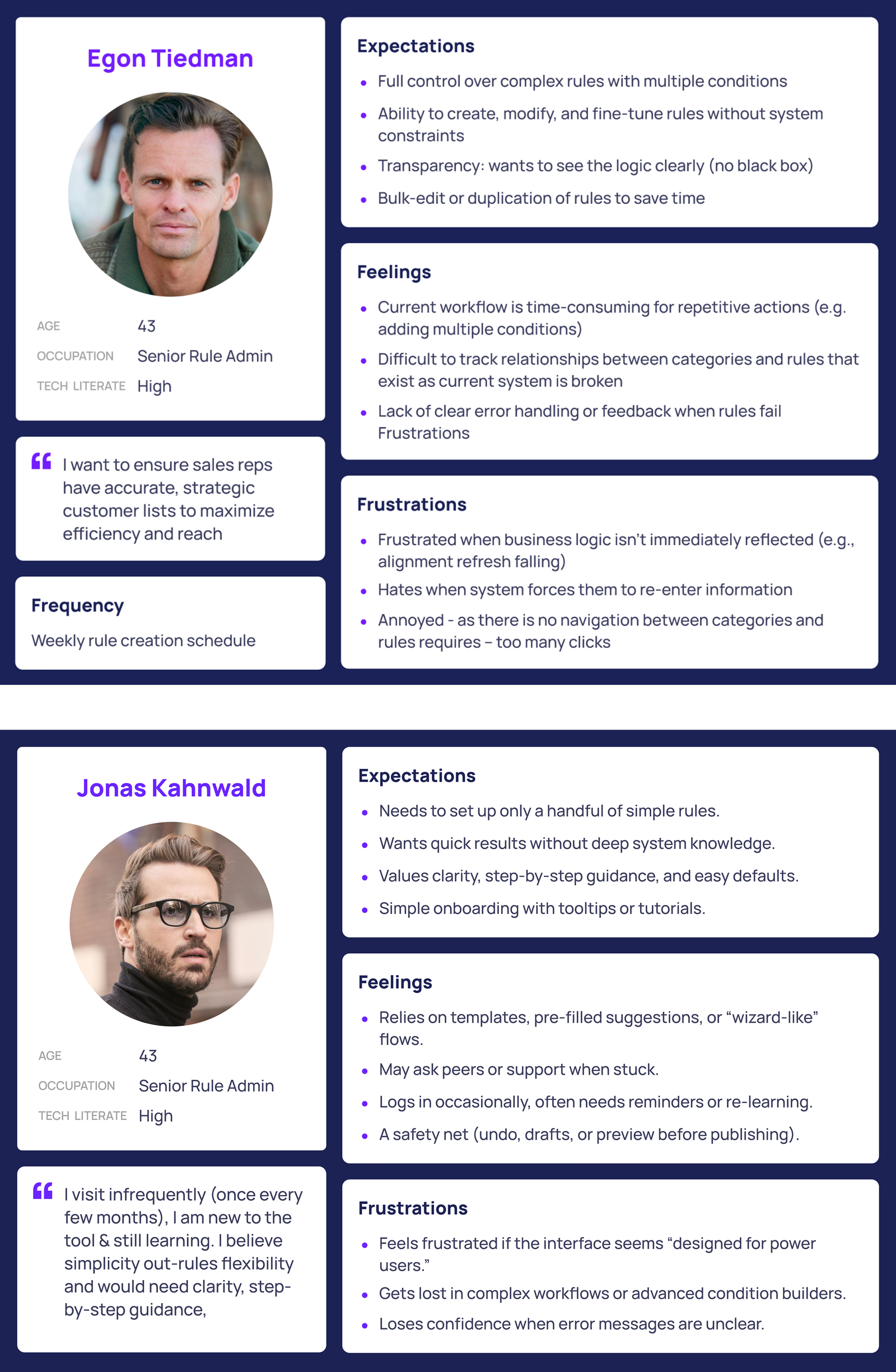
Research surfaced two distinct user types , but the real finding wasn't a personality difference. It was a structural one. Their needs don't just diverge , they require opposite things from the same interface at the same decision point.
IA requirements: Full condition nesting from the first screen. No mandatory AI step , it slows them down. Persistent rule state across sessions. Mode memory so they don't reconfigure on return. Any simplification that sits between them and the builder is friction they will route around.
IA requirements: Guided entry , they don't know what to type until they understand the schema. Plain language labels, not datamodel terminology. AIfirst path as default, not optin. Recoverable errors at every step. Any interface that assumes prior knowledge produces the wrong rule.
These aren't preferences , they're incompatible navigation architectures. A single entry point cannot serve both. The design problem was: how do you build one product that lets each persona enter on their own terms, without a toggle that patronises either?
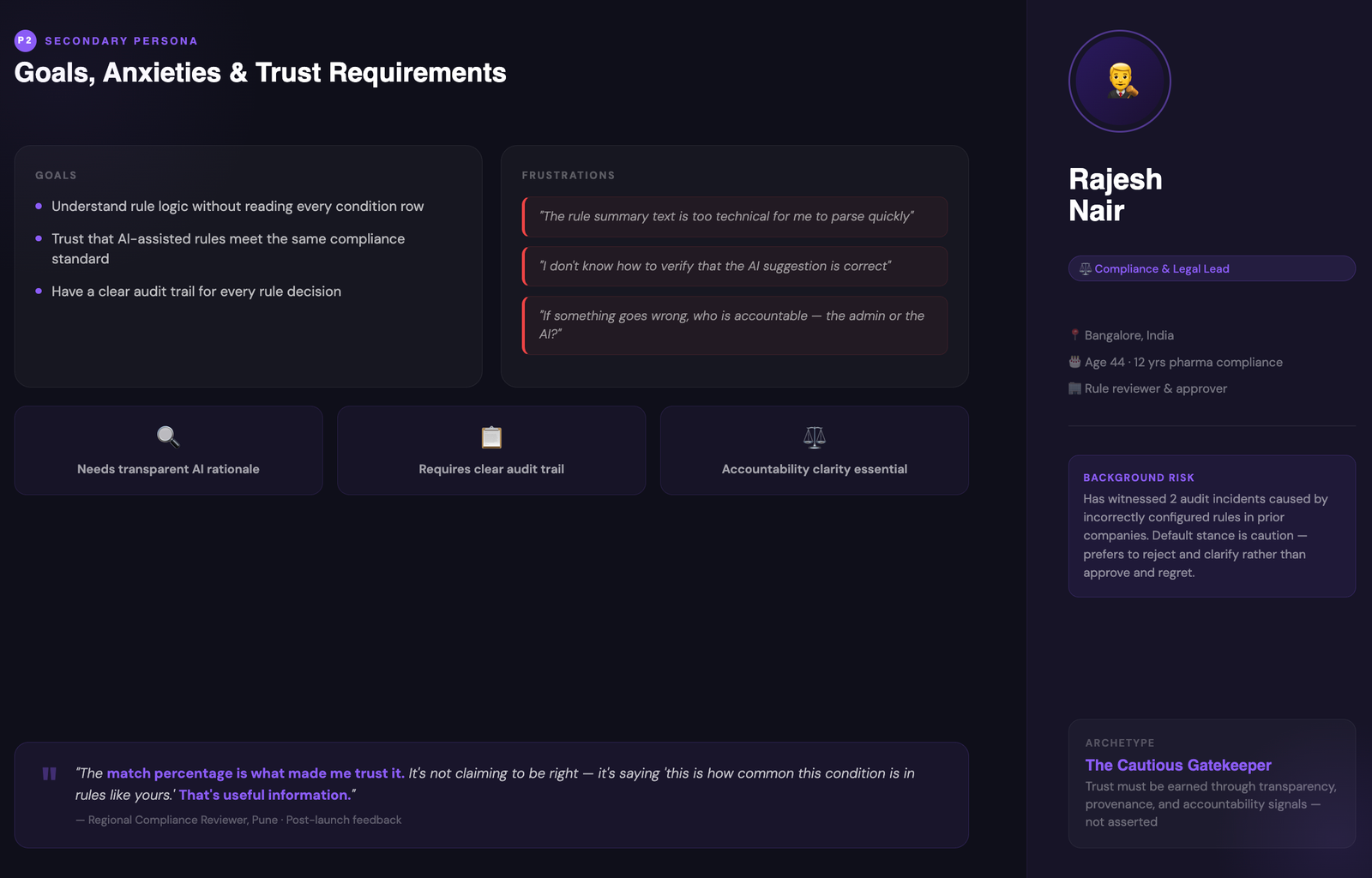
A Design audit using established heuristics revealed three critical failures in the existing interface: Visibility (partially passed , key rule state was not always visible), Flexibility (failed , no support for nested or grouped rules), and Learnability (failed , required training and prior knowledge to use correctly).
Every path through the 5Whys landed at the same place. The interface was built on the rule's data schema , conditions, operators, values, effective dates , because that's how the database represents a rule. But that's not how a manager thinks about coverage.
A rule isn't "a set of AND/OR conditions with effective dates." It's "who should my rep visit, under what conditions, starting when." The redesign had to map to that mental model first, and generate the schema second. That inversion is the entire case study.
Once the root cause was clear, the design direction followed: don't simplify the interface , change what the interface is an interface of. The tool needed to think in coverage terms, not data terms. That reframe is what made AI assistance viable , because natural language is how managers already describe coverage, and it's what the NL parser would receive.
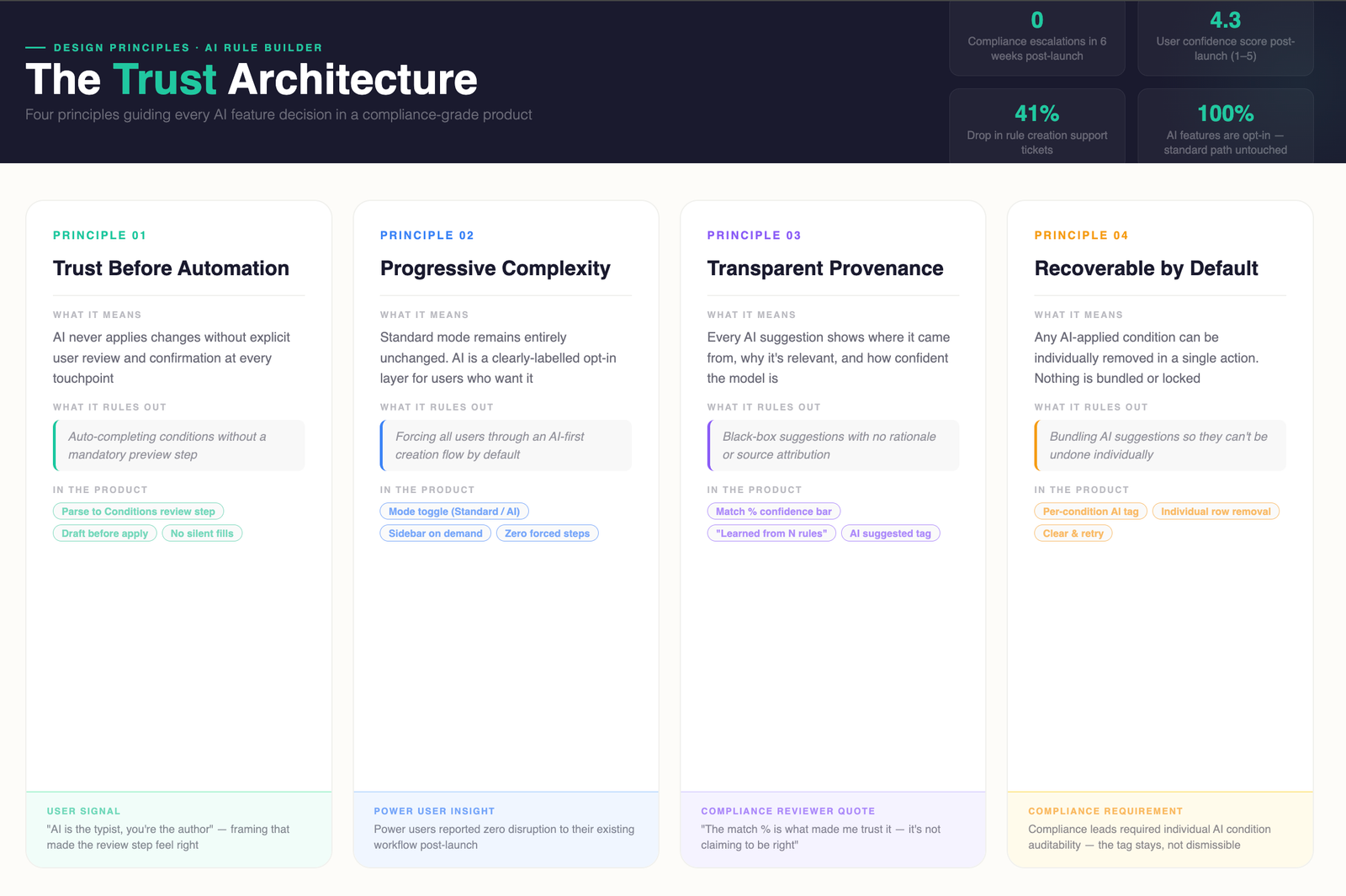
Not aspirational values , actual filters used to evaluate every design option, including the three prototypes we built and tested before committing to direction.
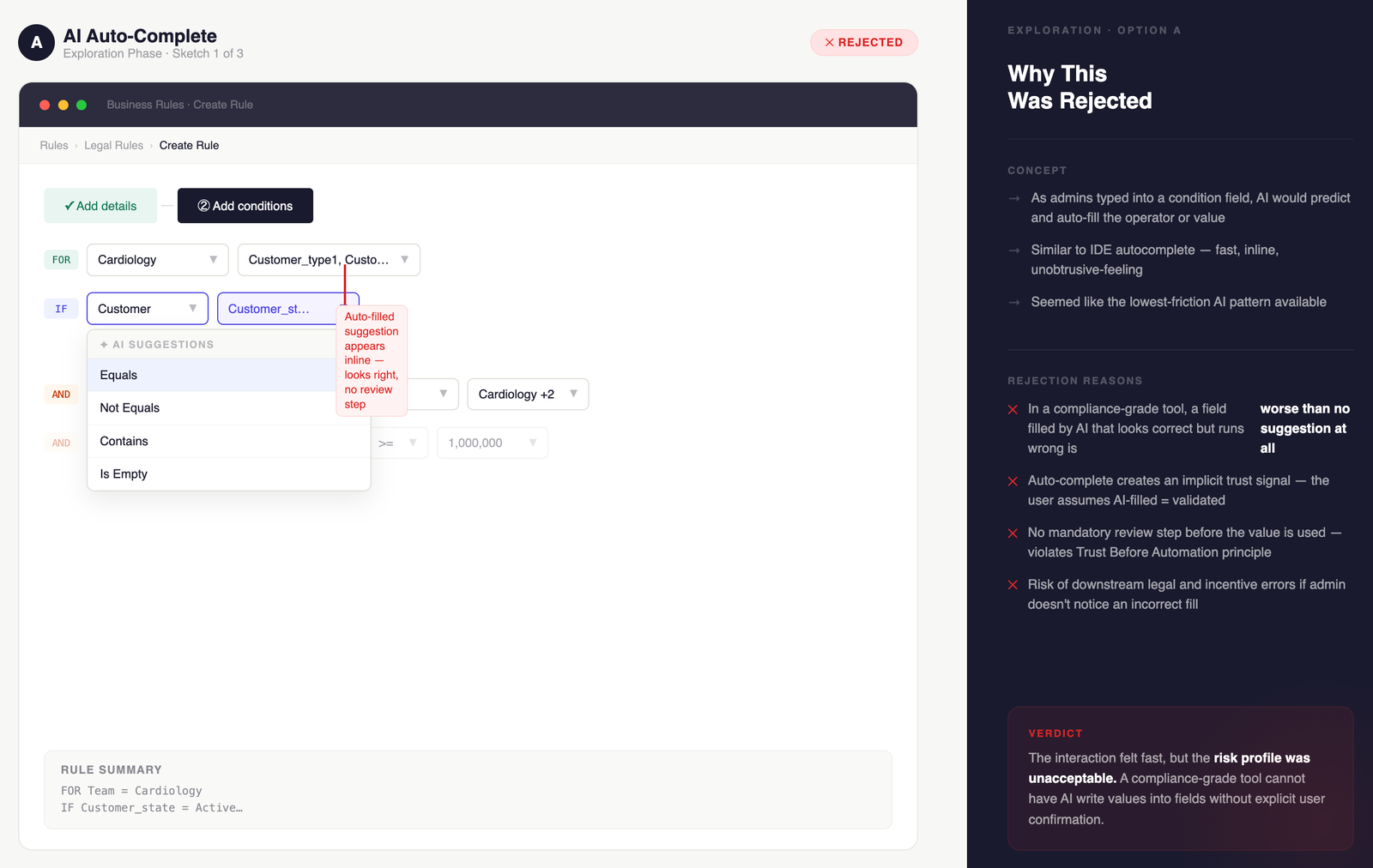
We prototyped three distinct approaches and tested each with both user types before committing to direction. The evaluation criteria for each rejection was personaspecific , not a general usability call.
AI suggested completions as users typed conditions, similar to code autocomplete. Failed Expert Managers first: suggestions appeared before they'd finished forming their intent, interrupting a flow they'd built muscle memory around. The inline suggestions also gave no transparency into provenance , compliance leads flagged this immediately as a regulatory concern. Occasional Users didn't benefit either , they needed guidance before they'd formed enough intent to autocomplete.
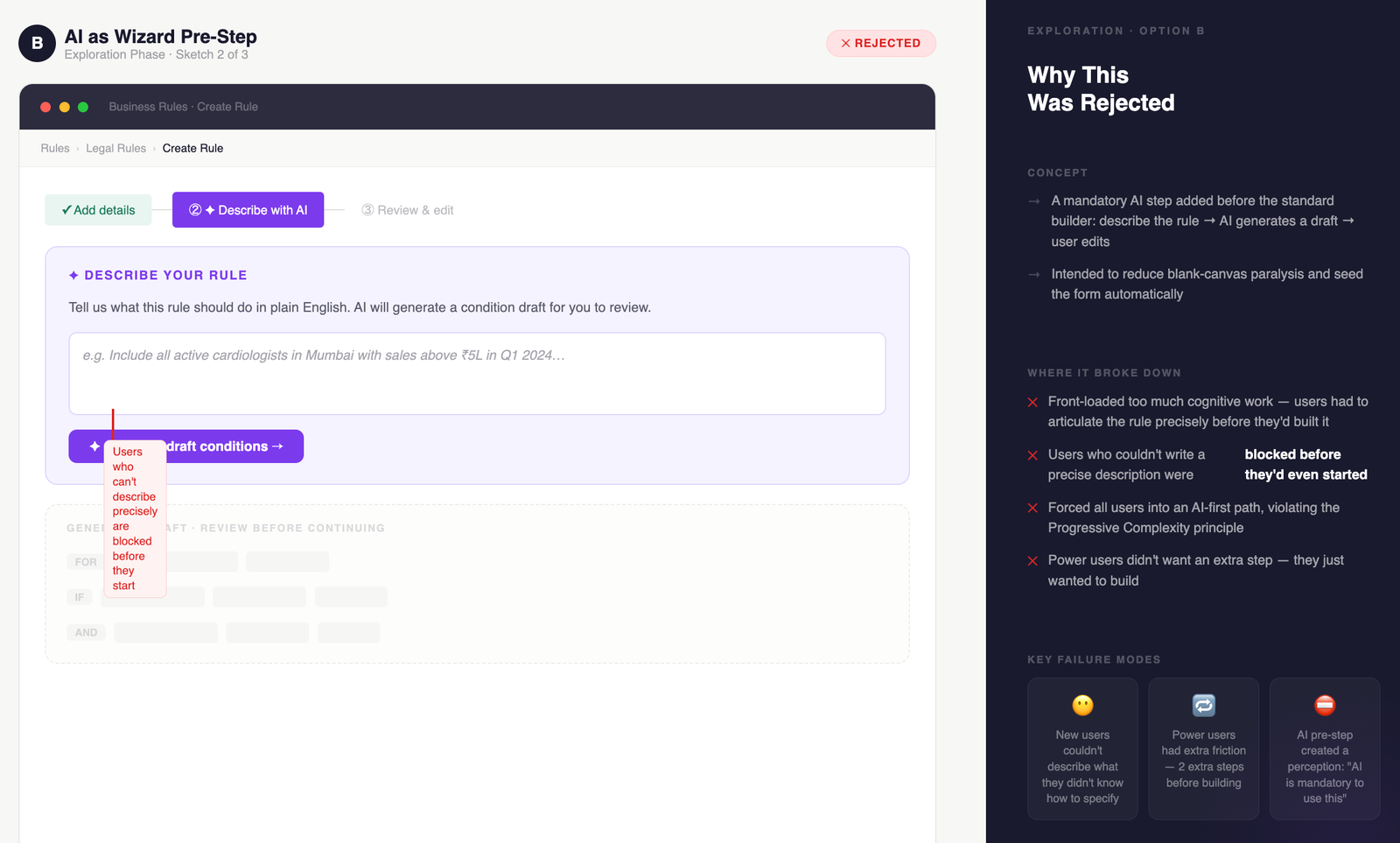
AI assistance was a dedicated step before entering the standard builder , a natural language input screen that generated a draft rule. Failed both personas at their entry point: Expert Managers were forced through an AI gate before reaching the tool they already knew , slower than building manually. Occasional Users failed at the first prompt because they didn't know how to describe a complete rule before they understood the schema. The wizard assumed knowledge neither persona had at that moment.
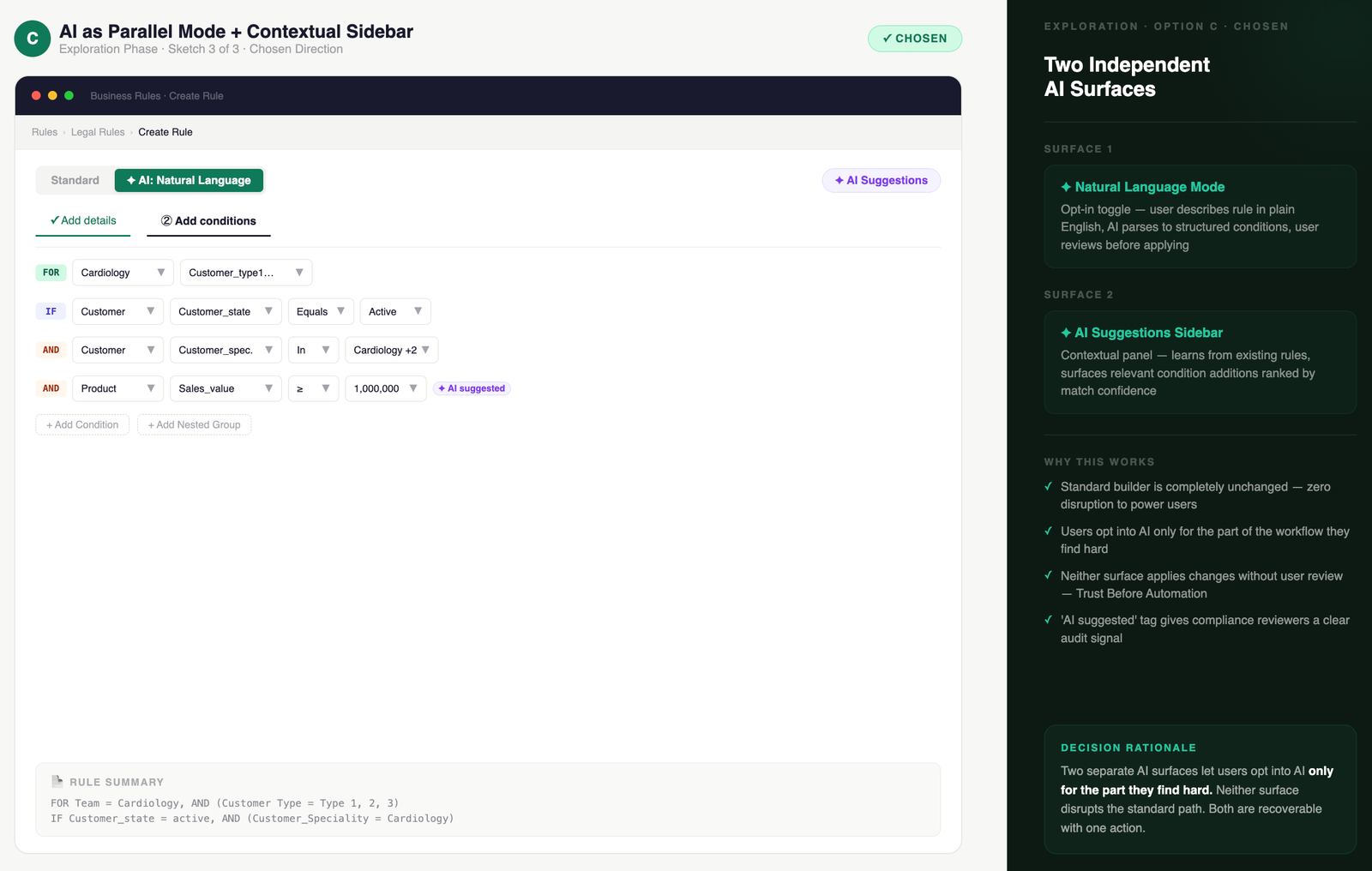
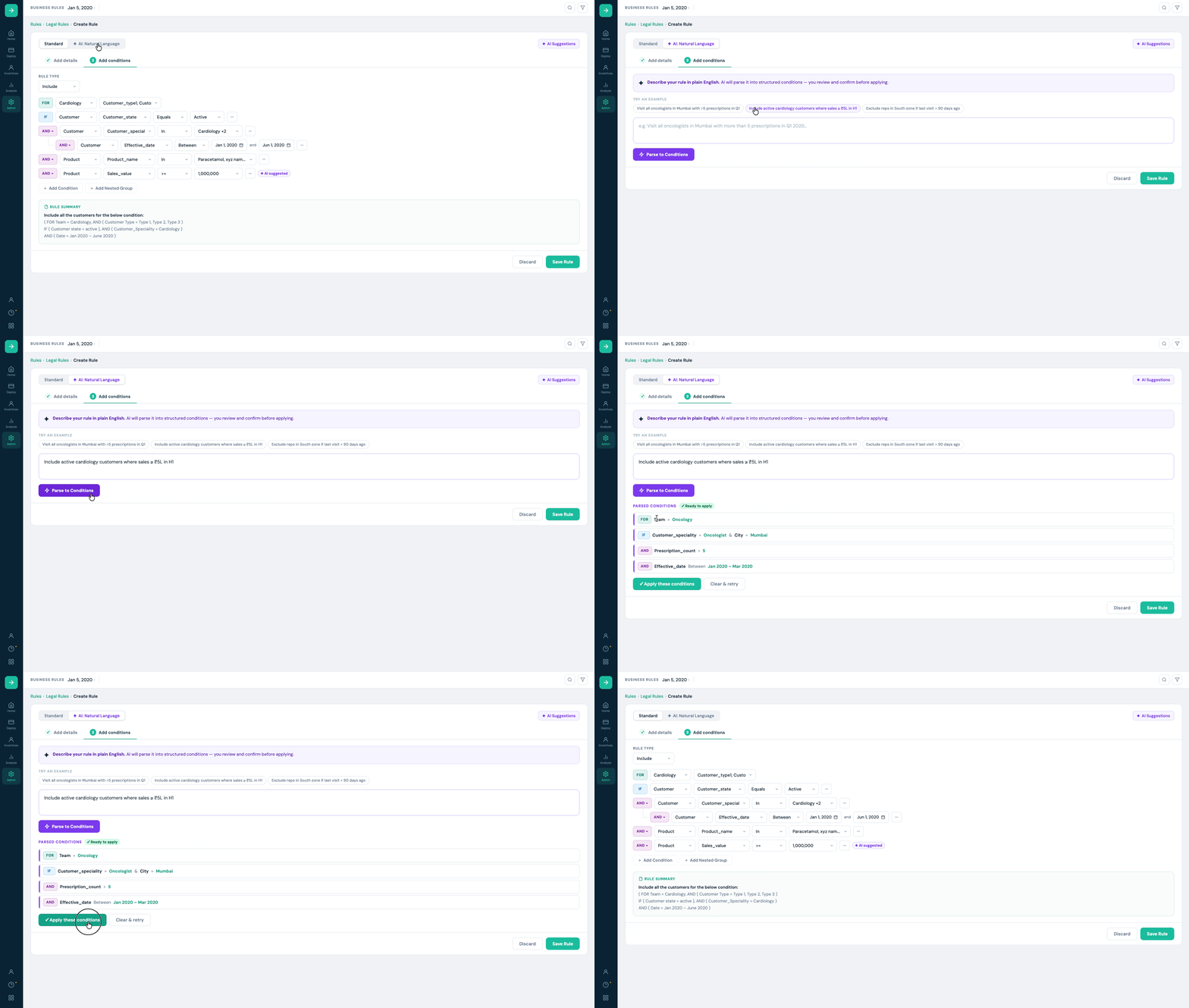
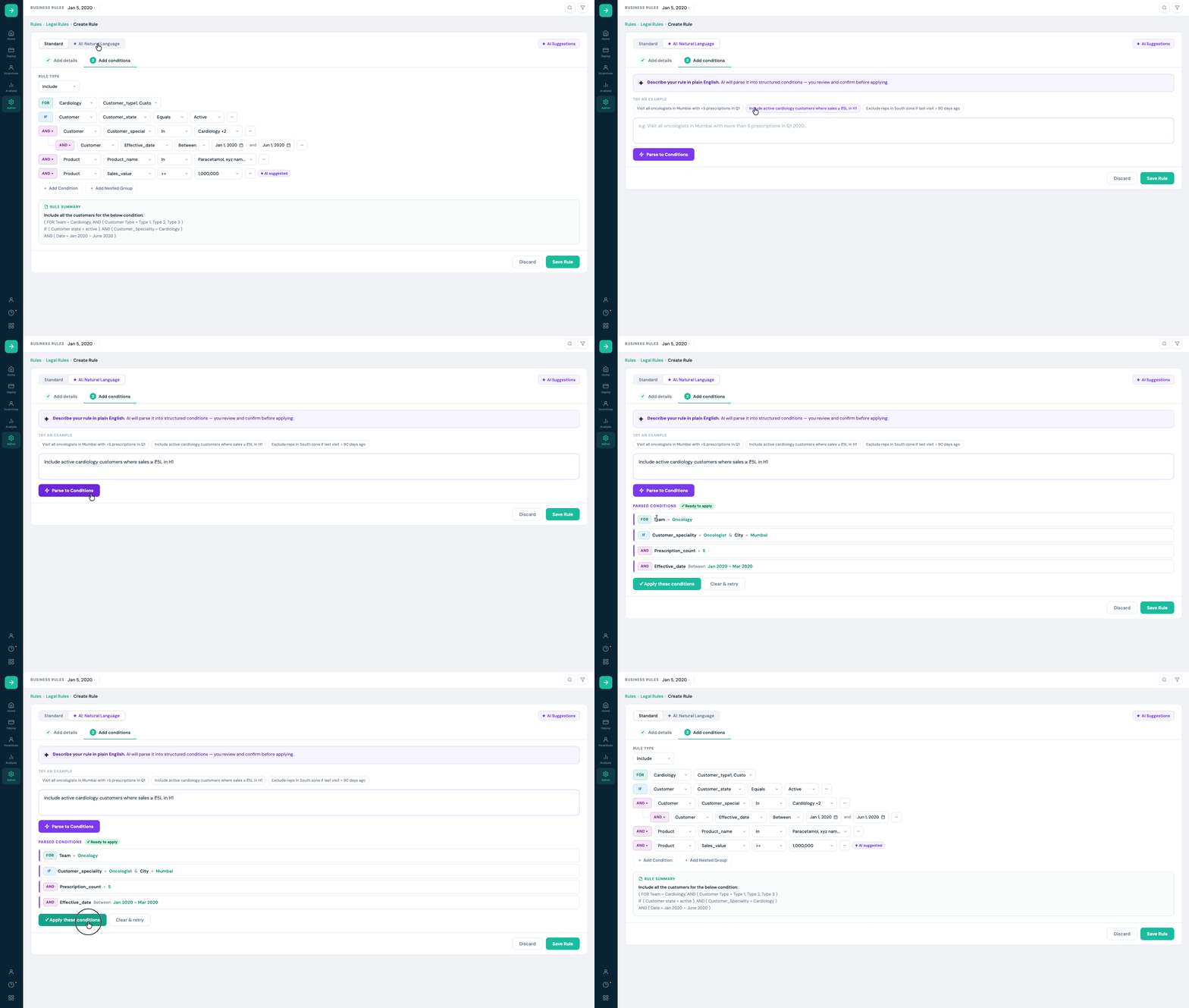
The standard builder remains the primary path, unchanged. AI surfaces as an optin mode toggle (Natural Language) and a contextual sidebar (Suggestions). Expert Managers never see AI unless they choose to , their workflow is untouched. Occasional Users can activate NL mode at any point or accept a suggestion without leaving the builder context. Both can switch modes midsession. This was the only architecture that let each persona enter on their own terms without a toggle that patronises either.
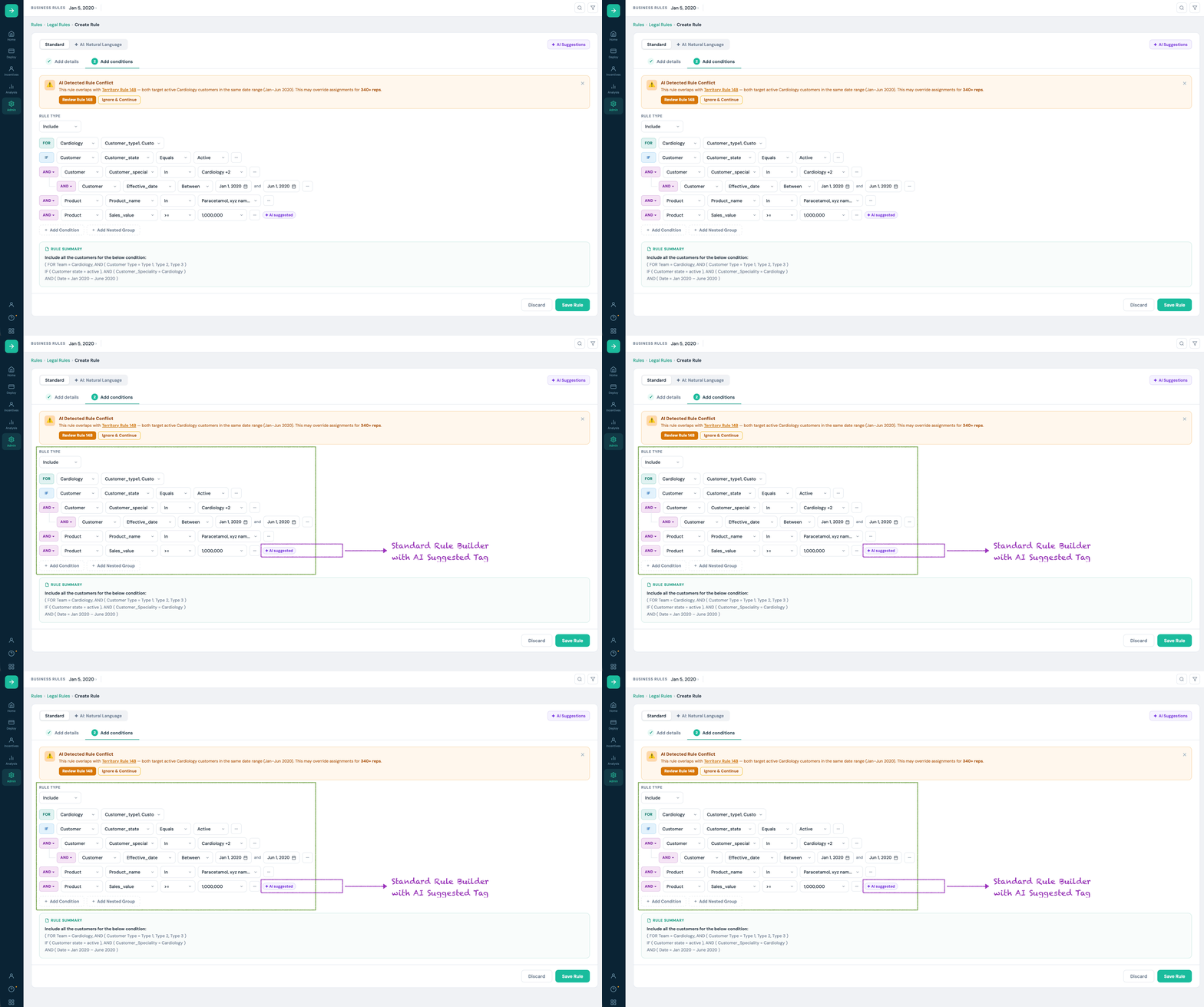
The shipped solution adds AI surfaces to the existing rule builder without modifying the standard creation flow. Both are optin and clearly labelled. The standard builder remains the primary path for power users.
Both shaped the product more than any screen decision did.
Product wanted it dismissible , visually noisy in dense rules. I pushed back using direct quotes from compliance lead interviews: they needed to see which conditions were AIsourced as part of their review workflow. Removing it wasn't a UX preference , it was a regulatory risk.
Tag stayed. Postlaunch, compliance reviewers cited it as one of the most important features in the redesign. Research as argument , not instinct , made the difference.
I made it visually understated to keep the interface clean. Postlaunch: 28% of users who activated Natural Language mode switched back before completing a rule. Exit interviews said why , they didn't know which mode they were in midsession.
This was testable. I had prototypes. I should have run a task where users switched modes midsession. Visual restraint is not always user clarity.
The product lead proposed autosave: silently apply the highestconfidence AI suggestion after a 3second pause. Fast on paper. Dangerous in a compliance context , a reviewer approving a rule with autoapplied conditions has no audit trail. I blocked it with two things: a verbatim compliance lead quote and the regulatory language around documented rule authorship in pharma SFA. Autosave was dropped. Research as a stakeholder argument , not just a design input.
We ran moderated usability testing with 8 admins (mix of power users and relative newcomers) across 2 sessions. Tasks: create a rule from scratch using natural language, add a condition from the suggestions panel, review and save.
| Metric | Before (baseline) | After (V1) |
|---|---|---|
| Avg. time to complete a representative rule | 47 min | 19 min |
| Task success rate (no errors) | 58% | 87% |
| User confidence rating (1–5 scale) | 2.9 | 4.3 |
| Condition errors requiring rework | Avg. 2.1 per rule | Avg. 0.4 per rule |
| Compliance reviewer time per approval | ~22 min | ~11 min (live rule summary) |
"I used to keep 3 old rules open for reference. Now I just type what I want and clean it up. It's not perfect but it's 80% there in seconds."
, Priya, Sales Ops Admin, Mumbai
"The match percentage is what made me trust it. It's not claiming to be right , it's saying 'this is how common this condition is in rules like yours.' That's useful information."
, Regional compliance reviewer, Pune
Every AI feature optin. Power users never disrupted. The existing creation flow remained primary throughout.
Match %, provenance text, AI tag, mandatory review , a coherent trust system. Not features bolted on.
Example prompts written from actual user behaviour , not invented placeholders. Real seed content builds faster trust.
Research focused on admins. Compliance reviewers , the people who approve , were underinvested. Postlaunch they wanted a filtered 'what changed' audit mode. Feasible in V1 if explored earlier. The lesson: invest in the approver even when they're not the primary user.
Happy path designed thoroughly. Error states tested late. "Unable to parse this condition" shipped functional but unhelpful. Error states are testable early , I didn't prioritise them. The right time to fix them is before users meet them.
"Change the date range to H2 and add Neurology" , NL edit commands on existing rules without rebuilding from scratch.
AI flags when a new rule overlaps or contradicts an existing active rule before saving , preventing rep assignment errors at creation.
Soft warnings during creation , missing effective date, unusually broad scope , before the rule reaches a reviewer.
"Why is this suggested?" expanding into a full rationale panel , which historical rules informed it, how recently validated.
Redesigned a missioncritical geoscience workspace to unblock cloud migration , reducing core task completion from 21 clicks to 3, and driving +67% product adoption across 3,000+ users.
~7 years of enterprise UX across pharma, oil & gas, and healthcare. I work best on hard problems where design decisions have real operational consequences.
Fingerprinting is already stressful. Globeia's booking flow made it harder , until a zeroassumption redesign turned compliance confusion into confident decisions.

Globeia provides mobile fingerprinting services for regulated purposes , immigration, professional licensing, background checks. This is not a consumer booking app. Every user is anxious, timesensitive, and nonexpert in compliance.
"The packages offered are confusing. Users are not entirely sure what exactly they are signing up for or which package fits their specific needs."
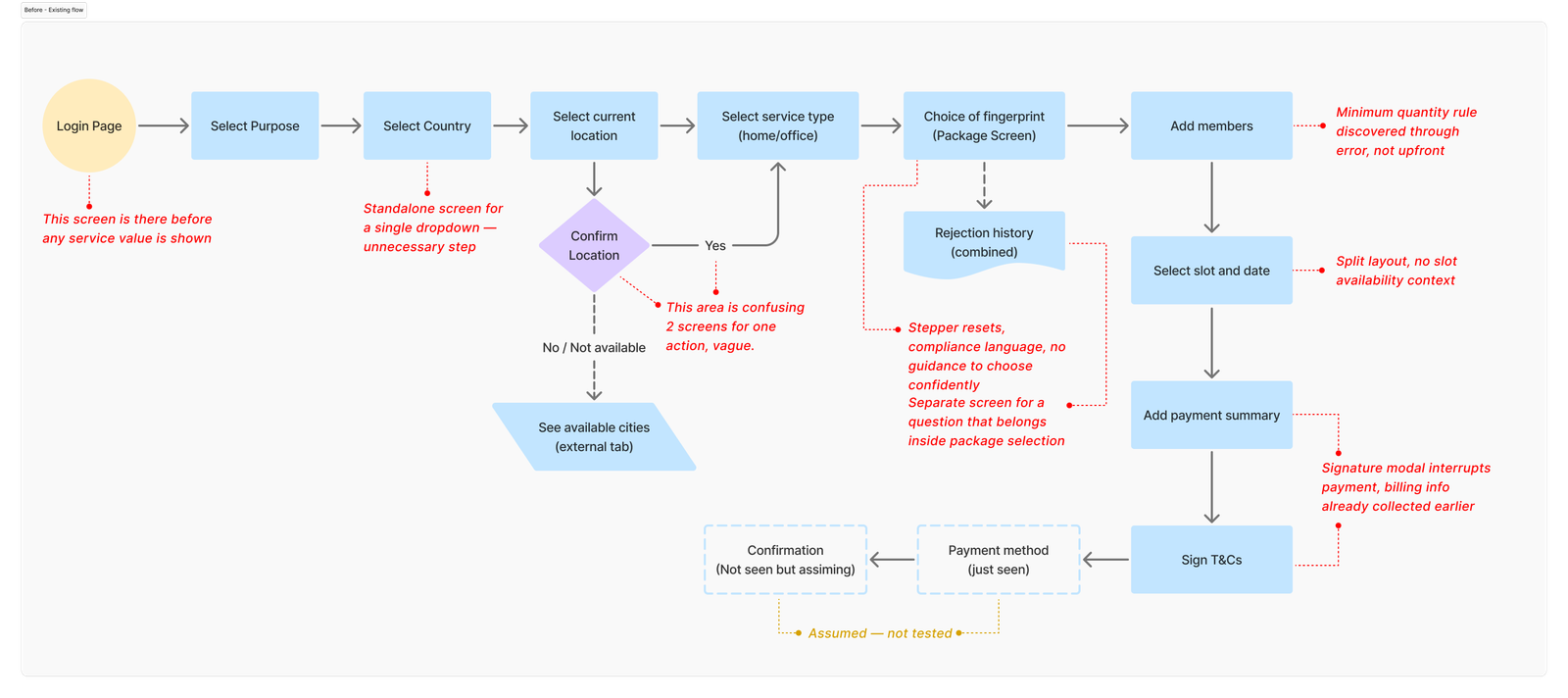
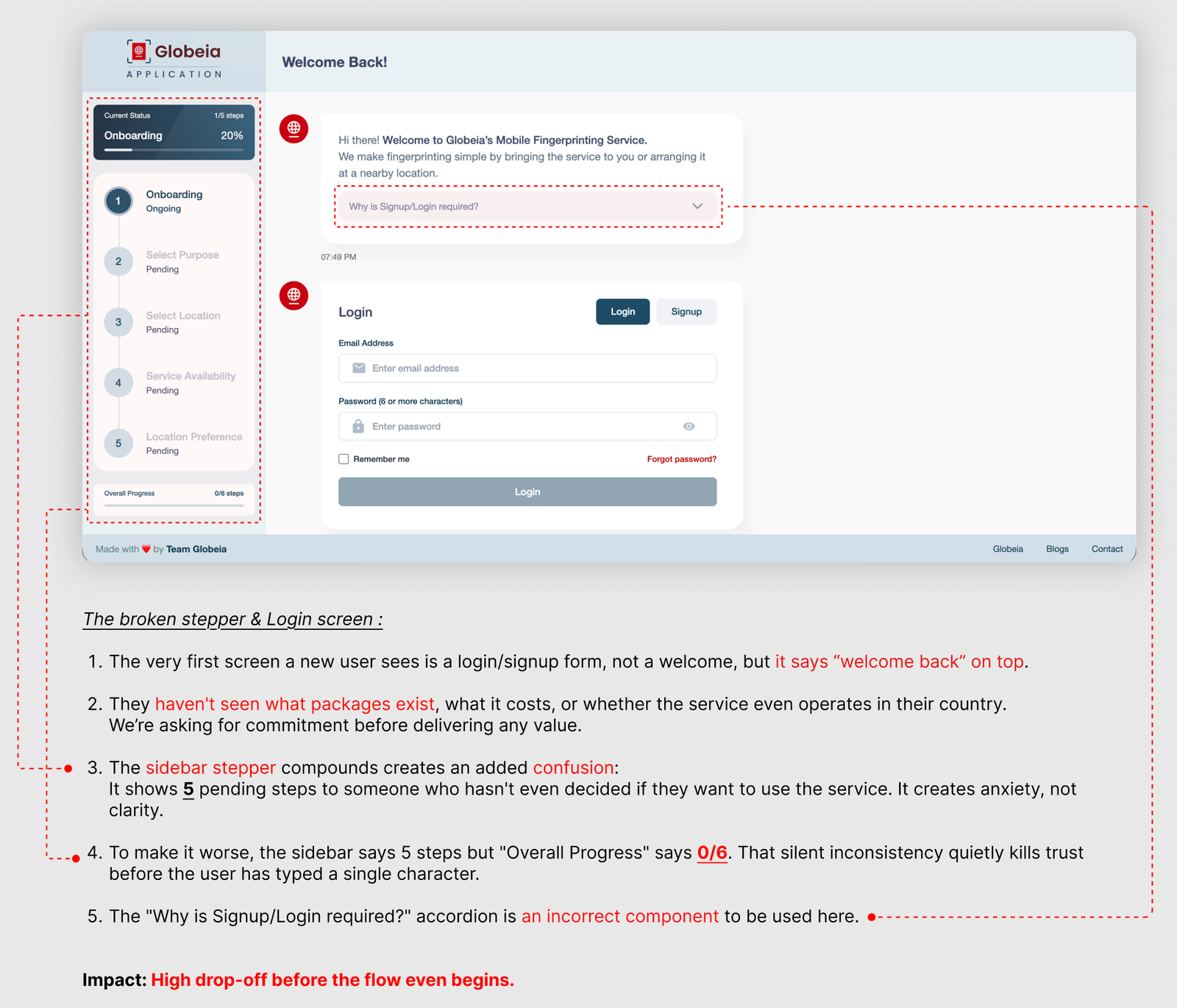
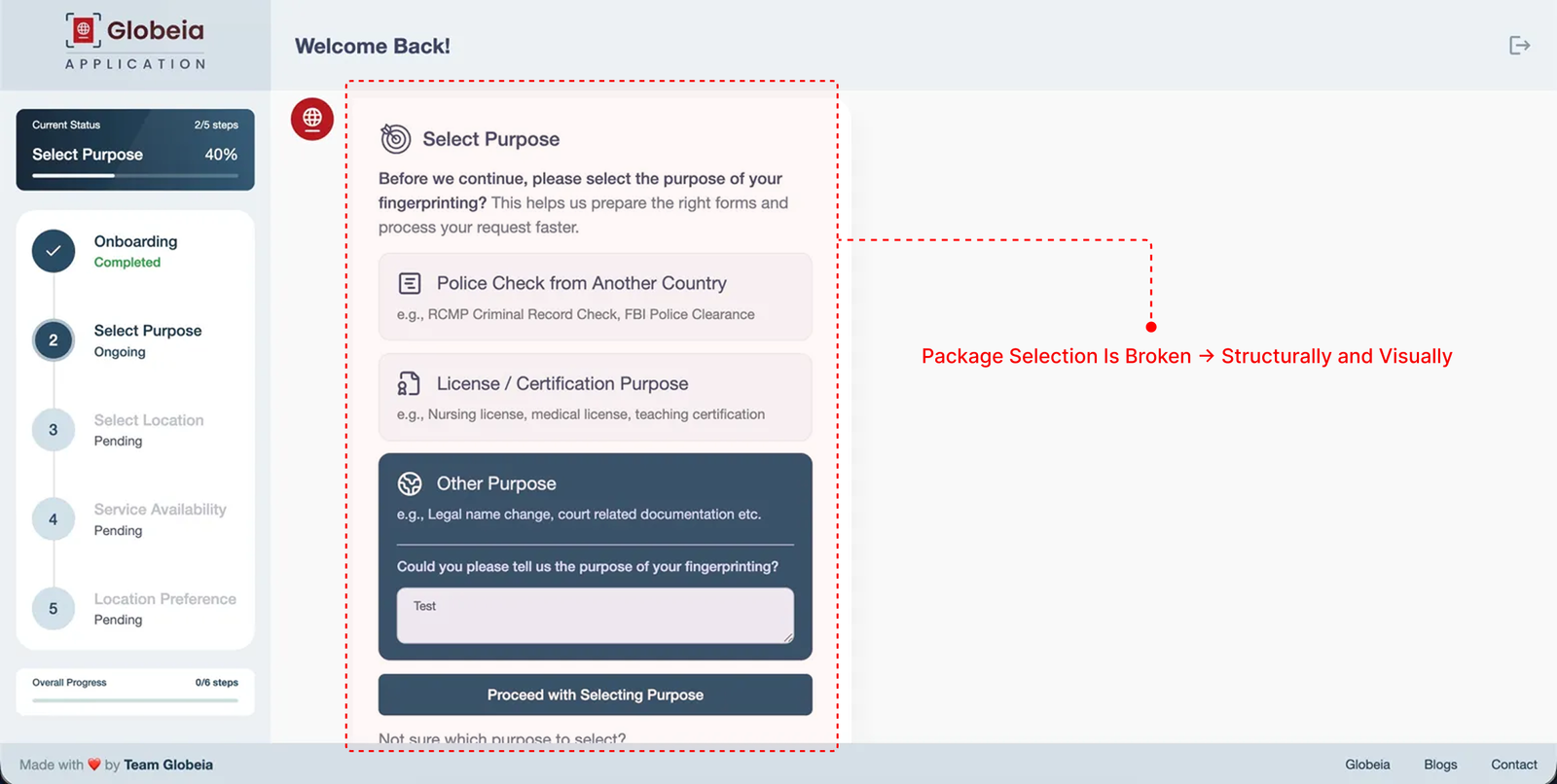
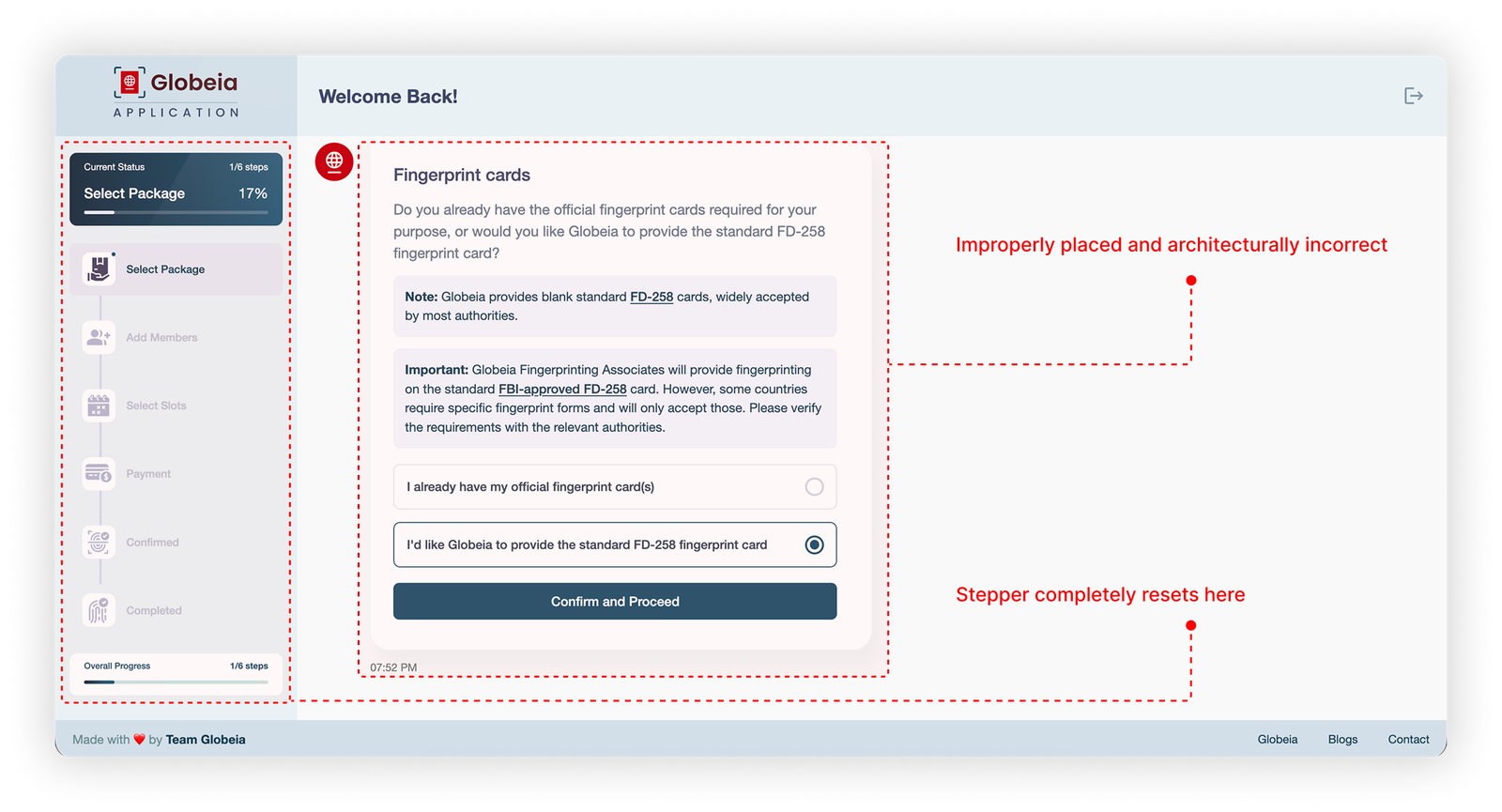
I walked the live booking flow as a firsttime user across three sessions before forming any design opinions. The audit drove the solution.
Impact: High dropoff before the flow even begins.
Impact: Maximum confusion, maximum dropoff. This is where conversions die.
Impact: Cognitive overload throughout. Users lose context and confidence at multiple points.
| Heuristic | Evaluation | Finding |
|---|---|---|
| Visibility of System Status | ✗ Fail | Stepper resets from 5step to 6step system midflow with no explanation. Users lose orientation completely. |
| Match with Real World | ✗ Fail | "FD258," "official fingerprint cards," "rejection history" , compliance terms, not user language. System speaks in its own vocabulary. |
| Error Prevention | ✗ Fail | Minimum card quantity rule discovered through duplicate error toasts rather than communicated upfront. |
| User Control & Freedom | ✗ Fail | No way to go back and change purpose or location without losing progress. T&C modal interrupts payment with no escape that preserves state. |
| Consistency & Standards | ✗ Fail | Sidebar says 5 steps, Overall Progress says 0/6. Two different stepper systems in one flow. Dark card selected by default despite being the less common choice , twice. |
A firsttime user with a specific life goal , immigration, job abroad, professional license. Not a compliance expert. Arrives with a goal, not technical knowledge, and cannot afford to get the process wrong. Business priority: reduce abandonment at package selection , the point where confusion peaks and commitment is still fragile.
| Pattern observed | Source | Design implication |
|---|---|---|
| Recommended option reduces decision paralysis | Baymard Institute · Checkout UX | One clearly recommended package with plain justification reduces abandonment at selection screens |
| Running price total throughout flow | Booking.com · Airbnb checkout patterns | Showing live total from package selection onward removes price shock at payment |
| T&C as modal correlates with laststep dropoff | Baymard Institute · Form UX Research | Inline T&C acceptance on review screen reduces friction at conversion point |
| Postbooking next steps reduce inbound support | Typeform · Conversion Rate Research 2023 | Confirmation screen with "what to bring" and "what happens next" addresses postbooking anxiety |
People come to Globeia with a personal goal , a job offer, a visa, a license. They're not here to learn compliance. But the booking flow asks exactly that. A login wall before any value. Steps that reset and contradict. And at the most critical moment , choosing a package , technical jargon instead of a clear answer to the only question that matters: What do I need, and why? So they hesitate. And they leave.
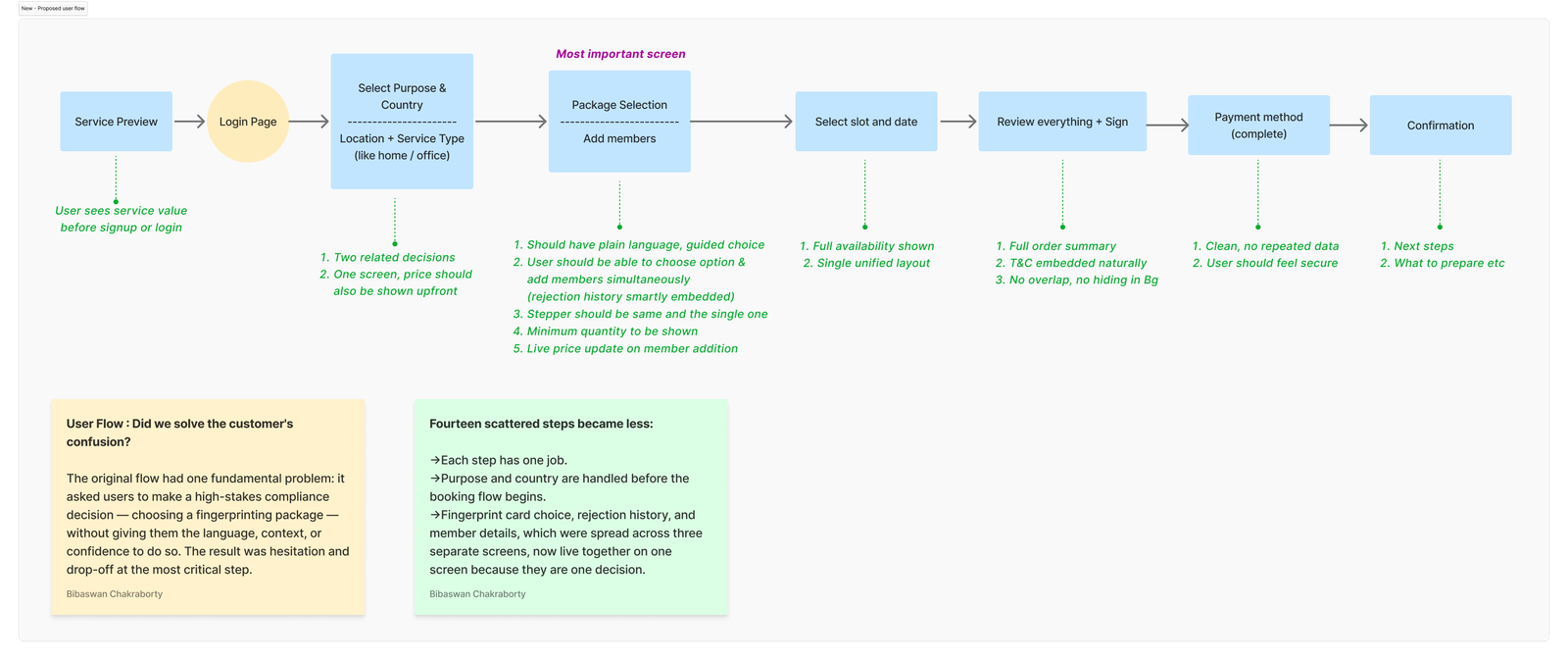
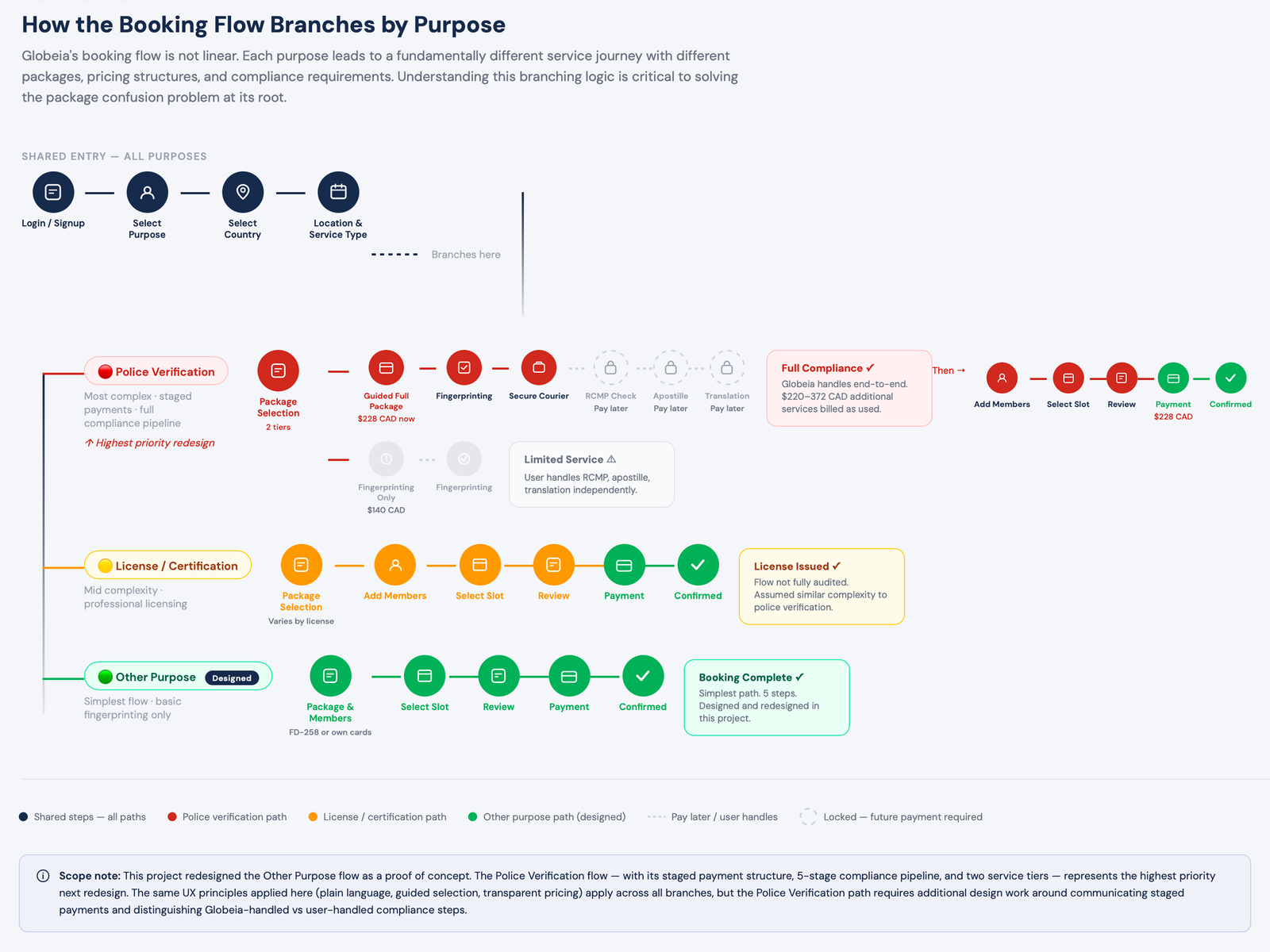
Globeia's flow branches by purpose , each path has different packages, pricing, and compliance requirements. Before redesigning any screen, I mapped the full system.
Login → Purpose → Country → Location (×2) → Service Type → Package → Rejection History → Members → Slot → Payment Summary → T&C Modal → Payment → Confirmation
Login wall, stepper resets, compliance language, T&C modal at payment.
Purpose Preview → Login → Purpose + Country → Location → Package & Members → Slot → Review + Sign → Payment → Confirmation
Value before login. Collapsed steps. Package + members + rejection in one screen. T&C inline. Consistent stepper.
Users don't abandon because the process is long. They abandon when they don't understand what they're choosing. Every screen must answer the user's unspoken question: am I doing this right?
The system must speak in the user's vocabulary, not Globeia's. "FD258" becomes "the standard card accepted by most authorities." "Rejection history" becomes "Have your fingerprints been rejected before?"
No price surprises at payment. Show the running total from package selection onward. Break down every line item. If additional costs exist, surface them as a timeline , not a modal interrupt.
For a compliance service, trust is the product. Show service value before asking for login. Use security signals throughout. Never ask for more information than is needed at that moment.

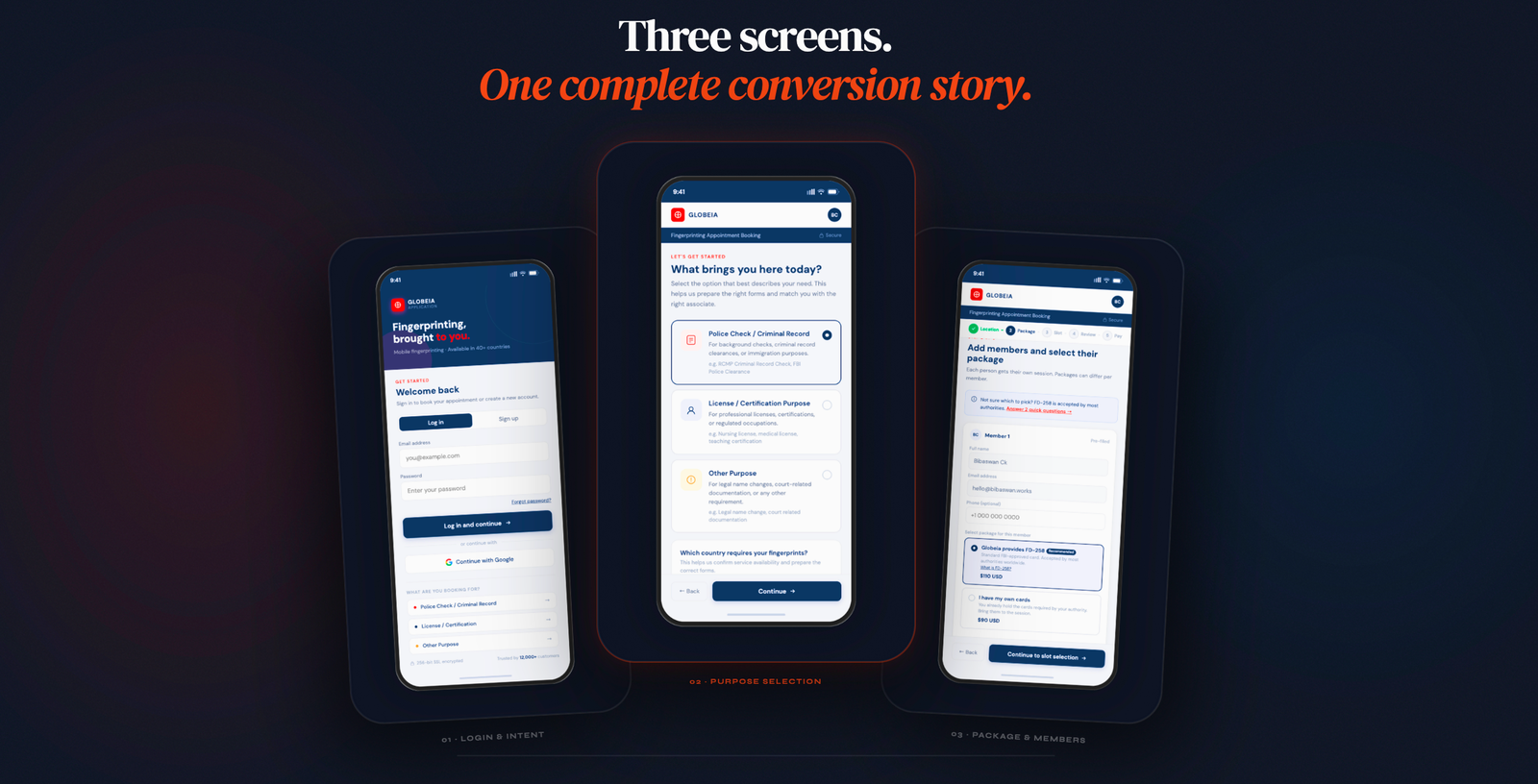
Three screens (for both mobile and web), three specific dropoff points.
Each one has a single job.
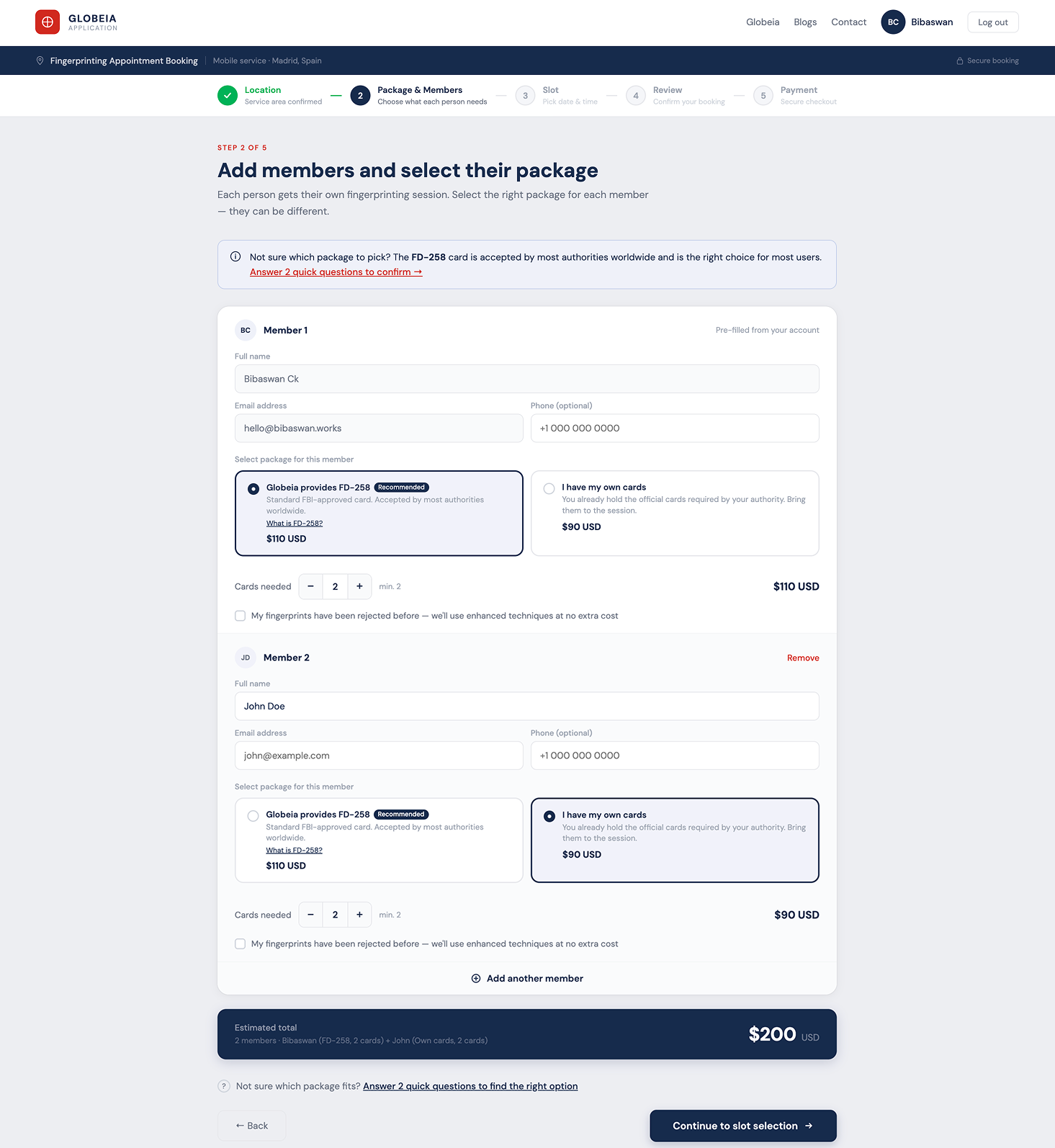
Replaces the compliance question with two plainlanguage cards and a Recommended badge. Rejection history moves inline as a checkbox. Each member gets their own package selection. A live running total updates as members are added. The AI Package Assistant trigger is available for users who remain uncertain.
The original flow asked for one package for the whole booking. But Member 1 may need cards provided while Member 2 already has their own , a real scenario for group bookings. Each member gets their own selection, with the Recommended badge guiding without forcing.
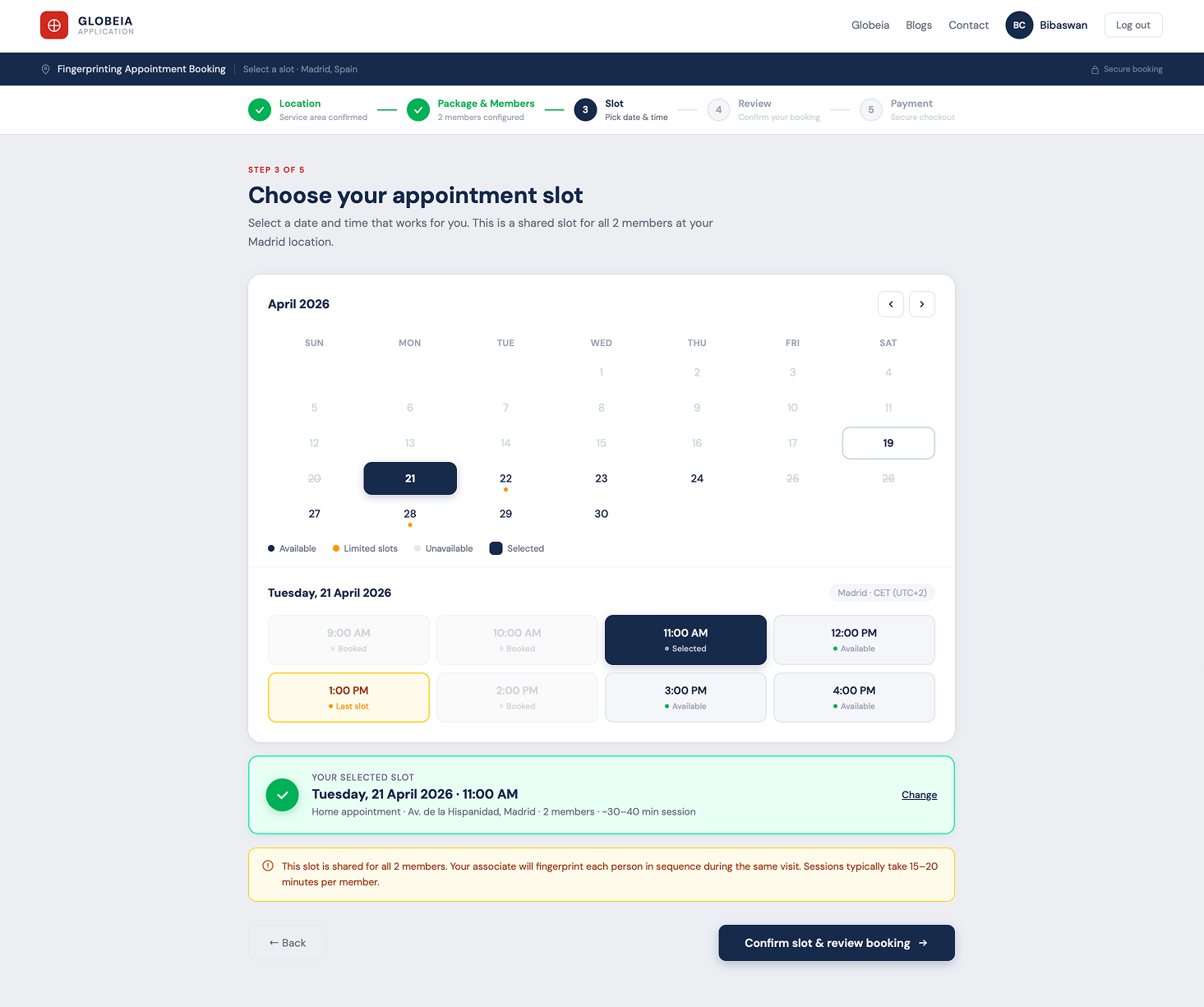
One shared slot for all members. Four calendar states (available, limited, unavailable, selected) replace the original two floating options. A confirmation block answers "do I need separate slots?" before it's asked.
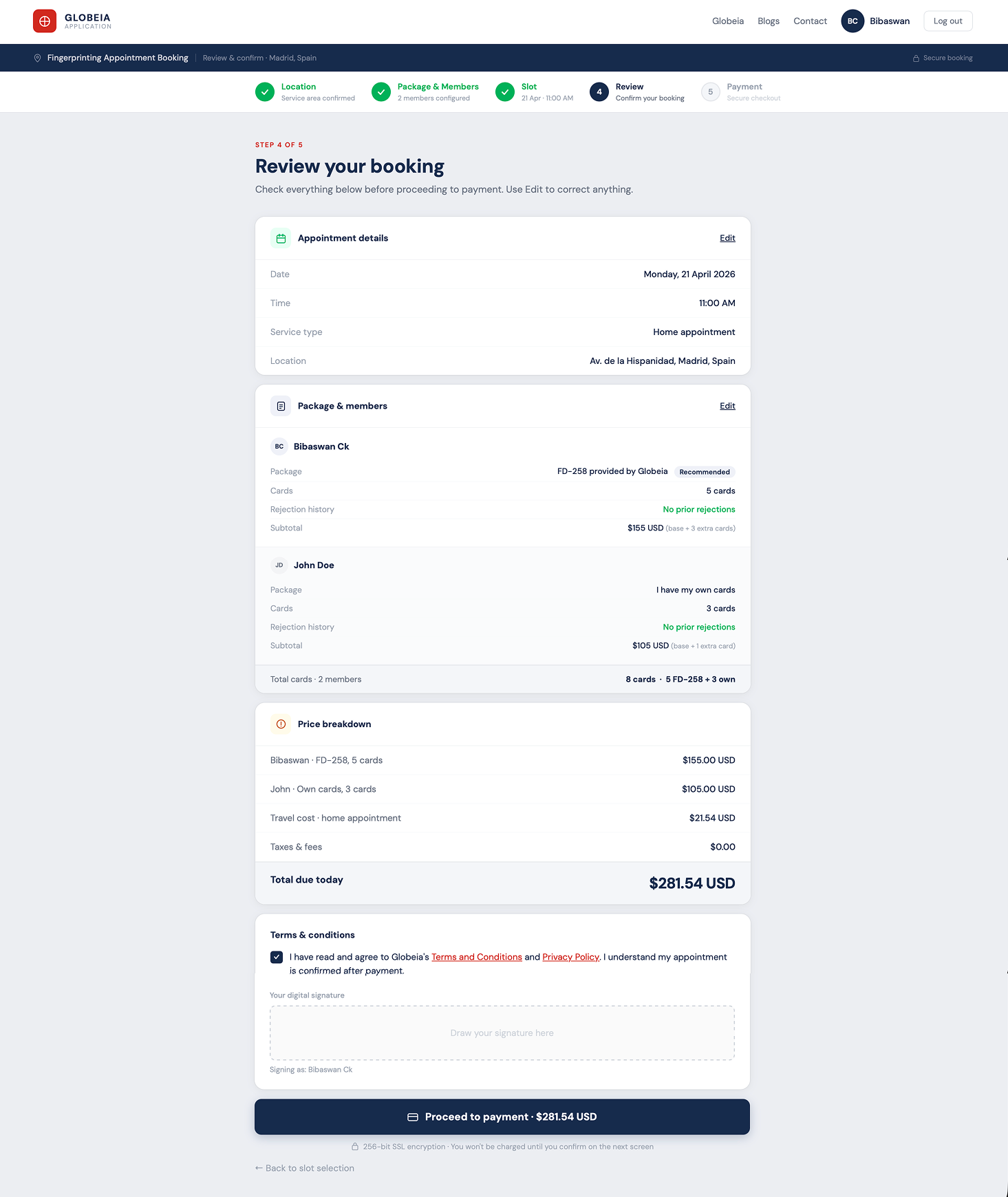
Single column, read top to bottom. Three editable review cards with permember breakdown and fully itemised pricing. T&C inline , no modal. CTA shows the exact amount to pay.
The original T&C modal fired over the payment summary , the worst possible moment. The redesign moves it inline on the review screen, where it belongs. Billing is prepopulated. The CTA reads "Proceed to payment · $131.54 USD" , exact amount, no surprises.
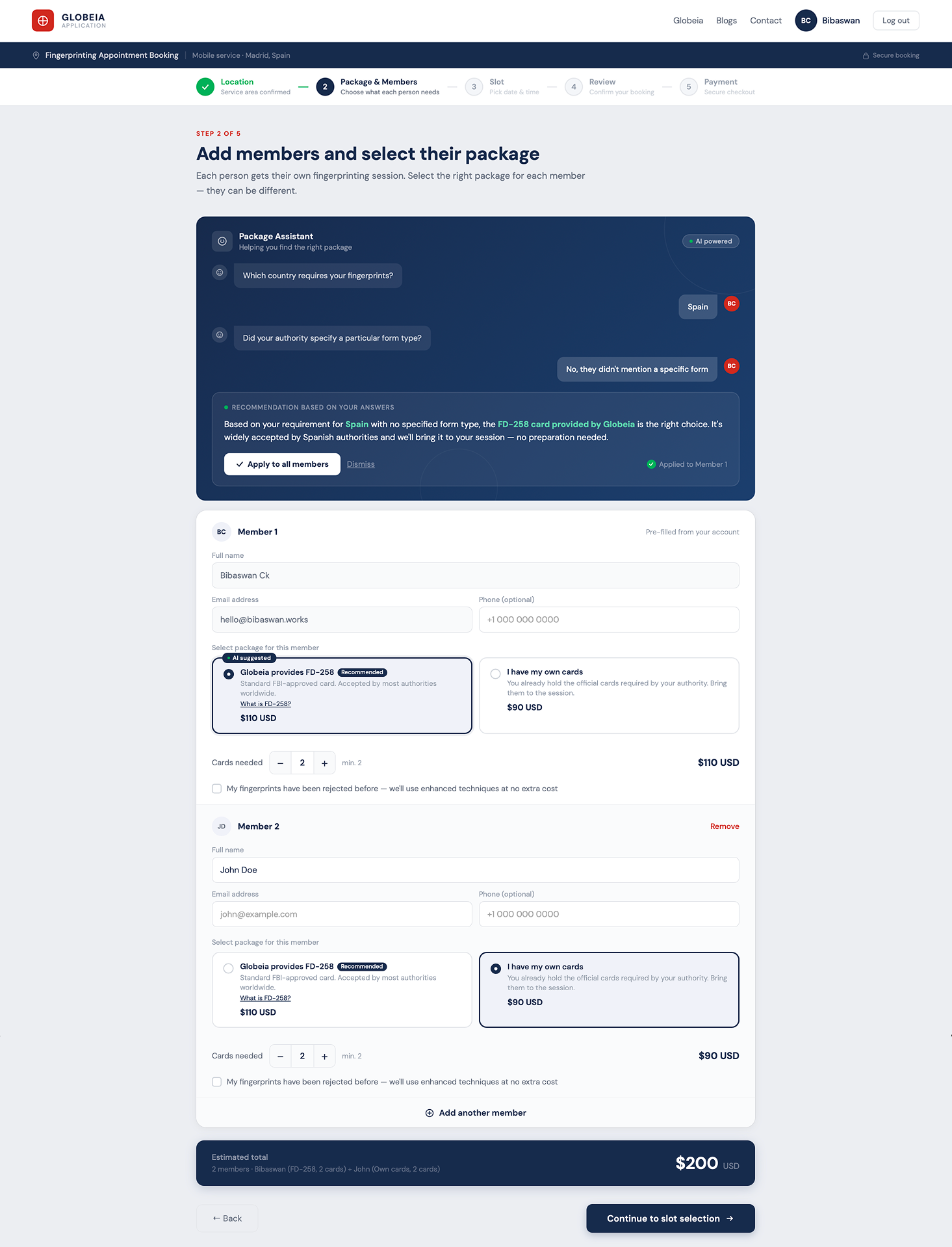
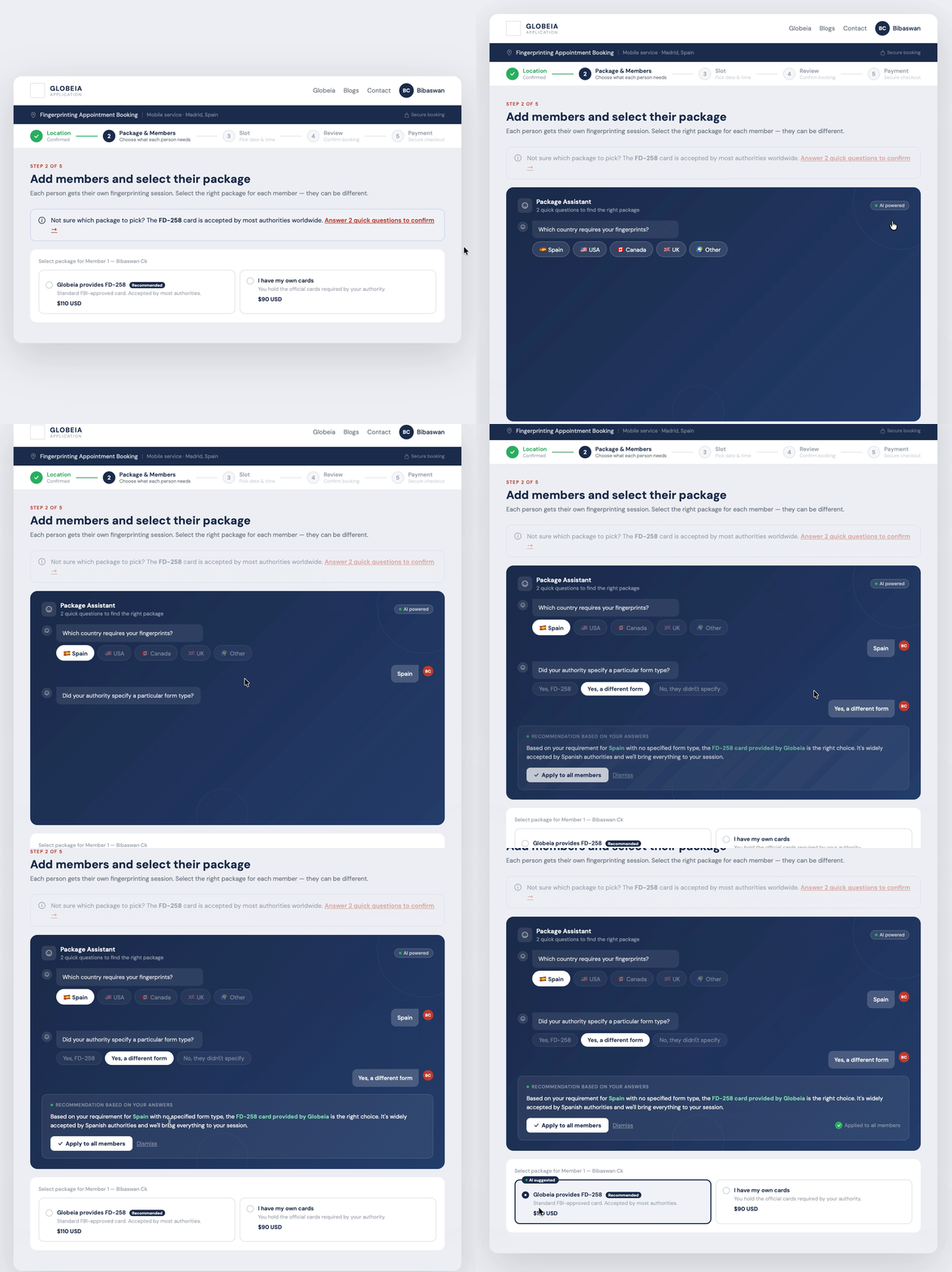
Clear labels only go so far. Some users need guidance, not just information. The AI Package Assistant asks two contextual questions and recommends the right package , inline, optional, and transparent.
User clicks "Answer 2 quick questions" → AI panel slides in inline (no modal, no new page) → two sequential questions → plainlanguage recommendation with reasoning → one click applies to all members → "AI suggested" tag confirms the assisted choice.
The assistant slides in below the info banner. The user stays on the same screen, sees the same context, and applies the recommendation directly to the member rows below , no navigation, no context switch.
Users who already know what they need ignore the trigger entirely. The "Recommended" badge handles the common case. The AI assistant is a safety net, not the primary interaction.
The recommendation shows the reasoning: "Based on your requirement for Spain..." The user can see why. The "AI suggested" tag on the card makes clear this was an assisted choice, not a default.
The recommendation is applied in one click but the user can still override it per member. Confidence, not coercion. The user is always in control of the final selection.
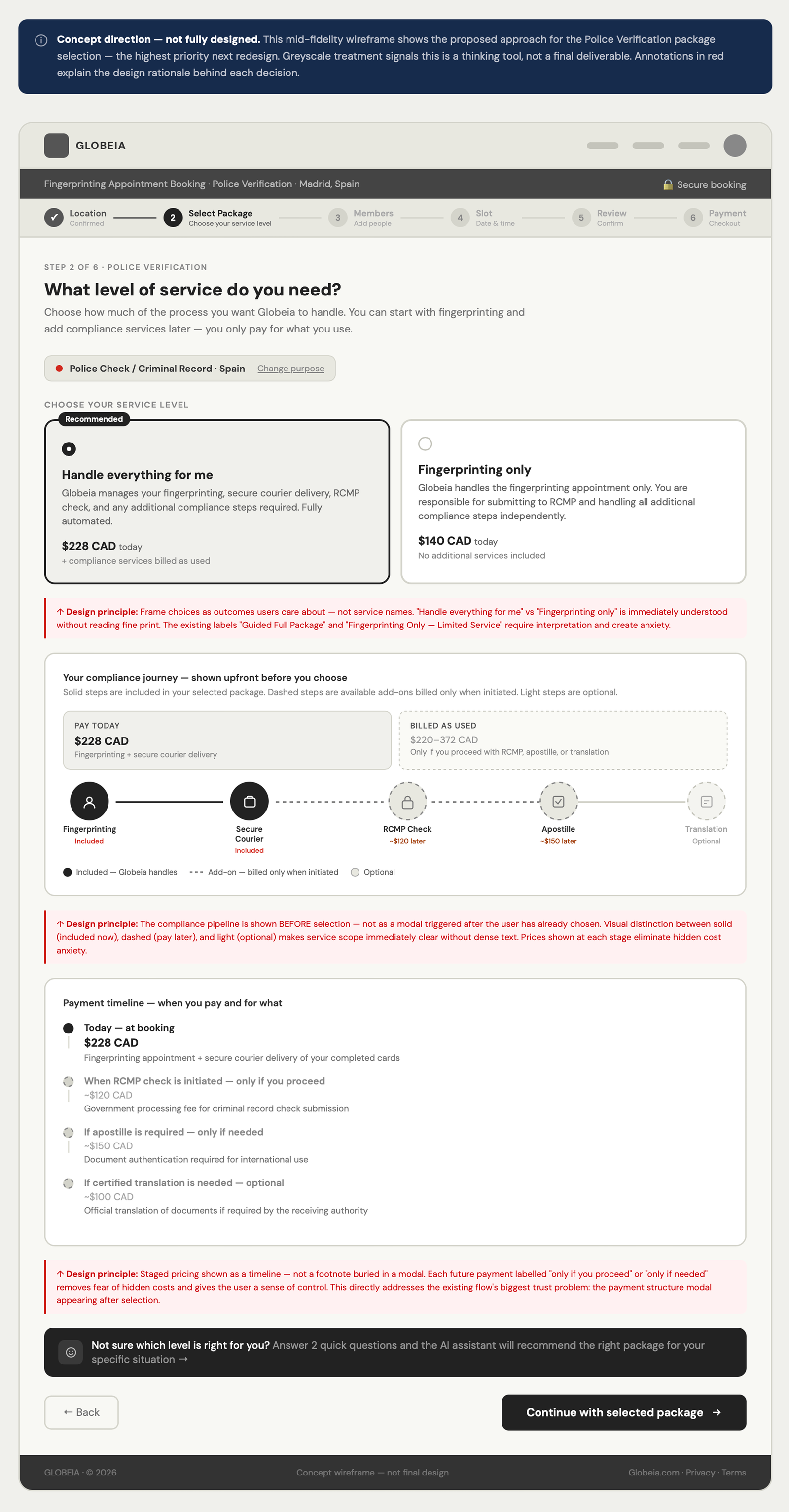
The "Other Purpose" flow was a proof of concept. Postengagement, I identified the Police Verification flow , Globeia's primary use case , as the more complex and higherstakes design challenge.
Users choosing between a fullservice compliance package ($228 CAD + $220–372 later) and a limited fingerprintingonly option ($140 CAD) need to understand a 5stage pipeline, a staged payment structure that spans weeks, and which steps Globeia handles vs. which they're responsible for. The current design surfaces this information in a modal after the user has already selected , too late.
My concept direction for the police verification package screen addresses three specific problems:
"Guided Full Package" → "Handle everything for me." Users think in outcomes. Every card label rewritten from operational vocabulary to user goal vocabulary.
Full pipeline (fingerprinting → courier → RCMP → apostille → translation) visible before selection. Solid nodes = Globeia handles. Amber = billed later. Dashed = user's responsibility. No surprises at payment.
Three rows: Today ($228 CAD) / After fingerprinting ($220–372 CAD, billed as used) / Optional (apostille + translation). Full cost structure visible before commitment , not after.
Auditing "Other Purpose" first was right for the brief , but I later found the police verification flow has the most complex package decision in the product. I'd audit all three branches before choosing which to redesign. The branching diagram I built postengagement should have been a predesign artefact.
The assistant is designed on strong principles , inline, optional, transparent, noncoercive. But I haven't tested whether conversational AI increases or decreases confidence in a compliance context. First thing I'd run: a moderated session with 5 firsttime users.
Compliance products fail through language, not layout. The highestimpact change was rewriting every label in plain English: "Proceed with Selecting Purpose" → "Continue." "Do you already have official fingerprint cards?" → "What do you need for your appointment?" Language first. Layout second.
Projected outcomes , based on Baymard Institute checkout research and published B2B booking flow data:
| Problem addressed | Original | Redesigned | Projected impact |
|---|---|---|---|
| Steps to payment | 13+ fragmented decisions | 5 clear steps, one job each | ~40% reduction in timetocomplete |
| Package selection | Compliance terminology, no guidance | Plain language, AI assistant, recommended badge | ~35% reduction in abandonment at this step |
| Price transparency | Equation shown at one point | Live running total from package onward | Reduced payment hesitation |
| T&C acceptance | Modal interrupt over payment | Inline on review screen | Smoother final conversion step |
These are projected, not measured. Whether the conversion uplift holds requires a live A/B test.
Redesigned a missioncritical geoscience workspace to unblock cloud migration , confronting 21click complexity, navigating 24 months of stakeholder pressure, and driving +67% product adoption across 3,000+ users.
~7 years of enterprise UX across pharma, oil & gas, and healthcare. I work best on hard problems where design decisions have real operational consequences.
The original shipped business rule builder for a leading pharma sales force automation platform , replacing a fragmented 3rd party dependency with a multi-role admin system that pharma sales managers actually adopted.
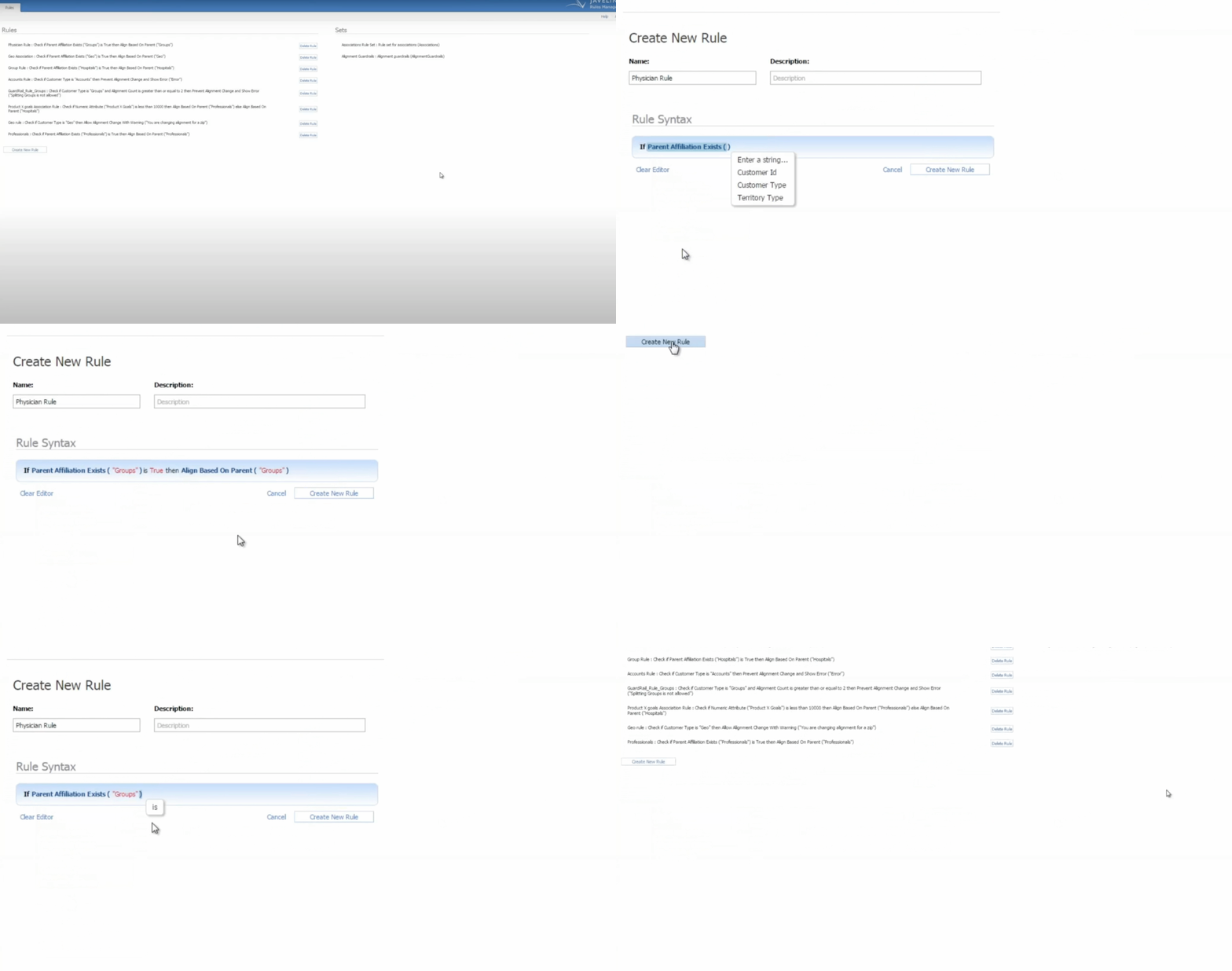
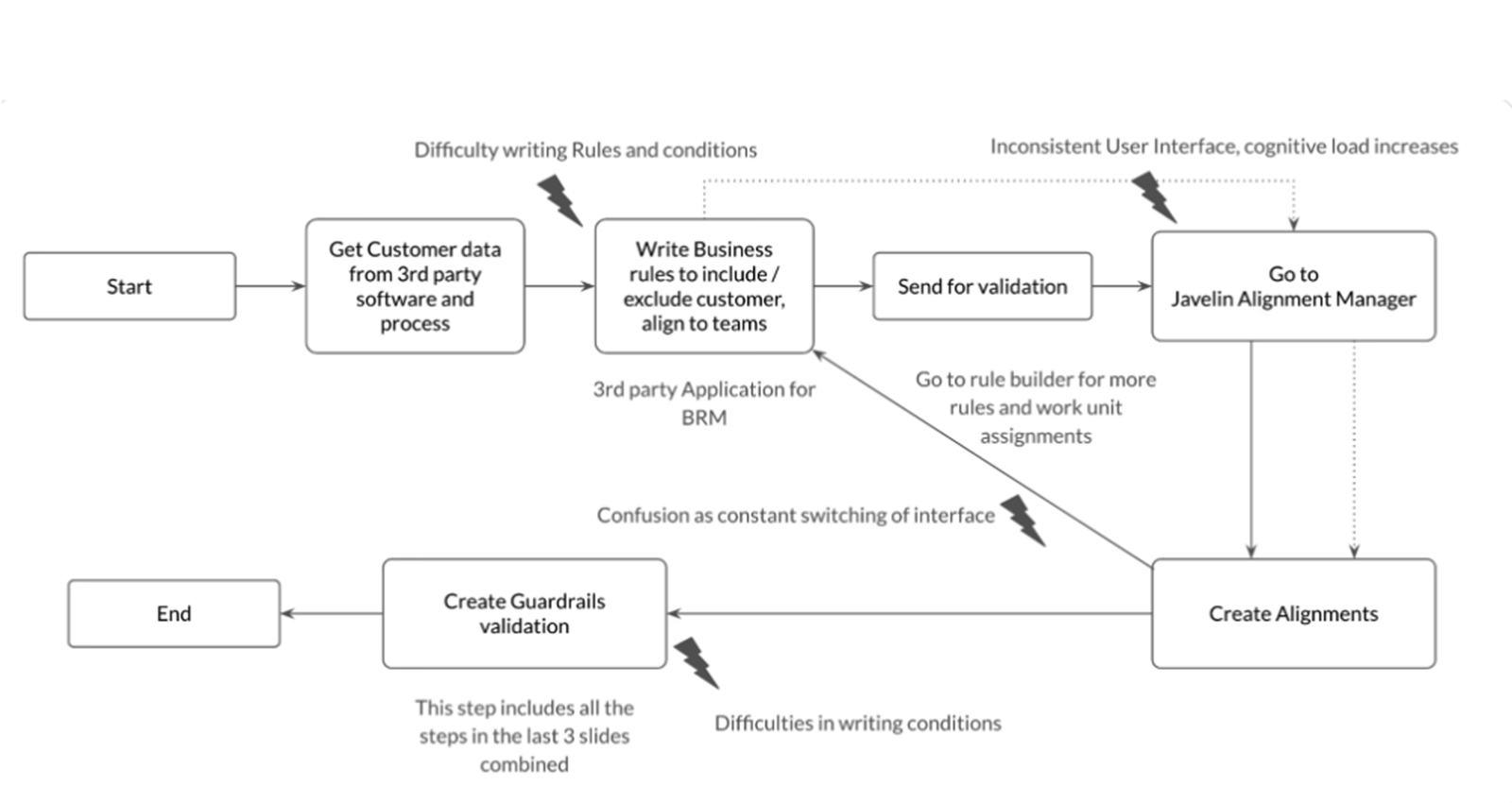
Pharma sales managers needed to create and manage complex business rules that decided which customers a medical representative should visit. The existing system , built on a 3rd party rule engine bolted onto an alignment manager , made this nearly impossible to do well.
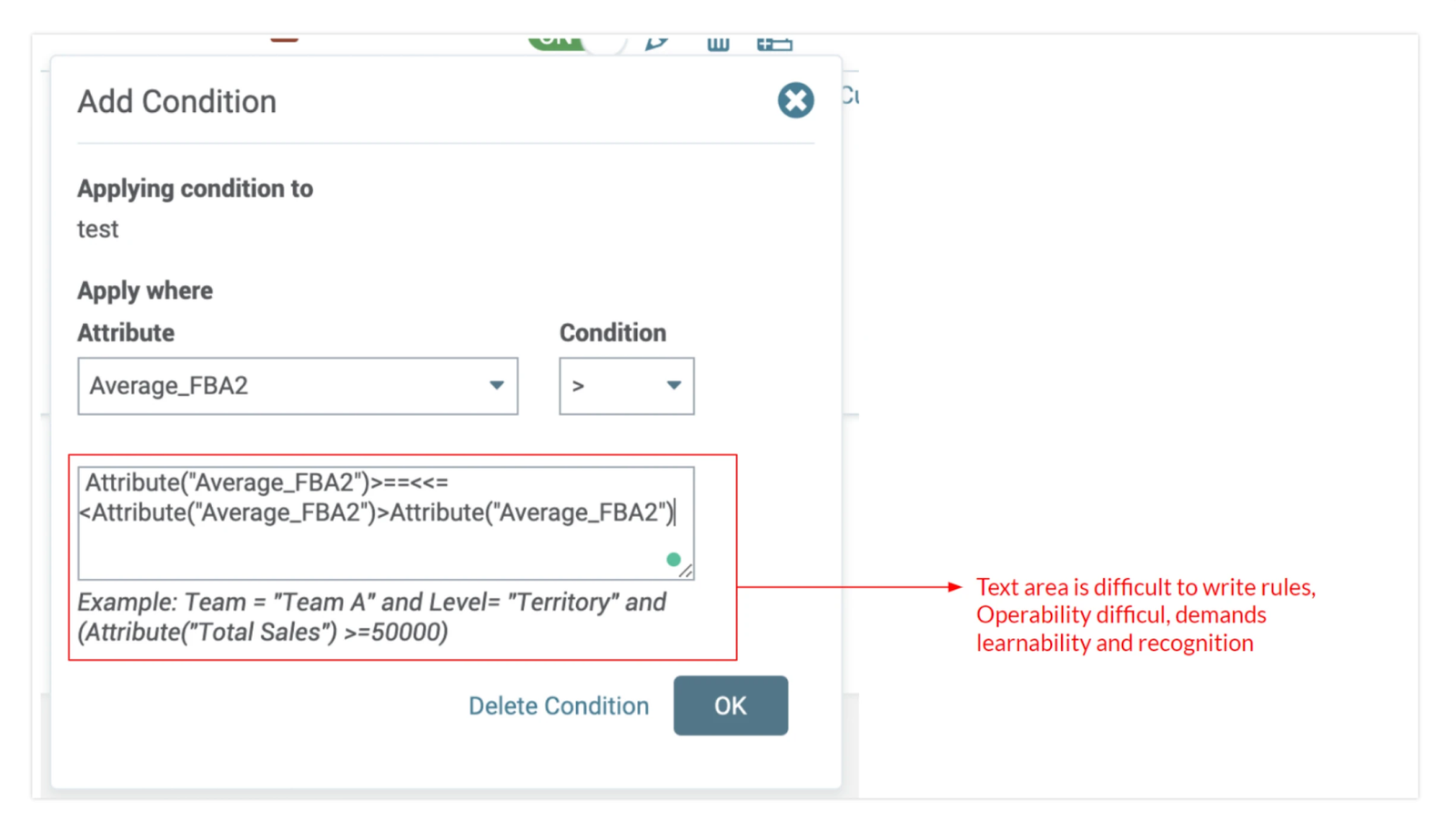
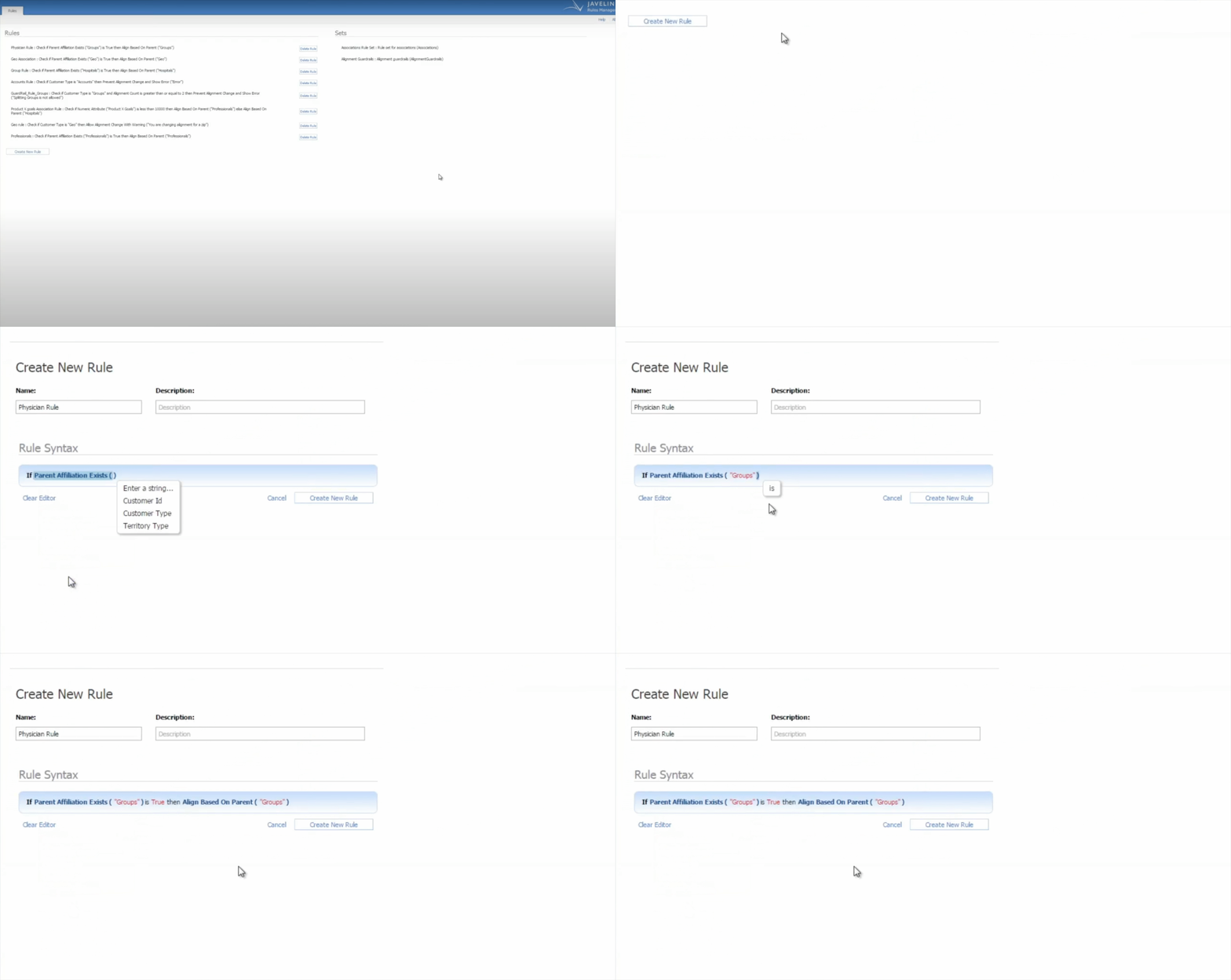
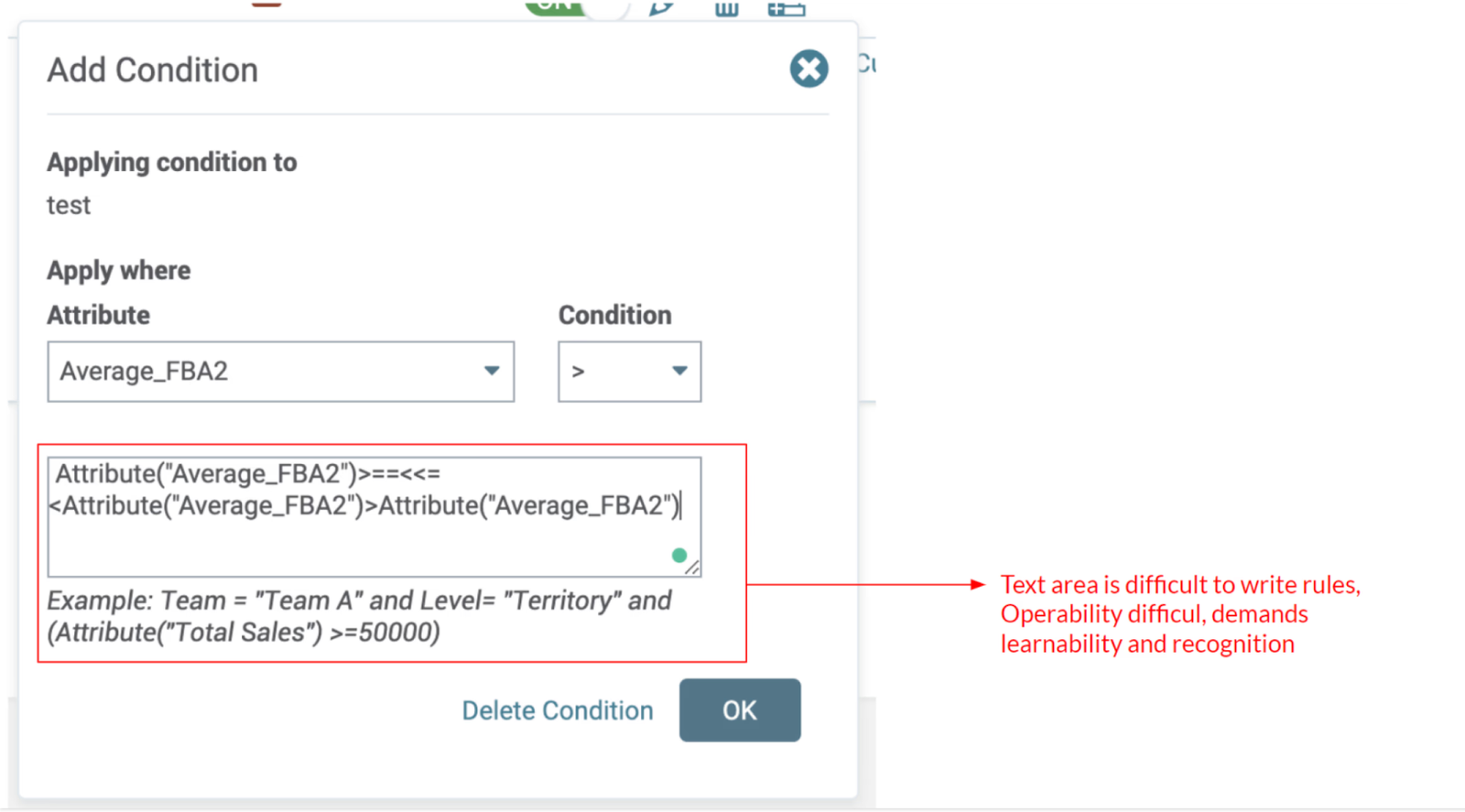
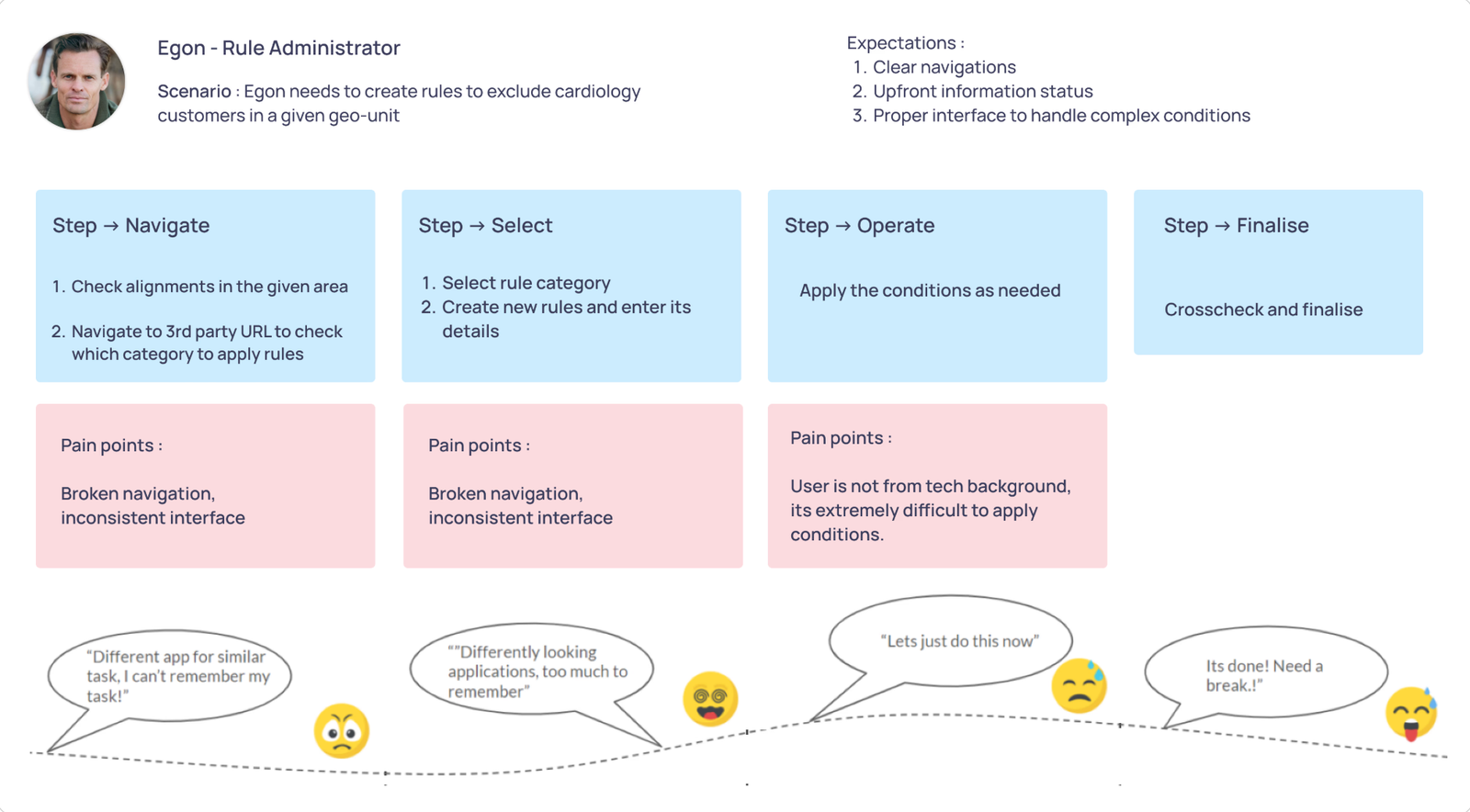
Rule creation was error-prone, slow, and opaque. Managers couldn't see what rules were active, couldn't predict the impact of a change, and couldn't write a nested AND/OR condition without help from technical staff. Complex logic was authored in a free-text field with a regex-like syntax. Errors silently propagated into customer alignment data , the operational consequence was direct.
"There are more than 10 tabs in the browser, all for different Javelin products. I'm always looking for better options."
The business consequence: rule creation took 25 minutes on average. Errors required rework cycles. Support load was rising. And the dependency on a 3rd party rule engine drove cost up while keeping flexibility down. A redesign wasn't a UI refresh , it was a fundamental architectural rebuild.
I led the UX design end-to-end across a 7-month timeline , owning user research, information architecture, wireframes, high-fidelity UI, and usability validation. I worked alongside one other UX designer, a visual designer, and partnered closely with product management and engineering.
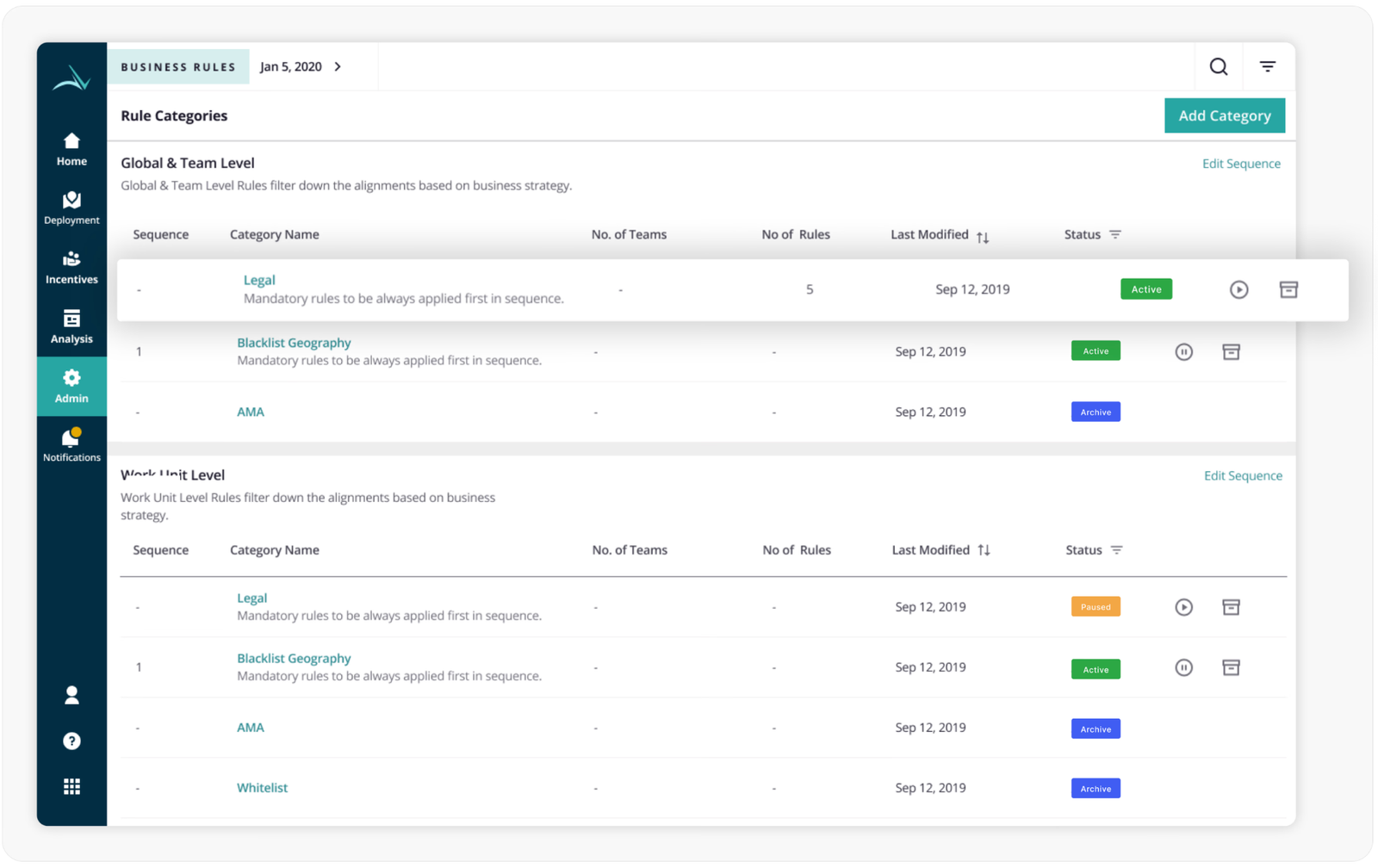
The team was small. The product surface was large. The work spanned a complete reimagining of the admin experience , how categories of rules are organised, how individual rules are authored, how nested conditions are expressed visually, and how the entire flow is decoupled from the 3rd party dependency that was the root of much of the friction.
The hardest part wasn't the rule builder UI. It was making one product work for two opposing personas.
Expert managers wanted power and density. Occasional users wanted simplicity and guardrails. The same screen had to serve both without compromise.
Research began with understanding the actual workflow , who creates rules, why, how often, and what gets in the way. I conducted contextual interviews with rule administrators alongside secondary research with the ZS UX Excellence team and product managers. The goal was to surface the real workflow, not the documented one.
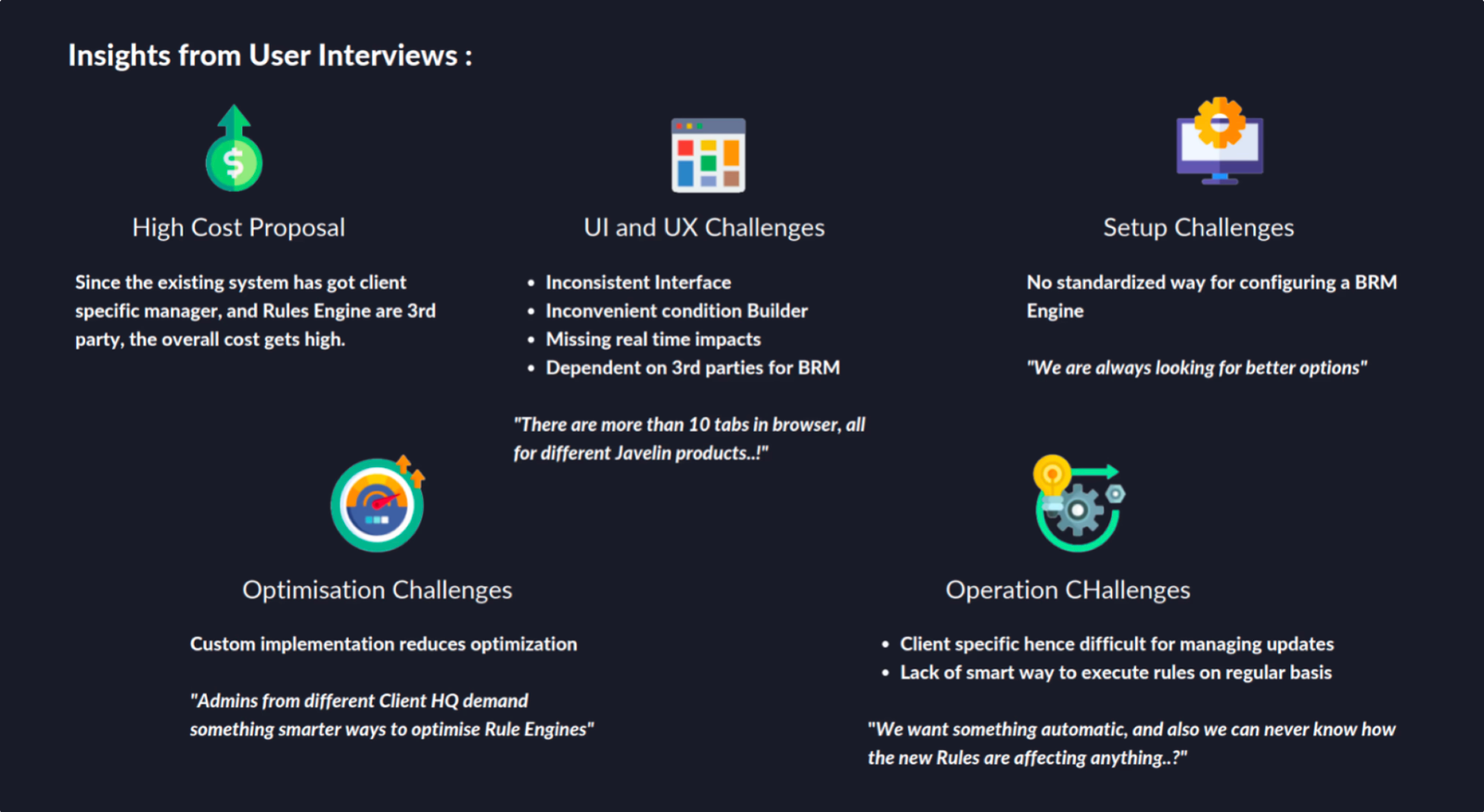
Five categories of friction surfaced consistently across interviews , each with a measurable business cost.
| Friction Category | What Users Said |
|---|---|
| High Cost Proposal | Client-specific rule engine + 3rd party dependency was driving cost up. Custom implementations reduced optimisation potential. |
| UI and UX Challenges | "Inconsistent interface, inconvenient condition builder, missing real-time impacts, dependent on 3rd parties for BRM." |
| Setup Challenges | "No standardised way for configuring a BRM engine , we are always looking for better options." |
| Optimisation Challenges | "Admins from different client HQs demand something smarter , ways to optimise rule engines." |
| Operation Challenges | "We want something automatic, and also we can never know how the new rules are affecting anything." |
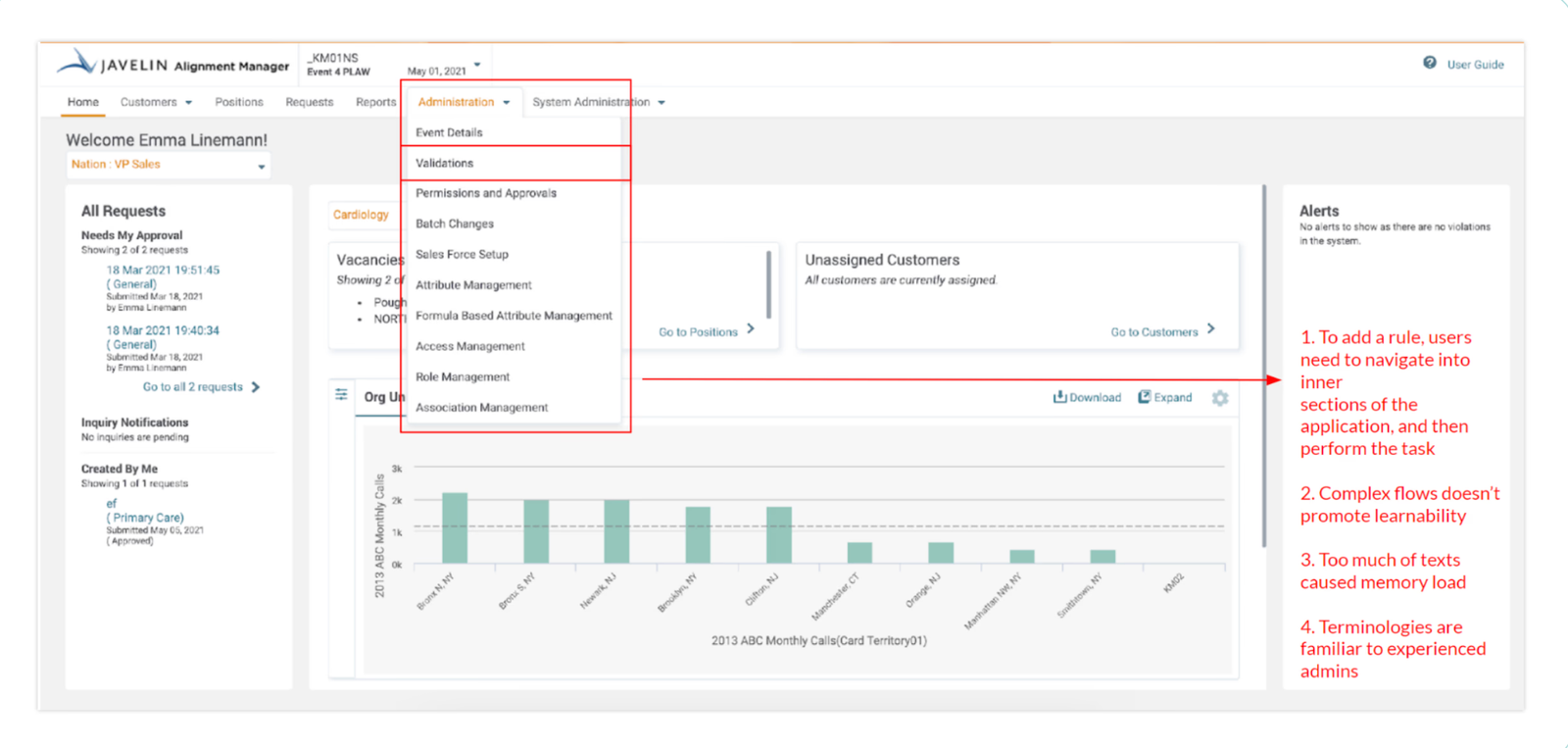
Before redesigning, I audited the existing Javelin Alignment Manager and rule builder against Nielsen's heuristics. The audit revealed three structural failures that no amount of visual polish would fix.
| Heuristic | Evaluation | Finding |
|---|---|---|
| Visibility of System Status | ~ Partially Passed | Information was displayed in an uncluttered way and navigation links were clear , but no instructions or contextual help were available, leaving new users stranded. |
| Flexibility & Efficiency of Use | ✗ Failed | To add a rule, users had to navigate into inner sections of the application, then perform the task. Complex flows didn't promote learnability. Too many texts caused memory load. Terminologies were familiar only to experienced admins. |
| Learnability | ✗ Failed | The text area for writing rule conditions was difficult to use. Operability was difficult and demanded deep learnability and recognition. Conditions were authored as raw expressions , not visual UI. |
Research surfaced two clearly distinct user types , and the central design challenge of the project was balancing their opposing needs without compromising either. This wasn't a "primary and secondary user" situation. Both were equally critical to the product's value.
The temptation in enterprise design is to optimise for the expert and call it "professional-grade." That decision quietly excludes half your users. I designed for both , progressive disclosure for occasional users, density and power for experts , on the same screen.
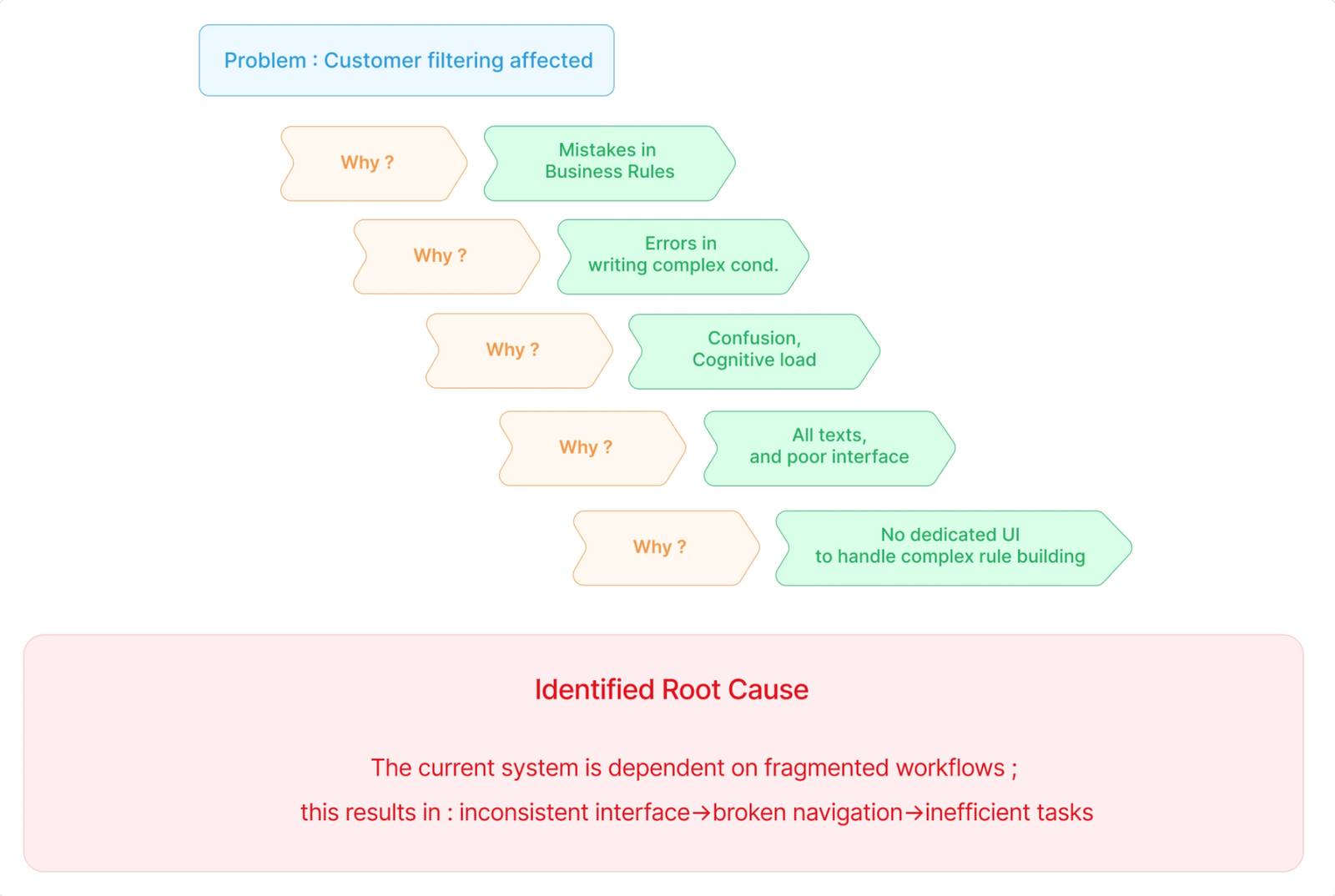
To go past surface symptoms, I ran a 5-Whys analysis starting from the most visible business pain , customer filtering errors , and working back to the structural cause in the UX.
| Question | Answer |
|---|---|
| Problem: Customer filtering affected | Why? → Mistakes in business rules |
| Mistakes in business rules | Why? → Errors in writing complex conditions |
| Errors in writing complex conditions | Why? → Confusion, cognitive load |
| Confusion and cognitive load | Why? → All text, poor interface |
| Poor interface for rules | Why? → No dedicated UI to handle complex rule building |
The current system is dependent on fragmented workflows. This results in: inconsistent interface → broken navigation → inefficient tasks → silent errors in business-critical alignment data.
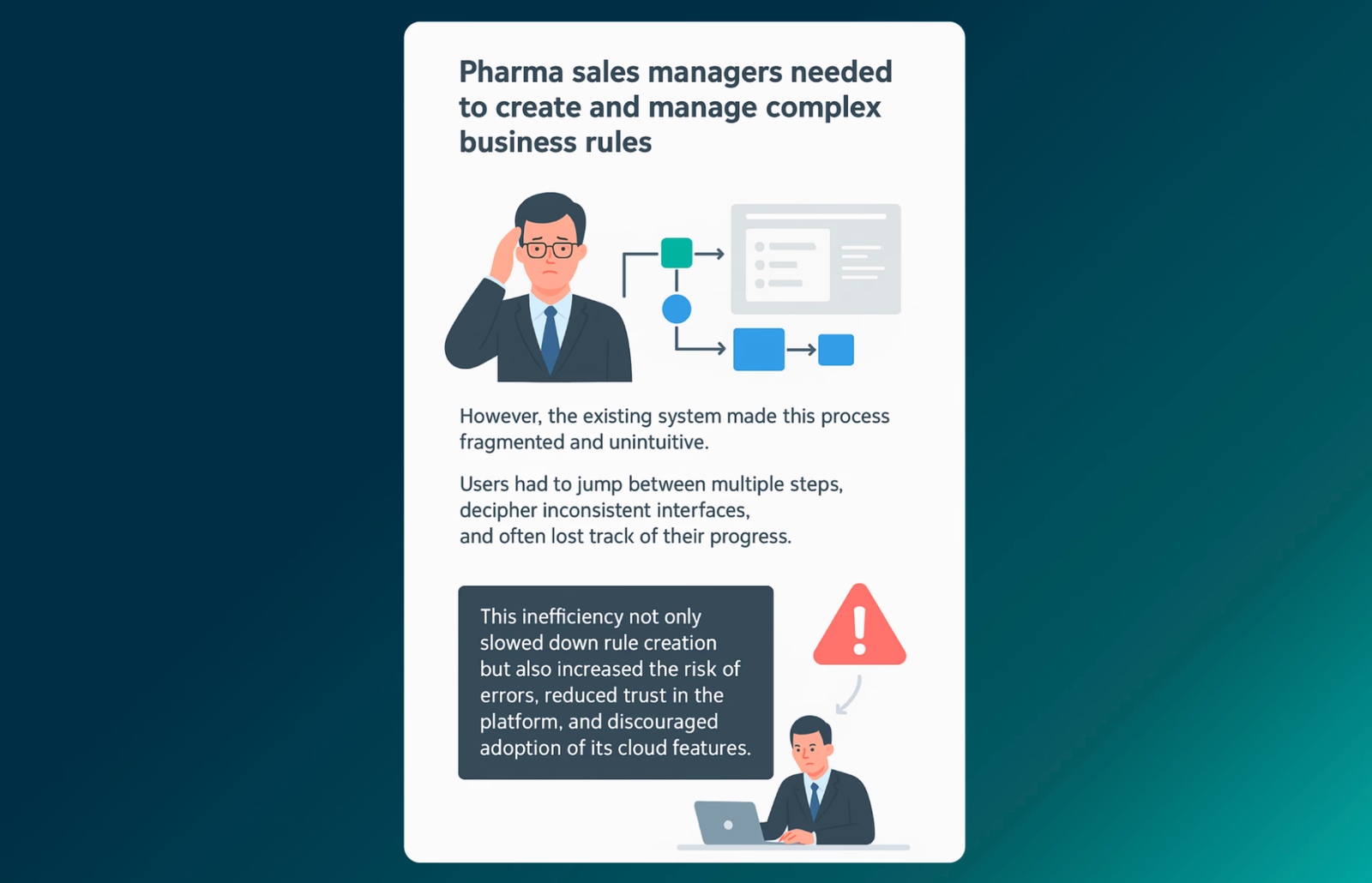
Pharma sales managers needed to create and manage complex business rules. The existing system made this process fragmented and unintuitive. Users had to jump between multiple steps, decipher inconsistent interfaces, and often lost track of progress. This inefficiency not only slowed down rule creation but also increased the risk of errors, reduced trust in the platform, and discouraged adoption of its cloud features.
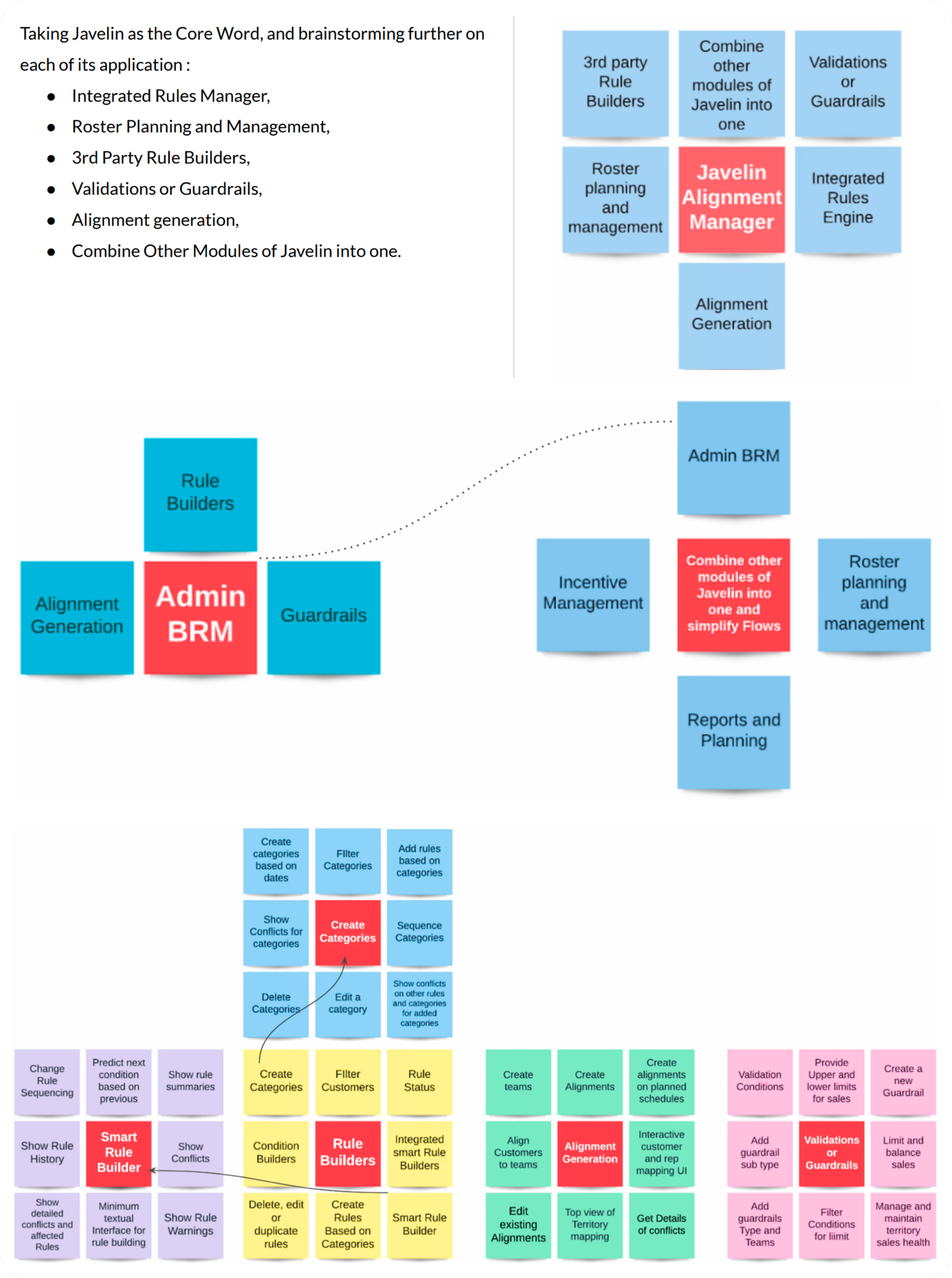
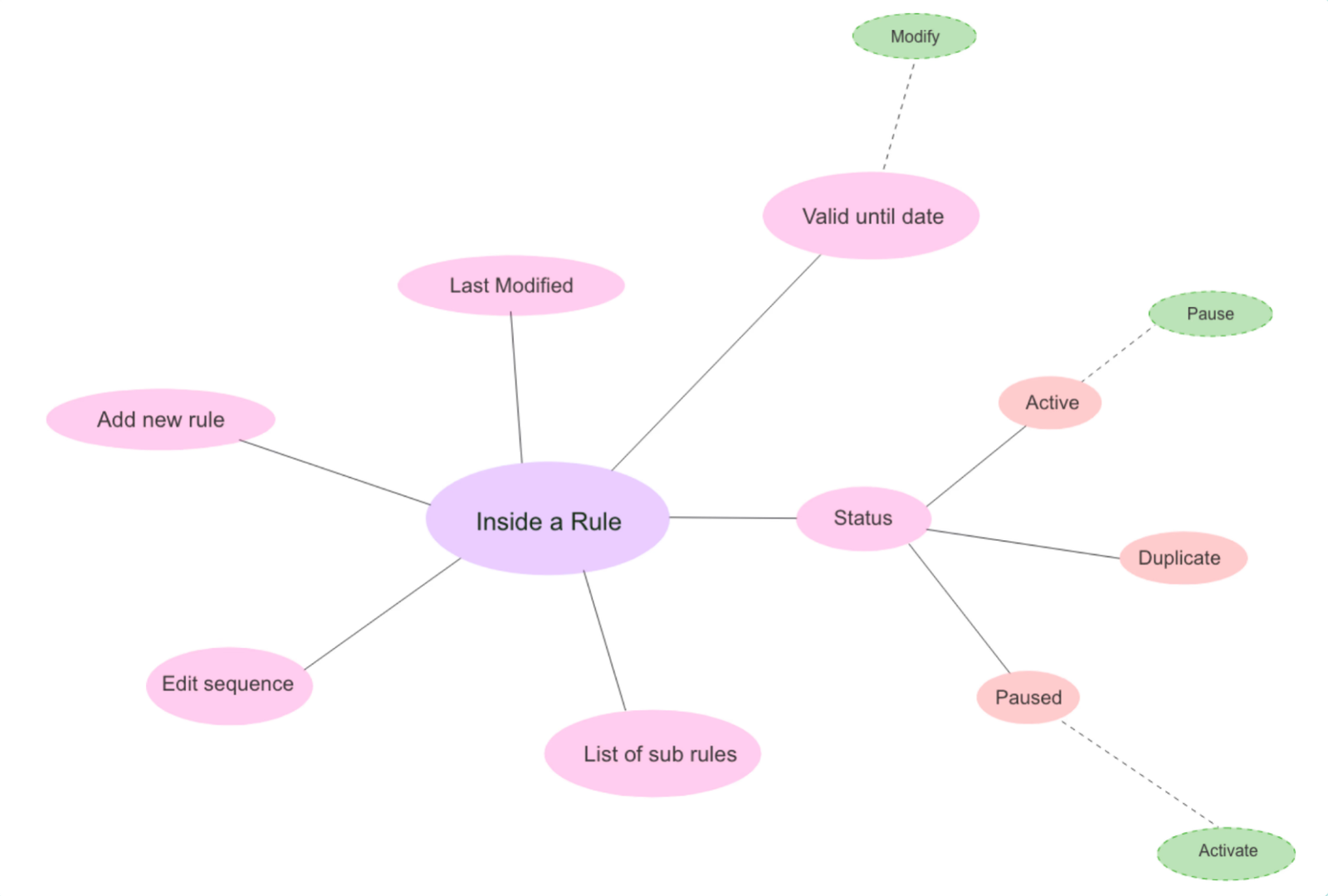
Ideation used the Lotus Blossom technique to expand outward from the core problem , brainstorming sub-ideas for each major feature area before evaluating them against research insights and engineering constraints.
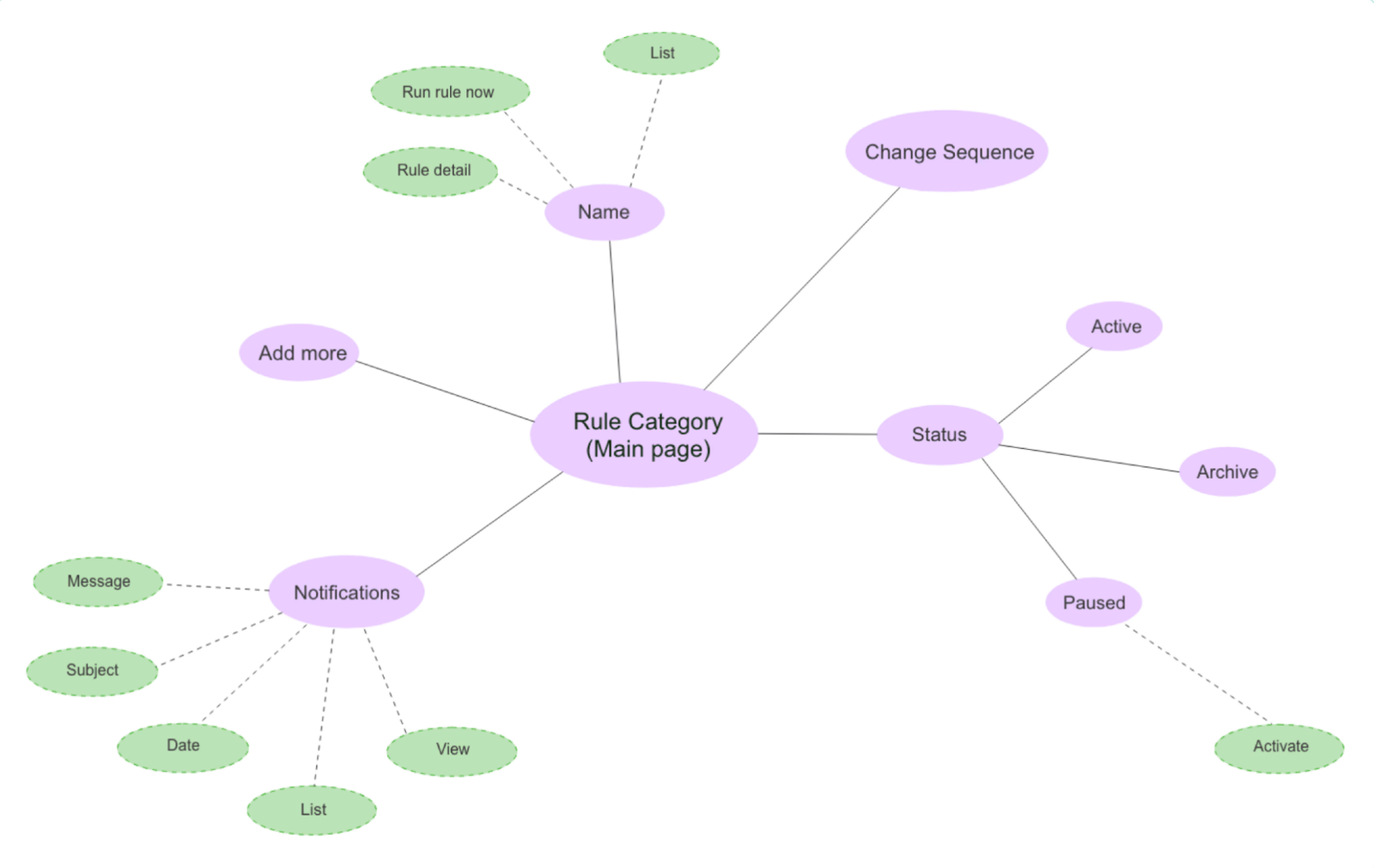
From the ideation grid, I mapped detailed feature flows for the most critical surface , the rule builder itself , including rule status, sequencing, notifications, and the inside-a-rule view.
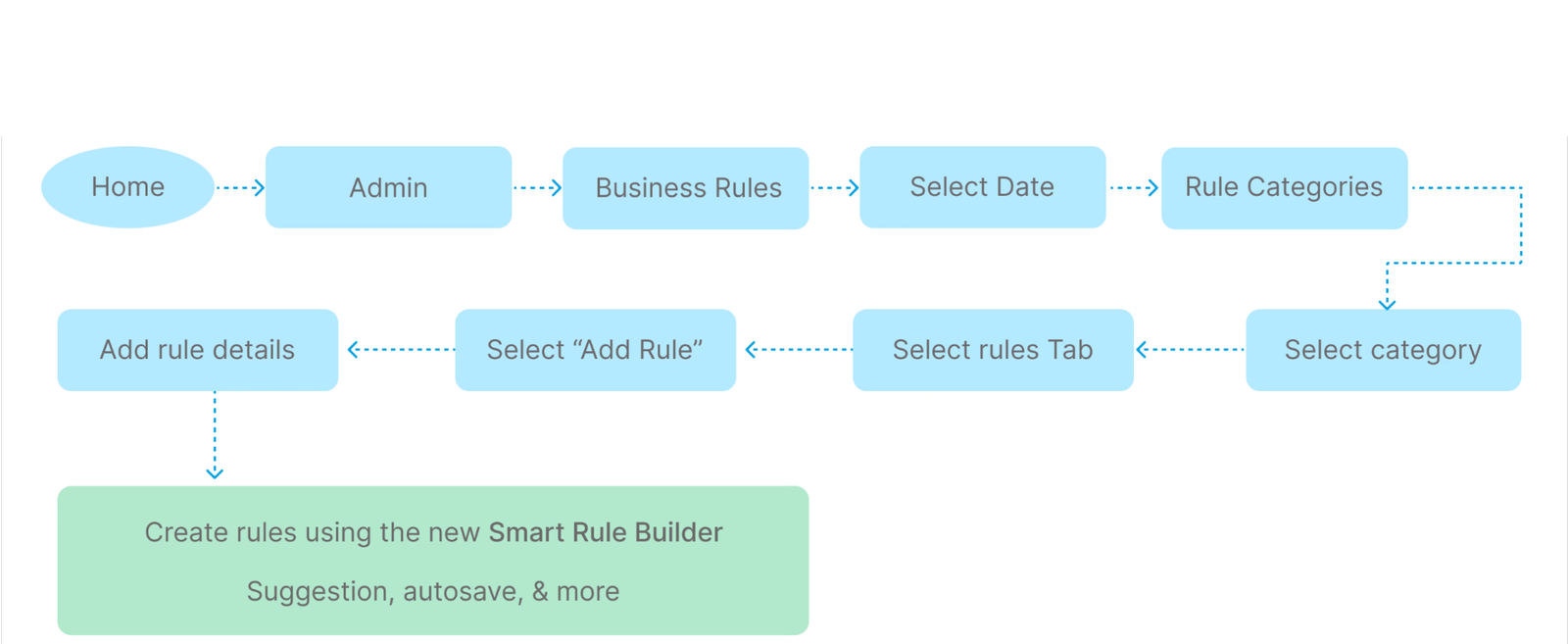
The redesigned flow eliminated the 3rd party dependency entirely , every step now happens within a single, consistent interface. The number of decision points dropped, navigation became predictable, and rule authoring moved from a textarea to a structured visual builder.
Four principles emerged from research synthesis. Every design call was tested against them. If a proposed solution didn't hold up against all four, it was reworked.
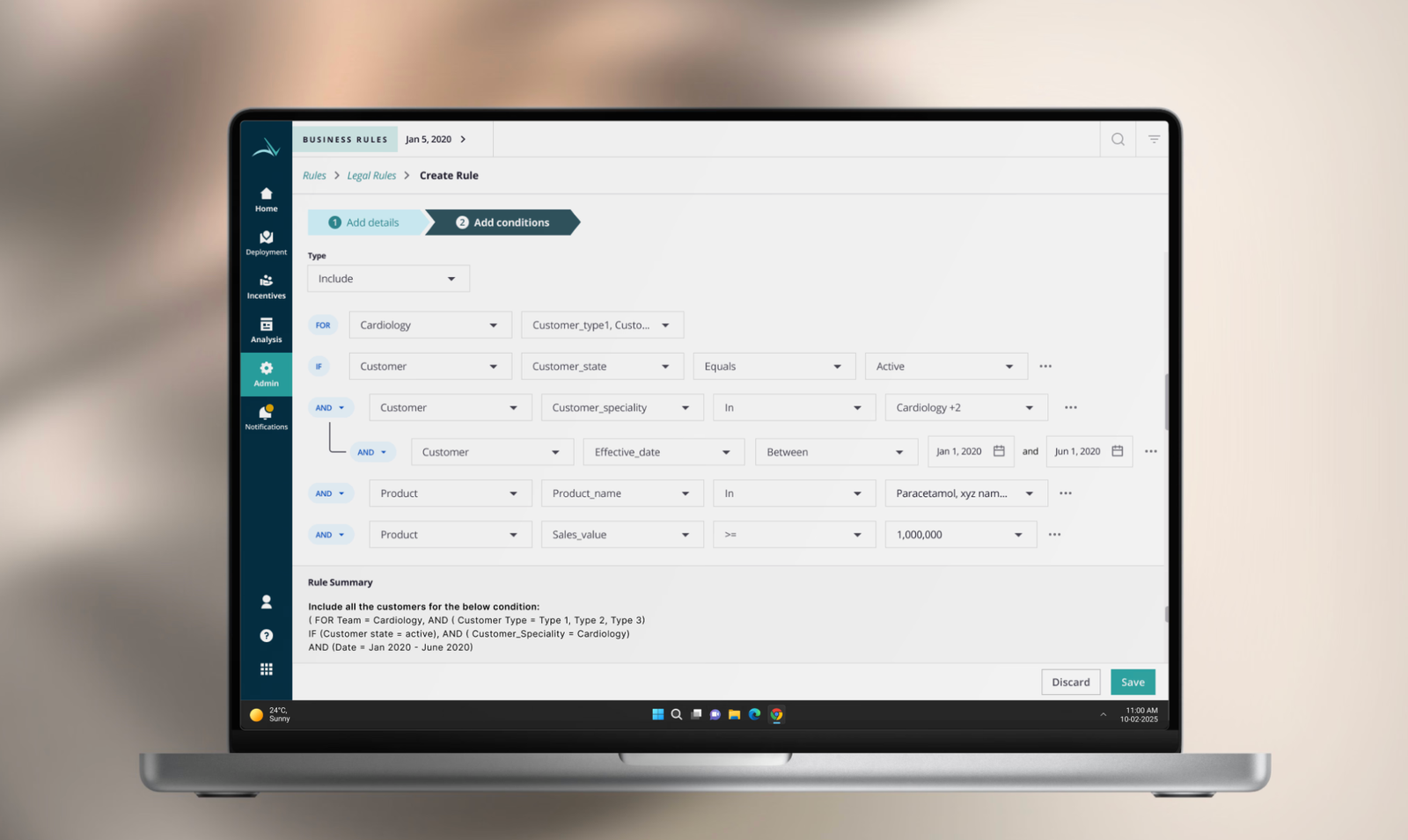
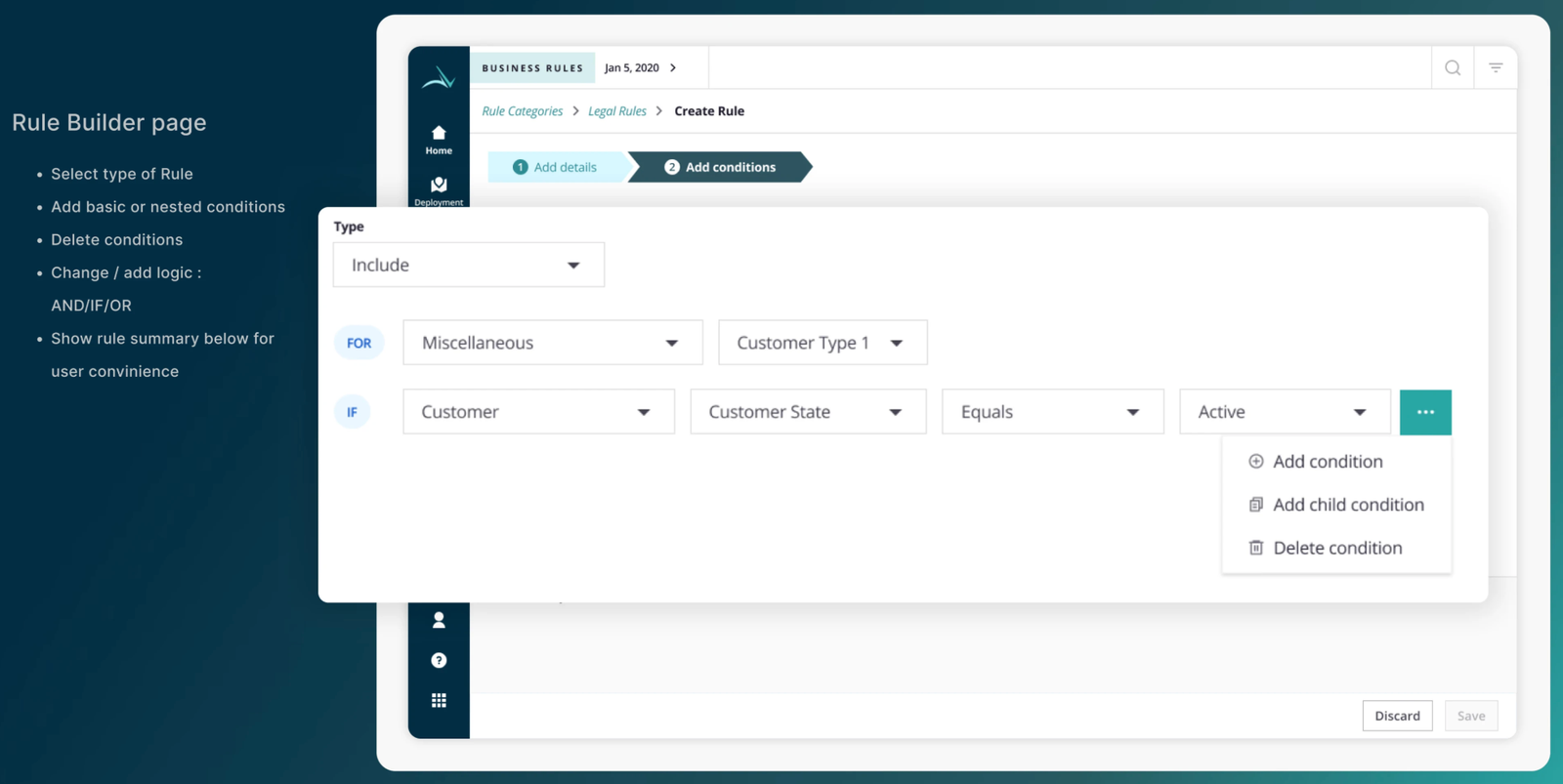
Nested conditions are a visual structure. Authoring them as text was the root of every error downstream.
A live rule summary at the bottom of every authoring screen , no more re-reading the expression to know what was built.
Group rules by business objective. The category model gave structure to what was previously a flat, unscannable list.
Density for experts. Progressive disclosure for occasional users. Same screen, both audiences.
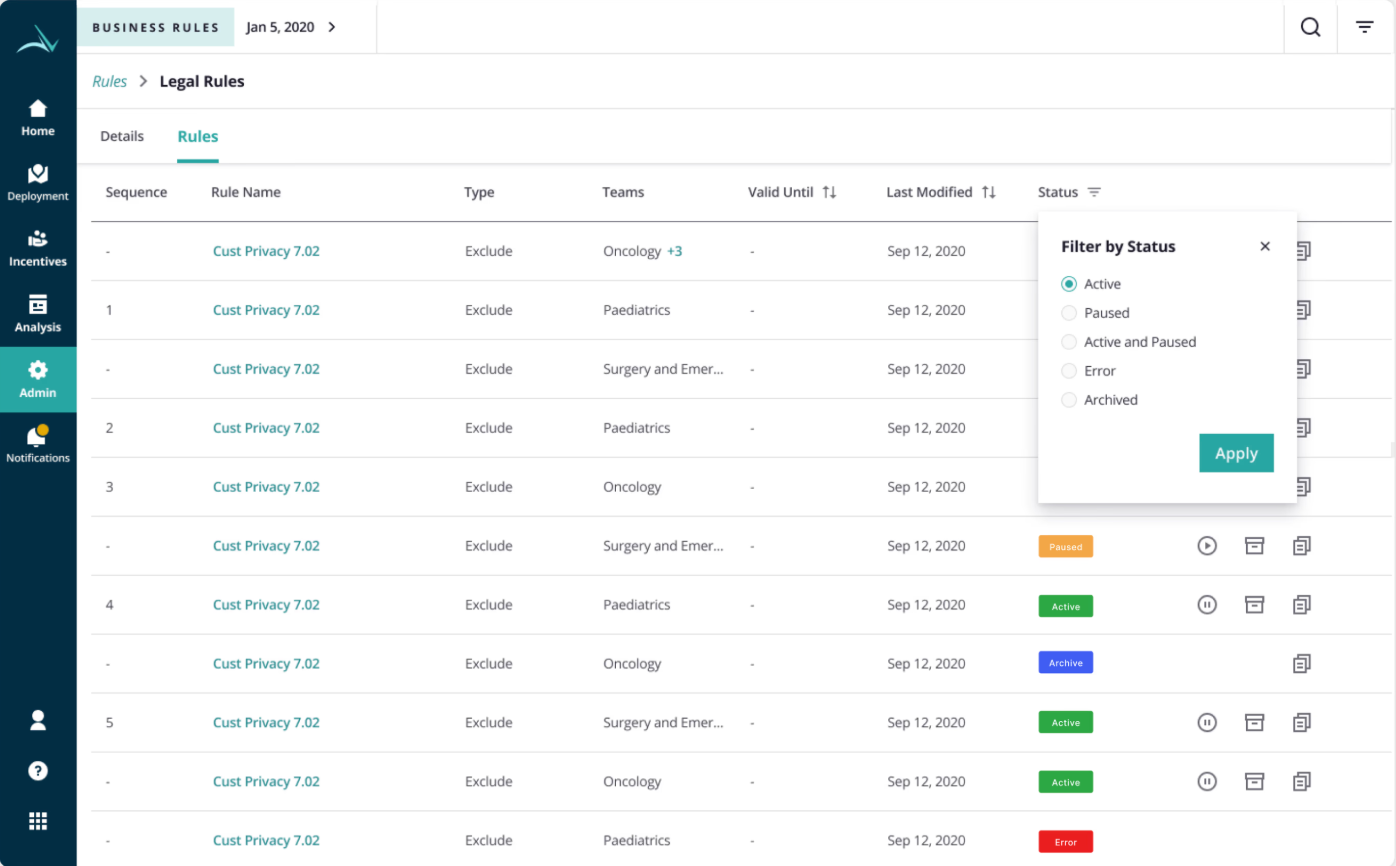
Visual designs translated the IA and principles into a working product. Five surfaces did the structural heavy lifting , the rule builder itself, the categories view, the rules list, the rule details, and the create-category flow.
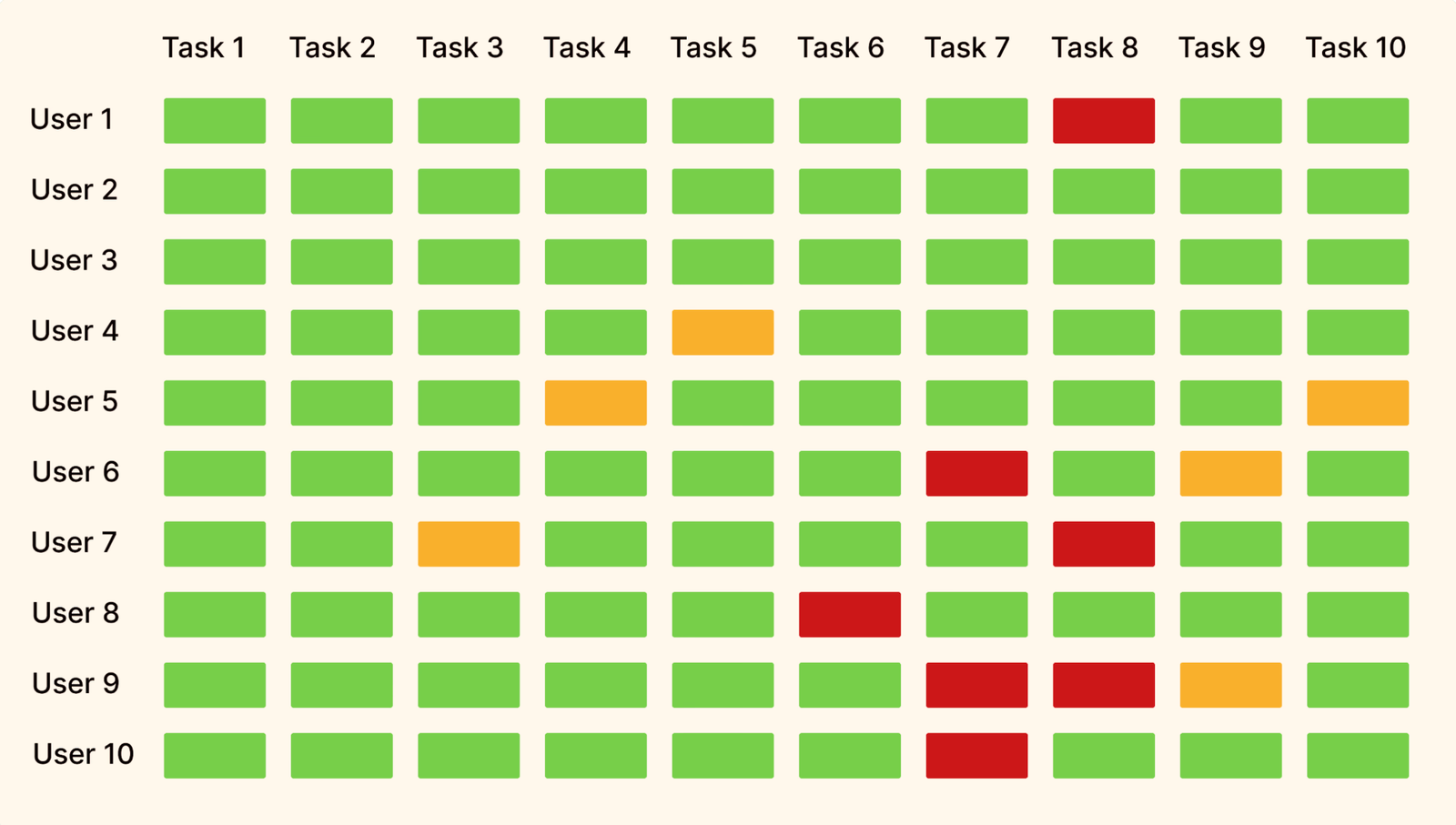
The redesign was validated through usability testing with 10 users across 10 representative tasks, and measured through structured outcomes post-launch. The results changed how rule administrators experienced the product , and the data backed it up.
Usability testing , 10 users, 10 tasks. Green = task completed successfully without intervention. Yellow = completed with hesitation. Red = task failed or required guidance. The matrix surfaced exactly where the design still needed iteration.
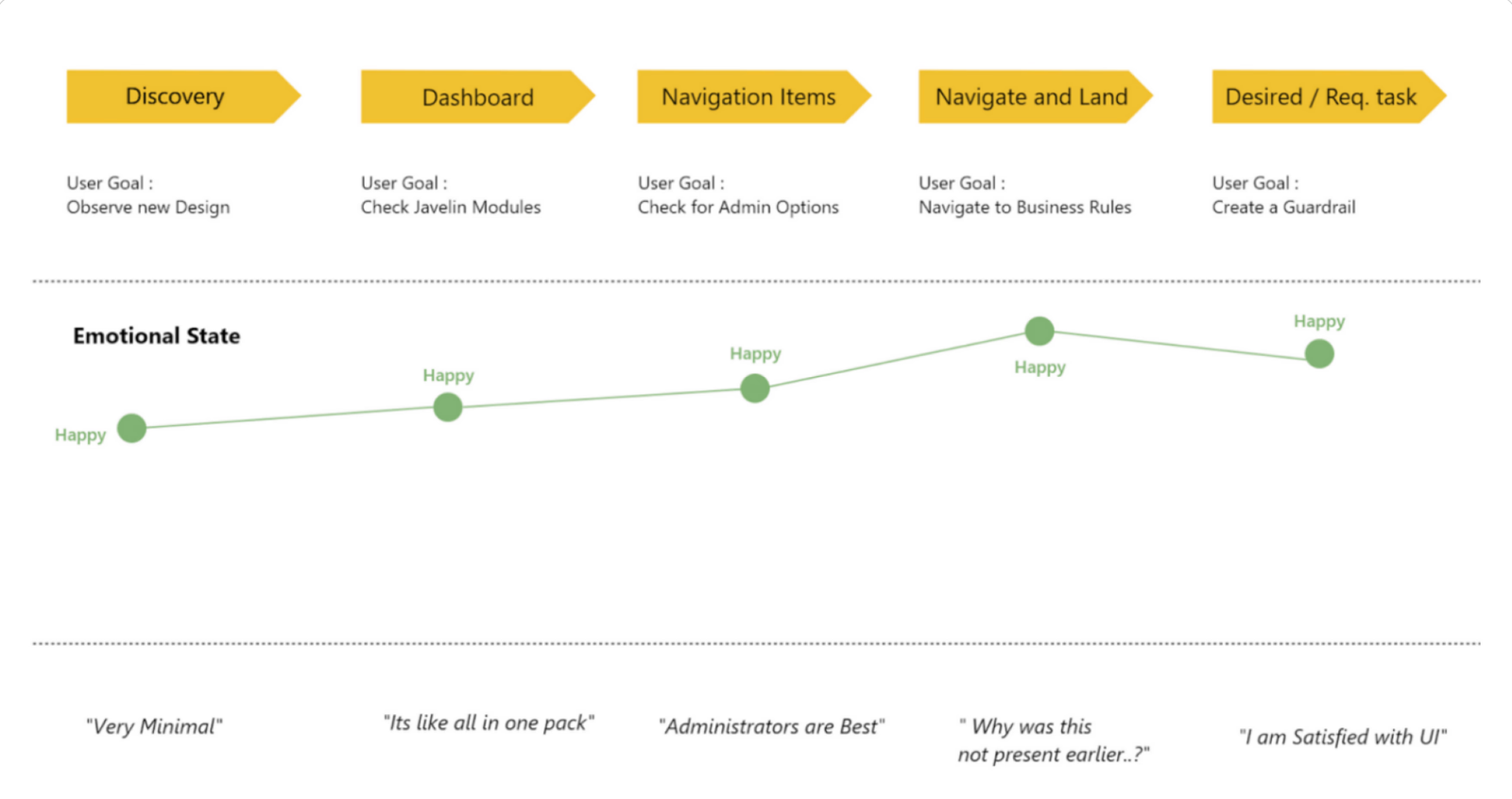
Post-launch validation tracked emotional state across the journey , Discovery, Dashboard, Navigation, Landing, and Task completion. The before-state plateaued at "Happy" only briefly before dipping into "Satisfactory" mid-flow. The after-state stayed consistently Happy , rising at completion.
"New colours, wow… so no URLs, finally!" / "Everything is here? Yeah, all here." / "I like the icons, but where's settings?" / "Everything under business rules. This was much needed!" / "So simple. Love it!"
— Actual user quotes from post-launch validation sessions.
Three honest reflections , things I'd approach differently if this project started today.

The biggest "if I had more time" was a simulation feature , a way for users to test a rule against historical alignment data before publishing. We deferred it to a future release. In hindsight, it was the single most-requested validation feature, and would have eliminated an entire class of downstream errors.
Rule creation in pharma is rarely a solo activity , a rule manager often validates with a regional lead before publishing. We designed for a single user. A collaborative editing model with comments and review states would have matched real workflows more accurately.
In 2022, AI integration in enterprise admin tools wasn't yet table stakes. In 2026, it is. Two years later I revisited this same problem space and explored what AI assistance would look like in this exact rule builder , available as a separate case study.
The shipped foundation here became the basis for a conceptual exploration in 2026 , reimagining the same rule builder with natural language input, contextual AI suggestions, and a trust architecture built for compliance contexts. Available as a separate case study.
Read the AI exploration →A compliance and booking workflow audit , identifying 3 critical friction points across 5 screens, and proposing an AI Package Assistant that eliminates the highest-anxiety decision in the flow.
~7 years of enterprise UX across pharma, oil & gas, and healthcare. I work best on hard problems where design decisions have real operational consequences.